agents-cron0.10.2
Cron-driven scheduled prompt tasks, each run in an isolated agent session
Untested on omp
This is a pi package. No one has reported whether it works on omp yet. If you try it, add your result below.
Reports 0
No reports yet.
Readme
agents-cron
Cron-driven scheduled prompt tasks for coding agents, with Pi as the built-in agent.
Pi is the management surface; the agents-cron CLI is the execution surface. A
cron entry invokes agents-cron run-due, which drives each due task through an
Agent Adapter — the Pi adapter creates a fully isolated Task Session per
run. The plugin never schedules itself and never injects task output into your
interactive Pi session.
Design
Time is not ours. The scheduler never wakes itself up: no timer, no daemon,
no long-running process. An external scheduler (cron) decides when to look, and
run-due answers one question — what is due now? — then exits.
One run, one session. Every Task Run gets a fresh, isolated session file.
Task output is never injected into your interactive session; /schedule open
prints the path so you can open it deliberately.
The store is the only shared state. Pi is the management surface and the CLI
is the execution surface, and they never call each other. They meet in
<project>/.agents/cron/, which is why Pi and cron can be set up in either
order, and why a scheduled run still works with Pi closed. The dashboard is a
third surface, and it only reads.
Deciding is not executing, and neither is agent-specific. The core owns
scheduling, storage, locking, and run records. An Agent Adapter owns exactly one
runtime. Adding an agent means adding an adapter directory and one
registerAgent line; the runner, store, CLI, and Pi surface stay untouched.
Borrow the runtime instead of rebuilding it. A Task Session is a real
headless run of the task's agent — pi --print, claude --print, or
codex exec — so the model, credentials, and project-trust rules are the ones
you already configured, not a second copy of an SDK that can drift.
Ship what you run. The published package contains the TypeScript sources it
executes. There is no build artifact that can go stale and no dist/ that can
differ from the code you reviewed.
  management surface (a Pi session)   execution surface (cron)
  ───────────────────────────────     ──────────────────────────────────
  /loop  /remind  /schedule           agents-cron run-due
  schedule_task tool                  │  acquires run.lock
        │ task-service                ▼
        │                             Task Runner
        │                             due filter · nextRunAt · stale reclaim
        │                             │  resolve (lazy)
        │                             ▼
        │                             Agent Registry → pi · claude · codex
        │                             │  spawn one headless agent run
        │                             ▼
        │                             one isolated Task Session per run
        │                             │
        ▼                             ▼
  ┌─────────────────────────────────────────────────────────────────────┐
  │  <project>/.agents/cron/     the only state the two surfaces share  │
  │  tasks.json   run.lock   runs/<runId>.json   sessions/<taskId>/…   │
  └─────────────────────────────────────────────────────────────────────┘
Boundaries
| Component | Owns | Never does |
|---|---|---|
Task Runner (src/runner.ts) |
due-ness, the run lock, run records, nextRunAt |
schedule itself, import an agent SDK, know which agents exist |
CLI (src/cli.ts) |
argv → task service / runner, exit codes | manage your crontab, run an agent inline |
Agent Registry (src/agents/) |
agent id → adapter, loaded lazily | know how any agent actually runs |
Agent adapters (src/agents/*/adapter.ts) |
spawning the agent binary, the session record, runtime concerns | read or write the scheduler store |
Pi surface (src/agents/pi/) |
commands, the schedule_task tool, confirmations |
schedule, lock, or execute anything |
Store (.agents/cron/) |
tasks, runs, sessions, the lock | hold run state inside tasks.json |
Interactions
cron → execution. Cron runs agents-cron run-due. The Task Runner takes the
run lock, reclaims stale runs, filters tasks by isDue, and drives each one
through its adapter, which spawns one headless agent process. Each attempt
writes its own run record and advances nextRunAt. The lock covers the whole
pass, so a second invocation exits 0 reporting that another instance holds the
lock instead of queueing.
Pi → management. /loop, /remind, /schedule …, and the schedule_task
tool go through the task service into tasks.json. The extension is
deliberately inert inside a Task Session (see AGENTS_CRON_TASK_SESSION), so a
scheduled run cannot schedule more work — no accidental fan-out.
Pi ↔ store ↔ CLI. The two surfaces only ever meet in the store.
/schedule run <id> and agents-cron run <id> both execute the same task with
trigger manual and leave its schedule untouched.
Features
- One-time, interval, and cron schedules
- One isolated Task Session per run, stored as its own session file
- Agent adapter layer: Pi, Claude Code, and Codex built in, new agents added without touching the core
- Local read-only dashboard for observing tasks and run history
- Global task registry (
~/.agents/cron/) with project-local run artifacts — every task visible from any directory, its own project's tasks listed first - Idempotent
run-duewith a project run lock and per-run records - Crash recovery: stale runs are reclaimed on the next invocation
- Per-task and per-project configuration overrides
- Per-run Markdown reports next to the run records — what ran, how it went, where the transcript lives
- Agent tool plus slash commands for management
Install
# From npm (recommended)
pi install npm:agents-cron

# Or from a checkout
pi install .
Requires Node >=22.19.0. The package ships TypeScript and runs it as-is — no
build step, no dist/. Pi loads the extension through its own TypeScript
loader; the CLI registers a small loader hook of its own, because Node refuses
to strip types for files under node_modules (see Development).
Previously published as @fookhsu/pi-scheduler. The rename is mechanical for
existing setups: the old package forwards to this one, the pi-scheduler bin
keeps working, and pre-rename PI_SCHEDULER_* environment variables are still
honored. Since 0.7.0 the store lives at .agents/cron/ (was .pi/scheduler/);
the first run after upgrading copies it over automatically and leaves the old
copy in place, so crontabs and existing projects keep running untouched.
Since 0.9.0 task definitions live in the global registry at
~/.agents/cron/tasks.json (ADR 0007), bound to their project; run records
and sessions stay in each project's .agents/cron/. The first command that
touches a project imports its old tasks.json into the registry and renames
it aside — rolling back is renaming the file back and reinstalling 0.8.x.
Per-project crontab lines keep working as project-scoped passes; replace them
with the one global line when convenient.
Restart Pi or run /reload after installing. Installed with pi install -l,
the package is recorded in the project's .pi/settings.json instead of your
user settings.
Cron setup
run-due is the only execution entry point, and the CLI never manages your
crontab. One global line drives every project's tasks (ADR 0007: task
definitions live in the machine-wide registry at ~/.agents/cron/):
*/5 * * * * AGENTS_CRON_PI_BIN=/absolute/path/to/pi "$HOME/.pi/agent/npm/node_modules/.bin/agents-cron" run-due --all >> "$HOME/.agents/cron/cron.log" 2>&1
A project-scoped line (cd /path/to/project && … run-due) still works: it
runs only that project's due tasks, under the same per-project run lock, so
the two line styles cannot double-execute within one tick. Migrate old
per-project lines to the single global line when convenient.
Project installs put the binary at .pi/npm/node_modules/.bin/agents-cron
instead. If you linked it onto your PATH, plain agents-cron works.
Running a task spawns the pi executable, and cron starts jobs with a minimal
PATH that usually does not include it. Either set PATH= at the top of the
crontab, or point AGENTS_CRON_PI_BIN at pi — the command above does the
latter. A missing pi is reported on the run record, not silently skipped.
Tasks pinned to the Claude Code adapter spawn claude instead; the same
minimal-PATH rule applies, with AGENTS_CRON_CLAUDE_BIN.
CLI
agents-cron run-due [--project <path>|--all] [--agent <id>]   # cron entry point
agents-cron run <taskId> [--project <path>] [--agent <id>]
agents-cron list [--json]                              # current project first, then others
agents-cron add --prompt <text> (--at <iso>|--every <duration>|--cron <expr>) [--agent <id>] [options]
agents-cron enable <taskId> | disable <taskId> | remove <taskId>
agents-cron prune --keep <n>                           # all projects unless --project
agents-cron dashboard [--port <n>]                     # global, grouped by project
agents-cron migrate-sessions [--dry-run] [--project <path>]   # legacy transcripts into Pi's store
agents-cron test-notify [--channel <id>]
--agent selects the agent adapter (see Agents); it sets the task's
agent on add and the fallback agent on run-due and run.
Tasks live in the global registry, so run, enable, disable, and
remove act on any task from any directory; add binds the task to the
project it runs in (--project to bind elsewhere, --cwd to override only
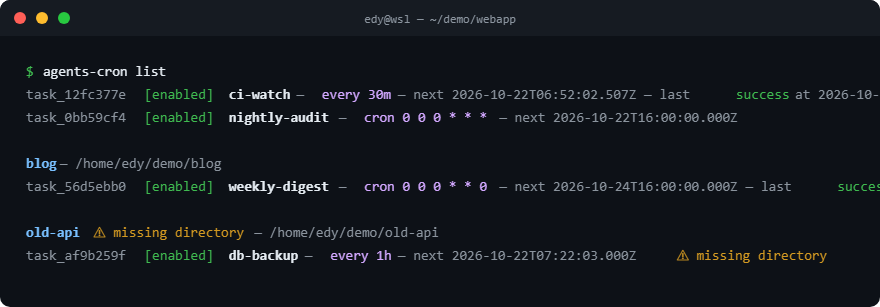
the run's working directory). list prints one ordered list — the current
project's tasks first, then every other project grouped under a header, with
⚠ missing directory on tasks whose project has moved or vanished.
Exit codes: 0 success (including "no due tasks" and "another instance holds
the lock"), 1 at least one task failed, 2 configuration or storage error.
The global task list
Install the CLI once (npm install -g agents-cron) and it manages every
project's tasks from any directory. list prints one ordered view — the
current project's tasks first, then every other project grouped under a
header with its path spelled out. Tasks whose project moved or vanished stay
visible under a ⚠ missing directory marker instead of disappearing:
add binds a task to the project it runs in (--project binds it elsewhere,
--cwd only overrides the run's working directory). run, enable,
disable, and remove accept any task id from any directory, and run <id>
executes with the owning project's lock, writing artifacts there. Full run
histories and session transcripts stay in each project's .agents/cron/ —
the registry carries only definitions, scheduling state, and counters.
Dashboard
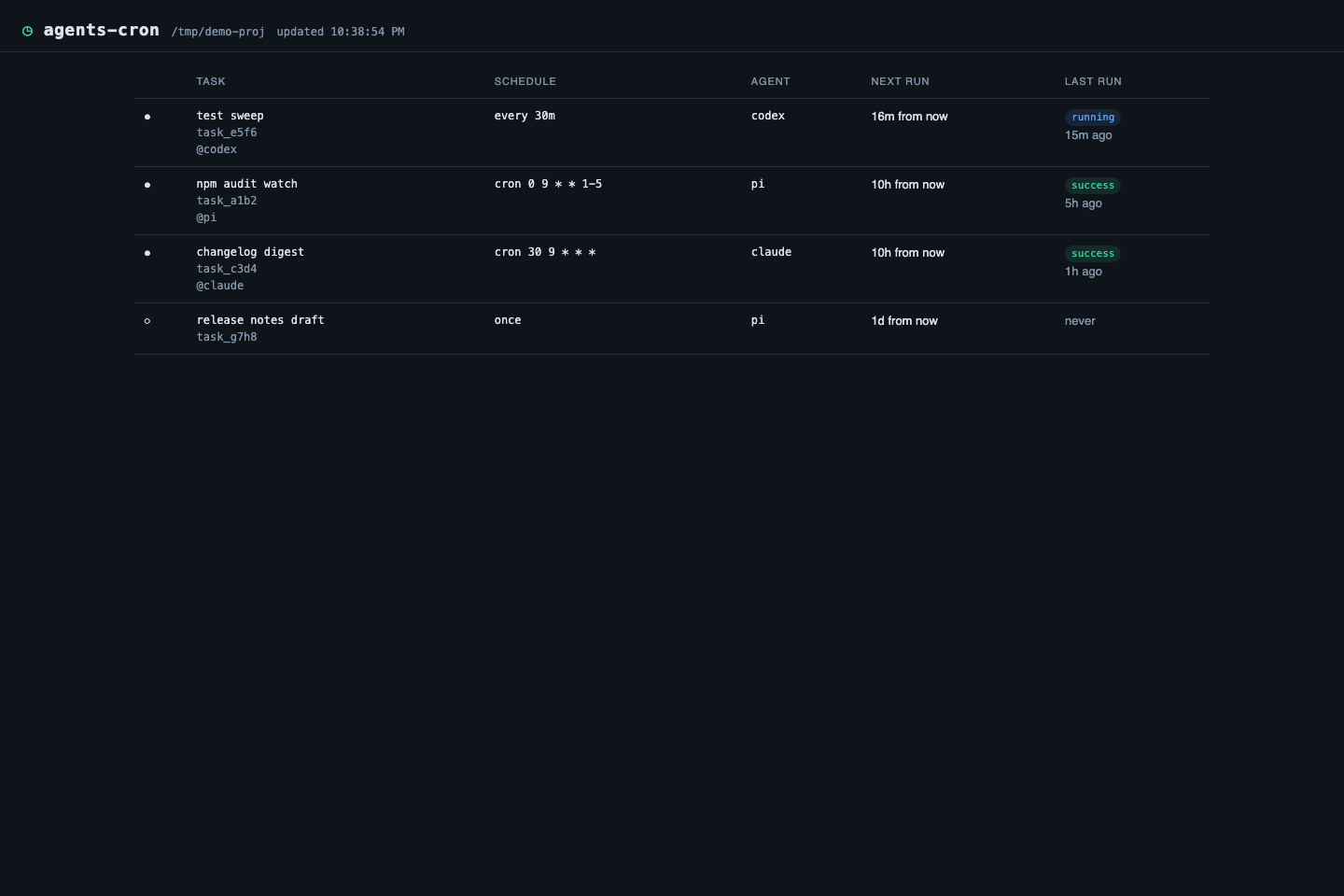
agents-cron dashboard serves a read-only web view of the same store the CLI
reads: every task with its next run, its latest outcome, per-task run history,
and each run's summary, error, and session record. It binds to 127.0.0.1
only (default port 7383, --port to change), starts on demand, auto-refreshes
every few seconds, and stops with Ctrl-C. Because it never writes, it takes no
run lock and never interferes with cron's run-due — leave it open in a tab
all day if you like.
Notifications
First-time setup is a guided wizard — agents-cron setup-notify opens the
mail and Feishu consoles for you, captures the SMTP authorization code and
bot webhook URL, writes the config, wires your shell and crontab, and
live-tests every channel.
Runs can announce themselves. Channels live in .agents/cron/config.json
(user-authored — chmod 600 it, webhook tokens and SMTP hosts belong behind
file permissions), and by default only failed runs notify:
{
  "version": 1,
  "notifications": {
    "on": "error",
    "channels": [
      { "id": "team", "type": "webhook", "url": "https://hooks.slack.com/services/…",
        "headers": { "Authorization": "Bearer …" } },
      { "id": "mail", "type": "email", "host": "smtp.example.com", "port": 465,
        "user": "cron@example.com", "from": "cron@example.com", "to": "you@example.com" }
    ]
  }
}
onis the project default —error(default),always, ornever— and a task overrides it withnotify(agents-cron add --notify always …).- webhook works with anything that accepts a POST: Slack, Lark, Discord,
n8n, a home-rolled endpoint. The default body is JSON
(
{source, project, task, run…});format: "text"posts the human summary. - email speaks plain SMTP (Gmail, QQ, 163, self-hosted). The password
comes from the environment, never the config file:
AGENTS_CRON_SMTP_PASSWORDby default, or the channel'spasswordEnv. The optionalnodemailerdependency is loaded only when an email channel is configured. - Delivery is best effort with a 10s budget per channel: a broken webhook prints one line to the cron log and never fails the run it reports on.
agents-cron test-notifysends a sample run through every configured channel (or one, with--channel <id>) so the setup can be verified without waiting for a real failure.
Pi commands
/loop 30m check CI status
/loop "*/5 * * * *" check CI status
/loop @daily check CI status
/remind in 45m review the release
/remind at 15:30 check production
/schedule add 30m check CI status
/schedule add "0 9 * * 1-5" check CI status
/schedule list
/schedule enable <id>
/schedule disable <id>
/schedule run <id>
/schedule remove <id>
/schedule runs <id>
/schedule open <runId>
/schedule clear
/unschedule <id>
/loop and /schedule add take a schedule first: a duration (30m), a cron
nickname (@daily), or a cron expression in quotes. Quote an expression
whenever it contains spaces, otherwise its first field is read as the start of
the prompt. Nicknames are @yearly, @annually, @monthly, @weekly,
@daily, and @hourly.
/schedule open <runId> prints the Task Session file path and suggests
pi --session <path>. Task Sessions are never merged into the current session.
Agent tool
The schedule_task tool supports add, list, enable, disable, delete,
run, runs, and clear. It is registered with deferred exposure: it stays
out of the resident tool manifest until the model finds it with pi's built-in
tool_search, which the extension activates on session start. On pi versions
without deferred exposure the tool simply registers as before.
{
  "action": "add",
  "name": "check-ci",
  "prompt": "检查当前项目 CI 是否通过;如果失败请分析原因",
  "schedule": { "kind": "interval", "every": "30m" }
}
Deleting and clearing tasks requires interactive confirmation; creating a task does not. The /schedule remove, /schedule clear, and /unschedule commands ask for the same confirmation.
Configuration and overrides
Every AGENTS_CRON_* variable below also answers to its pre-rename
PI_SCHEDULER_* spelling; the new name wins when both are set.
A Task Session is an ordinary Pi session: it runs in the task's cwd (the
project root by default) and loads that project's settings, AGENTS.md, skills,
and extensions. You can override what it uses at two levels.
Because the Task Runner is invoked by cron, a Task Session is always headless:
it is a pi --print process, so it resolves project trust exactly like any
other non-interactive Pi run — the saved decision in ~/.pi/agent/trust.json,
otherwise defaultProjectTrust, which leaves a project with project-local
resources untrusted. An untrusted project contributes no .pi/settings.json,
skills, prompts, or extensions to its Task Sessions; run /trust in that
project once (or set defaultProjectTrust to "always") to change that.
AGENTS.md is not gated by project trust and loads either way.
Resolution order, highest priority first:
- Per-task fields (
agent,model,thinking,cwd,tools). - Project settings in
<project>/.pi/settings.json. - User settings in
~/.pi/agent/settings.json.
Override a run with .pi/settings.json
Project settings merge over global settings, so a repository can pin the model that scheduled work uses without touching your global default:
{
  "defaultProvider": "deepseek",
  "defaultModel": "deepseek-v4-flash",
  "defaultThinkingLevel": "low"
}
The same file can disable scheduler resources for a project that should not run scheduled tasks, using the package-filter object form:
{
  "packages": [
    {
      "source": "npm:agents-cron",
      "extensions": [],
      "skills": []
    }
  ]
}
Project overrides only apply after the project is trusted; commit
.pi/settings.json to share them with your team. pi config -l opens the same
file in an editor with inherited global resources dimmed.
Override one task
Any task can override the agent, model, thinking level, working directory, and
tool allowlist. In .agents/cron/tasks.json:
{
  "id": "task_a1b2c3d4",
  "name": "daily-audit",
  "prompt": "检查 CI 并分析失败原因",
  "schedule": { "kind": "cron", "expression": "0 9 * * *" },
  "agent": "pi",
  "model": "anthropic/claude-opus-4-5",
  "thinking": "high",
  "cwd": "packages/api",
  "tools": ["read", "bash", "grep"],
  "enabled": true,
  "nextRunAt": "2026-09-11T09:00:00.000Z",
  "createdAt": "2026-09-10T09:00:00.000Z",
  "updatedAt": "2026-09-10T09:00:00.000Z"
}
cwd is resolved relative to the project root. Omitting a field falls back to
the project and user settings; omitting tools keeps the agent's default tool
set. Omitting agent uses the adapter that run-due selected (the built-in Pi
adapter by default).
The same overrides are available on the CLI and the Agent tool:
agents-cron add \
  --prompt "检查 CI 并分析失败原因" \
  --cron "0 9 * * *" \
  --agent pi \
  --model anthropic/claude-opus-4-5 \
  --thinking high \
  --cwd packages/api \
  --tools read,bash,grep
{
  "action": "add",
  "prompt": "检查 CI 并分析失败原因",
  "schedule": { "kind": "cron", "expression": "0 9 * * *" },
  "agent": "pi",
  "model": "anthropic/claude-opus-4-5",
  "thinking": "high",
  "cwd": "packages/api",
  "tools": ["read", "bash", "grep"]
}
Agents
The scheduler core — scheduling, storage, locking, run records — never imports an agent SDK. Running a task goes through an Agent Adapter: a small object that knows how to drive one Task Run in a concrete runtime.
export interface AgentAdapter {
  readonly id: string;          // e.g. "pi"
  readonly displayName: string;
  run(request: AgentRunRequest): Promise<AgentRunResult>;
}
Adapters register lazily, so an unused agent runtime is never loaded. Adding an
agent means adding src/agents/<id>/adapter.ts and one registerAgent line in
src/agents/builtin.ts; the runner, CLI, storage, and Pi surface stay
untouched. The Pi adapter lives in src/agents/pi/ together with the Pi
extension, tools, and slash commands.
The Pi adapter drives a Task Run by spawning pi --print --session <file> in the
task's cwd, and reports the printed answer as the run summary. It imports no
Pi SDK, so a Task Run works from a bare node process — which is what cron is.
The spawned pi is also the runtime that owns the model, credentials, and
project-trust rules, so a scheduled run behaves like any other non-interactive
Pi run. The only requirement is that pi be reachable: see
Configuration and overrides and
AGENTS_CRON_PI_BIN.
Claude Code
The Claude Code adapter drives a Task Run by spawning
claude --print --output-format json in the task's cwd, and records the JSON
result — final message, Claude Code session id, usage — as the run's session
record at .agents/cron/sessions/<taskId>/<runId>.json. Claude Code keeps its
own transcript; claude --resume <session_id> reopens it.
Two behavior differences from the Pi adapter:
- A headless Claude Code run cannot approve permission prompts, so a tool the
task did not allow is denied, not asked. Set
toolson tasks that need to write or execute: the task's tool list maps to--allowedTools. thinkinghas no Claude Code equivalent and is ignored.
The claude binary is resolved like pi: AGENTS_CRON_CLAUDE_BIN first,
then $PATH. Pin it in the crontab the same way.
Pi remains the management surface: /schedule, /loop, and /remind still
manage the same store, and schedule_task gains an agent field to pin a task
to a specific adapter.
Codex
The Codex adapter drives a Task Run by spawning
codex exec --json --skip-git-repo-check --output-last-message <tmp> in the
task's cwd, and records exit code, final message, and the JSONL event tail as
the run's session record at .agents/cron/sessions/<taskId>/<runId>.json.
Codex keeps its own transcript under ~/.codex/sessions/.
Two behavior differences from the other adapters:
- A task without
toolsruns in aread-onlysandbox; a task with anytoolsrunsworkspace-write. Codex has no per-tool allowlist —codex execfixes its approval policy at "never", so the sandbox decides what a headless run may touch, and it can never block on an approval prompt. thinkinghas no Codex equivalent and is ignored.
The codex binary is resolved like the others: AGENTS_CRON_CODEX_BIN first,
then $PATH. Pin it in the crontab the same way.
Pi remains the management surface: /schedule, /loop, and /remind still
manage the same store, and schedule_task gains an agent field to pin a task
to a specific adapter.
Storage and recovery
~/.agents/cron/                       # the global Task Registry (ADR 0007)
├── tasks.json                        # version 2: every task + scheduling state, 0600
├── registry.lock                     # short-lived registry write lock, 0600
└── cron.log                          # redirect target for the global crontab line

<project>/.agents/cron/               # run artifacts, one store per project
├── config.json                       # optional notification channels (user-authored)
├── run.lock                          # project-wide run lock, 0600
├── runs/<runId>.json                 # one record per run, 0600
├── reports/<taskId>/<runId>.md       # per-run Markdown report, 0600
├── sessions/<taskId>/<runId>.jsonl   # the Task Session, forced to 0600
└── tasks.json.imported.<ts>          # a migrated pre-0.9 store, kept for rollback
Both directories should be gitignored (the registry is never inside a repo;
add .agents/cron/ for the project store — other tools may commit their own
.agents/ entries such as skills/). Every scheduler file, including Task
Session JSONL files, is written with 0600 permissions. AGENTS_CRON_HOME
relocates the global registry for tests and non-default homes.
Task Sessions in Pi's session store (opt-in)
By default the Task Session stays in the private layout above. Set
AGENTS_CRON_PI_STORE=1 for the pi adapter to place each run's transcript
in Pi's own default session store instead —
<agentDir>/sessions/--<encoded-cwd>--/<taskId>-<runId>.jsonl — so scheduled
runs appear in pi --continue pickers and pi-web's project session lists
like any interactive session. The file is still one fresh, isolated session
per run; only its location changes. PI_CODING_AGENT_DIR and
PI_CODING_AGENT_SESSION_DIR relocations are honored, keeping Pi, pi-web,
and the scheduler on the same paths.
Run records always carry the transcript's absolute path (sessionFile), so
/schedule open, the dashboard, and future layouts need no reconfiguration:
reads follow the record, not the layout. This variable is newer than the
rename, so — unlike the variables above — it has no PI_SCHEDULER_* spelling.
To carry transcripts that already exist into the store, run
agents-cron migrate-sessions (--dry-run first to preview). It moves each
pi transcript to the directory Pi uses for the cwd the run actually worked
in — taken from the transcript's own session header — rewrites the run
record, keeps 0600 permissions, never overwrites an existing file, and
refuses to run while another instance holds the run lock. Other agents'
transcripts stay where they are; a second pass is a no-op.
- A task stores a prompt and a time rule, never a shell command, and is bound
to its project (
projectDir): artifacts, run lock, and notification config all follow the binding. - Scheduling state (
nextRunAt, counters,lastStatus) lives only in the registry; the project store is append-only artifacts. A crash may lose one run record, never re-execute a task. - A project still carrying a pre-registry
tasks.jsonis migrated lazily on the next command that touches it; the old file is renamed aside, and rollback is renaming it back. run-duetakes each project'srun.lockin turn, executes that project's due tasks serially, and advancesnextRunAtfrom the current time. Missed recurring periods collapse into one catch-up run.- A one-shot task is terminal after its first attempt: success disables it,
failure does not retry, and a run that passed the grace window (default 5
minutes) is recorded as
missedand needsrun <id>. - A task whose project directory is gone errors in the registry (visible in
listas⚠ missing directory), stays enabled, and — when recurring — moves to its next occurrence instead of erroring every tick. - A run still marked
runningafter the timeout (default 30 minutes) is reclaimed aserroron the next invocation. - Every terminal run — success, error, or missed — also writes a Markdown
report (
reports/<taskId>/<runId>.md): metadata, the full summary, the error, and a link to the session transcript. Reports are pruned together with their run records.
Development
npm install
npm run check    # typecheck + tests (includes a packed-tarball smoke test)
There is no build. npm run typecheck runs tsc --noEmit, and npm test runs
the suite with Node's own test runner against the same .ts sources the
package ships.
Two loaders run those sources, which is the whole packaging story:
- Extension —
picompiles the extension itself through jiti. The manifest entry is the rootindex.mjs, a three-line re-export ofsrc/agents/pi/extension.ts. Theindexbasename is load-bearing: pi's compact label logic only drops the file path for entries namedindex.*, so this naming is what keeps the extensions list showing justagents-cronwhile the real code stays next to its commands, tools, and env pieces. A CI gate intests/packaging.test.tsenforces it. - CLI — cron starts
bin/agents-cron.mjswith a barenode, and Node explicitly refuses to strip types for files undernode_modules, which is where an installed package lives. The entry registersbin/ts-loader.mjs, a hook scoped to this package's own.tsfiles and nothing else.
Stripping is a whitespace-preserving strip, so the sources must stay erasable
(no enums, no parameter properties). erasableSyntaxOnly in tsconfig.json
enforces that at typecheck time, which is what keeps the missing build step
from becoming a runtime surprise.
tests/packaging.test.ts packs the tarball, installs it into a temp
directory, and runs the installed CLI with a bare node — the one test that
exercises the node_modules path the loader exists for.
src/agents/ is the agent adapter layer: types.ts is the adapter contract,
registry.ts resolves adapters, builtin.ts wires the built-ins, and each
agent (pi/, claude/, codex/) holds everything agent-specific; nothing
under src/agents/pi/ except its adapter is imported by the CLI path, and the
adapters spawn the agent binary rather than linking an SDK.
Everything else in src/ is agent-agnostic: the Task Runner, stores, locking,
and CLI.
Releasing
The package follows the Pi package
conventions: the pi-package keyword and a pi manifest in package.json.
npm run check        # typecheck + tests
npm pack --dry-run   # inspect the published file list
npm publish          # prepublishOnly re-runs check
files ships assets/, bin/ (entry points and the TS loader), src/ (the
sources that actually run), and skills/. Nothing is compiled, so what
npm pack lists is what executes on install. @earendil-works/pi-coding-agent
stays an optional peer: only the extension imports it, and Pi hands its own
copy to extensions, so an install of the scheduler never needs a second SDK.