agent-notify0.18.1
Get notified the moment your AI coding agent needs you — Claude Code, Codex, OMP/oh-my-pi, ZCode & Grok → phone & desktop (Feishu, WeCom, DingTalk, Bark, ntfy, Slack).
Built for omp
The author tagged this package oh-my-pi.
Reports 0
No reports yet.
Readme



Overview
Agent Notify hooks into the lifecycle events of AI coding agents (Claude Code, Codex, OpenCode, ZCode, Grok, Droid, OMP/oh-my-pi, DeepSeek Harness, etc.) and pushes them to your phone and desktop. Get notified the moment your agent needs permission, finishes a task, or fails — so you never have to babysit a running agent.
Supported delivery channels: OS-native system notifications, Feishu/Lark, WeChat Work (企业微信), DingTalk (钉钉), Bark (iOS), and ntfy.
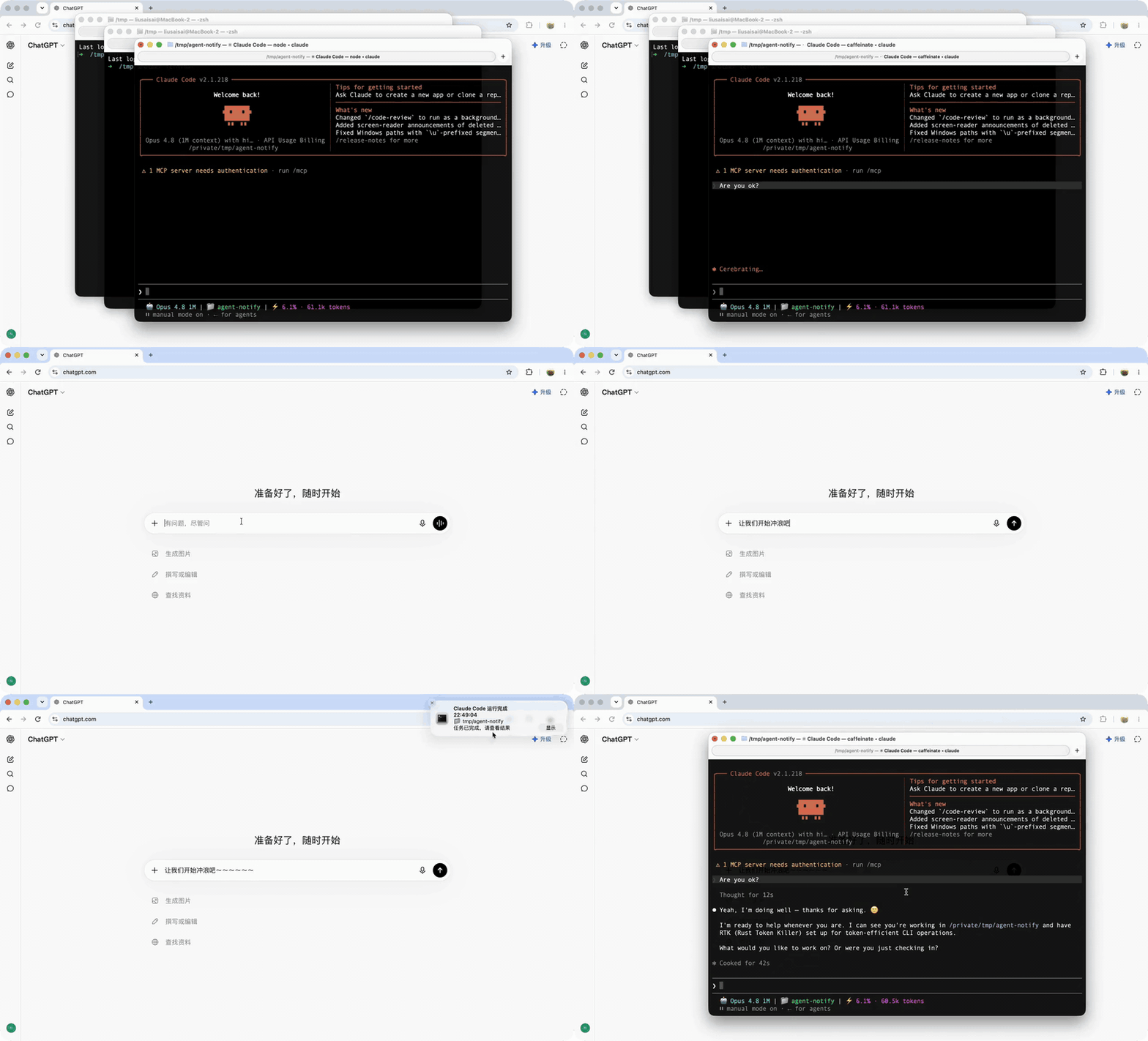
Quick Start
Run it without installing anything:
npx agent-notify@latest
Or install it globally, which puts the agent-notify command on your PATH:
npm install -g agent-notify
agent-notify
Update a global install later:
npm update -g agent-notify
Both routes run the same launcher: it downloads the platform binary into ~/.agent-notify/ on first run, so the npm package itself is only a bootstrap. The launcher updates the binary to the version of the npm package it was invoked from, never to whatever is newest — so keep that package current: npx agent-notify@latest re-resolves from the registry on every run, while a global install only moves when you run npm update -g agent-notify. The global install is the better fit if you plan to call agent-notify directly — agent-notify doctor, agent-notify send, agent-notify freeze — rather than going through npx every time. Pin a version with npm install -g agent-notify@0.17.0.
You can also send a custom message directly through a configured channel:
agent-notify send --channel wechat-work --agent omp "Deployment finished; please check the service"
agent-notify send --channel ntfy --agent omp --title "Build result" --message "Build succeeded"
send reads the selected agent's channel configuration and sends explicitly, regardless of that channel's enabled flag or event subscription list. Supported channels are system, feishu, wechat, wechat-work, dingtalk, bark, ntfy, and slack.
Features
Supported Channels
| Channel | Description | Setup |
|---|---|---|
| 🖥️ System Notification | Native notifications on macOS, Linux, and Windows | Default |
 Feishu / Lark Feishu / Lark |
One-click QR-code binding; push via Feishu bot messages | QR scan |
 WeChat Work WeChat Work |
Push notifications via a WeChat Work group bot webhook | Webhook |
 DingTalk DingTalk |
Push notifications via a DingTalk group bot webhook | Webhook |
 Bark Bark |
Push to iOS devices via a Bark webhook URL | Webhook |
 ntfy ntfy |
Push via ntfy.sh or self-hosted ntfy server | Topic |
 Slack Slack |
Push via Slack Incoming Webhook | Webhook |
 Discord Discord |
Push via Discord channel webhook | 🚧 Webhook |
 Telegram Telegram |
Push via Telegram Bot API | 🚧 Bot token |
Supported Events
| Event | Claude Code | Codex | OpenCode | ZCode | Grok | Droid | OMP | DSH |
|---|---|---|---|---|---|---|---|---|
permission_required |
✅ | ✅ | ✅ | ✅ | ✅ | ✅ | ✅* | ✅ |
input_required |
✅ | — | ✅ | — | ✅ | ✅ | ✅ | ✅ |
run_completed |
✅ | ✅ | ✅ | ✅ | ✅ | ✅ | ✅ | ✅ |
run_failed |
✅ | — | ✅ | ✅ | ✅ | — | ✅ | ✅ |
Notes:
- Claude Code subscribes via hooks in
~/.claude/settings.json:PermissionRequest,Notification,Stop,PostToolUseFailure, andSessionStart. - Codex subscribes via
~/.codex/hooks.json:PermissionRequestandStop(mapped topermission_required/run_completed), plusSessionStart.input_requiredandrun_failedhave no corresponding Codex hook yet, so they are not supported. - OpenCode uses a JS plugin instead of native hooks: the plugin is written to
~/.agent-notify/opencode-plugin.js(binary path baked into JS), and its path is registered in~/.config/opencode/opencode.json(user) or./opencode.json(project)pluginarray. The plugin subscribes tosession.created→session_start,permission.asked→permission_required,question.asked→input_required,session.status(idle)→input_required,session.idle→run_completed,session.error→run_failed. - ZCode subscribes via
~/.zcode/cli/config.json:SessionStart,PermissionRequest,PostToolUseFailure, andStop, mapped topermission_required,run_failed, andrun_completed. ZCode has noNotificationevent (so noinput_required), and its hook schema is strict — an unknown event name will cause the whole hooks config to be silently dropped. - Grok subscribes via
~/.grok/hooks/agent-notify.json:SessionStart,Notification,Stop,StopFailure, andPostToolUseFailure. There is no dedicatedPermissionRequestevent;Notifications with permission/approval semantics map topermission_required(marked *), others map toinput_required.StopFailure/PostToolUseFailuremap torun_failed. - Droid subscribes via
~/.factory/hooks.json:SessionStart,Notification,Stop, mapped tosession_start/permission_required|input_required/run_completed. Droid has no failure event, sorun_failedis not supported.session_startis only used for click-to-focus window capture, not as a notification event. - OMP uses a native TypeScript extension instead of a JSON command hook: user scope writes
~/.omp/agent/extensions/agent-notify.ts, while project scope writes.omp/extensions/agent-notify.ts. It listens tosession_start,tool_approval_requested,tool_execution_start, andsession_stop, mapping them to focus capture,permission_required,input_required, andrun_completed/run_failed. Theasktool blocks the session waiting for an answer, so itstool_execution_startis mapped toinput_required. A run is judged bysession_stop's stop reason:stop_reason: "error"(or an aborted stop with an error message) maps torun_failed; ordinary per-tool errors are not treated as run failures.permission_requiredis emitted only when OMP actually requests tool approval. - OMP respects
OMP_PROFILE/PI_PROFILEprofiles and thePI_CODING_AGENT_DIRoverride. - DeepSeek Harness uses a native Cordis plugin (the separate
agent-notify-dshpackage) instead of a JSON command hook. The plugin subscribes directly to the harness's lifecycle extension points —agent/created→session_start,approval/request→permission_required,user-questions/request→input_required,agent/turn-stopping→run_completed,agent/error→run_failed— and spawnsagent-notify handle-dsh-hookdetached, never blocking the agent. Install it withdsh plugin --profile web add agent-notify-dsh. This native route is deliberate: DSH's bundled Claude Code hook bridge only recognisesSessionStartandStop, soPermissionRequestandNotificationwould be dropped silently, losing the pending-authorization alert that matters most. Only root agents are reported; subagent events are filtered to avoid notification spam. SessionStartdoes not produce a notification. It is subscribed on every agent solely to capture the terminal window at session start, which powers Linux window-level Click-to-Focus. On macOS/Windows the SessionStart hook is a no-op.
Supported Platforms
| Platform | Architecture | Status |
|---|---|---|
| macOS | amd64 / arm64 | ✅ |
| Linux | amd64 / arm64 | ✅ |
| Windows | amd64 / arm64 | ✅ |
Click-to-Focus
System notifications are clickable — clicking one brings you back to the terminal / window where the agent is running. Behavior differs by platform:
- macOS — App-level by default (activates the agent's terminal/IDE app). For window-level focus (return to the exact window even when several are open), set
AGENT_NOTIFY_FOCUS_PRECISION=windowin your login shell environment (e.g.~/.zshrc); this uses a bundled helper and requires Accessibility permission. Unset stays app-level. - Linux (X11) — Window-level. The exact terminal window is captured at session start (via the
SessionStarthook) and re-focused on click, so it distinguishes sibling windows of single-process terminals (deepin-terminal, GNOME Terminal, etc.). Native Wayland windows can't be targeted. - Windows — Returns to the terminal window via a bundled helper.
AGENT_NOTIFY_FOCUS_PRECISIONacceptswindow(window-level) orapp(app-level — the default). Values are case-insensitive and whitespace-trimmed; anything unset or unrecognized falls back toapp. This variable only affects macOS — Linux is always window-level, and Windows uses its own helper.
Click-to-focus is enabled by default for the System channel; the target app/window is detected automatically from the hook's environment and process tree.
Configuration
On first run, the launcher downloads the platform-specific binary matching the current npm package version from GitHub Releases and installs it to:
- macOS / Linux:
~/.agent-notify/agent-notify - Windows:
~/.agent-notify/agent-notify.exe
On every subsequent run it checks the local binary version against the version of the npm package the launcher ran from: it downloads if missing, updates if it differs, and otherwise runs directly. Invoke with npx agent-notify@latest (or run npm update -g agent-notify) to move to a new release. The launcher never persistently modifies PATH — it always executes via an absolute path.
Note: Codex integrates through the official hooks system in
~/.codex/hooks.jsonand currently subscribes only toPermissionRequestandStop. After first install, run/hooksinside Codex to complete the trust review.Grok: Writes
~/.grok/hooks/agent-notify.json. Global hooks are always trusted; project hooks (.grok/hooks/) require/hooks-trustor--trust. After install, run/hooks(orCtrl+L) inside Grok to confirm they loaded.
You don't need to edit config files by hand — this section is for reference only.
Agent Notify's own config lives at ~/.agent-notify/config.yaml. New installs start with all agents and channels disabled — run npx agent-notify@latest (setup wizard) once to enable the agents and channels you want. This avoids showing unconfigured agents as ready in view/doctor after a partial setup. Existing config files are left unchanged.
Agent integration config locations:
- Claude Code:
~/.claude/settings.json(writes hooks → commandagent-notify handle-claude-hook) - Codex:
~/.codex/hooks.json(writes hooks → commandagent-notify handle-codex-hook; run/hooksinside Codex to complete trust) - OpenCode:
~/.config/opencode/opencode.json(writespluginarray →~/.agent-notify/opencode-plugin.js, commandagent-notify handle-opencode-hook; project scope uses./opencode.json) - ZCode:
~/.zcode/cli/config.json(writeshooks.events.<Event>+hooks.enabled→ commandagent-notify handle-zcode-hook; restart ZCode for the config to take effect) - Grok:
~/.grok/hooks/agent-notify.json(writes hooks → commandagent-notify handle-grok-hook; project scope uses.grok/hooks/agent-notify.json) - Droid:
~/.factory/hooks.json(writes hooks → commandagent-notify handle-droid-hook; project scope uses.factory/hooks.json) - OMP:
~/.omp/agent/extensions/agent-notify.ts(writes a native TypeScript extension; project scope uses.omp/extensions/agent-notify.ts) - DeepSeek Harness:
<DSH_HOME>/profiles/<profile>/package.json(registers theagent-notify-dshbundle; the install itself runsdsh plugin --profile <profile> add agent-notify-dsh. DSH has no project-level install location)
WeChat Work Bot Binding Tip
- Create a single-person notification group: start a group chat in WeChat Work (pull in a few colleagues). After it's created, do not post anything, then remove the others — the group becomes your personal notification channel.
- Add a bot: "Group Settings" → "Message Push" → "Add" → "Custom Message Push", name it and save.
- Get the webhook URL: copy the generated URL, which looks like
https://qyapi.weixin.qq.com/cgi-bin/webhook/send?key=xxx. - Bind it: run
npx agent-notify@latest, enable the WeChat Work channel in the setup wizard, and paste the webhook URL.
Older WeChat Work versions: "Group Settings" → "Group Bots" → "Add Bot" → "New Bot", name it and save.
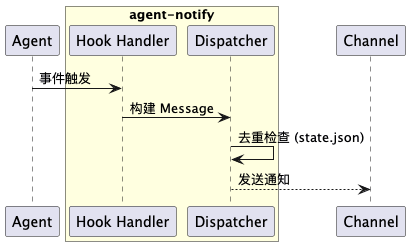
Screenshots
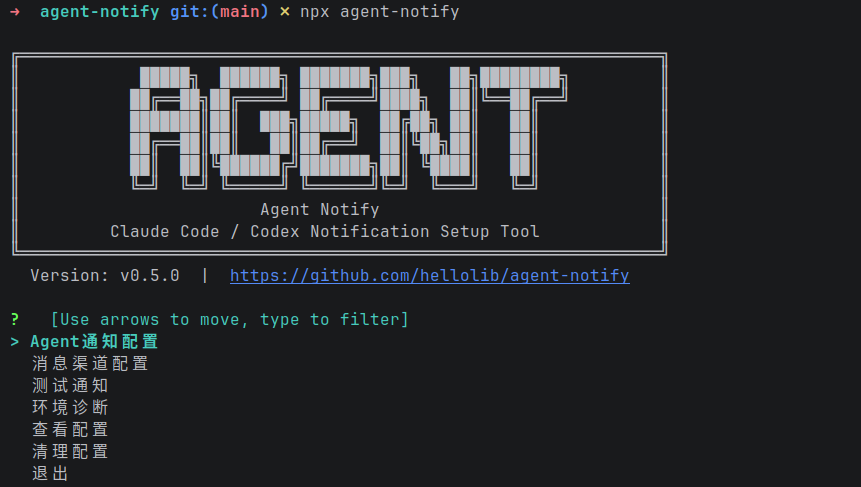 |
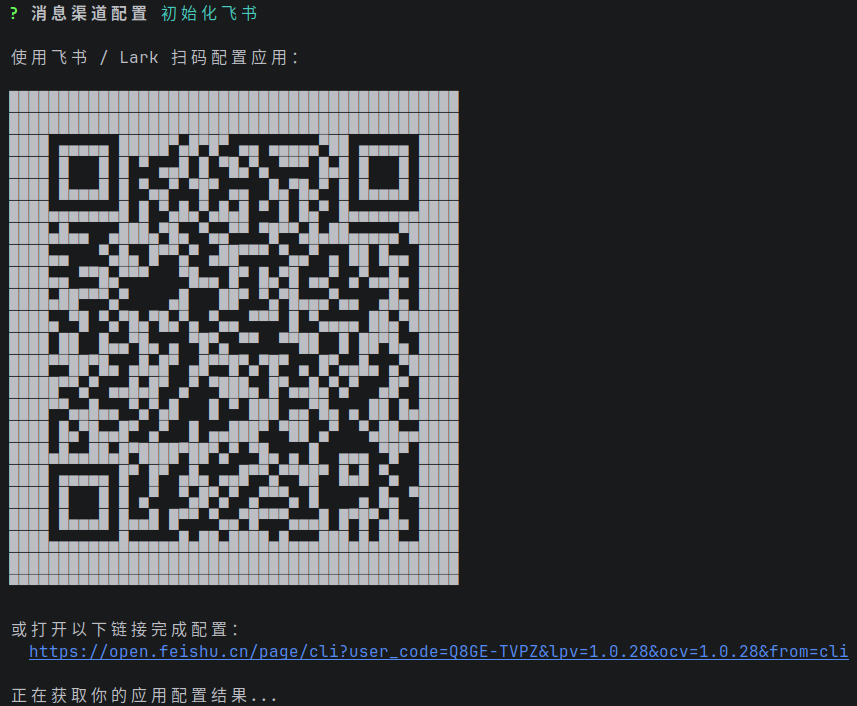 |
| Setup | Feishu Binding |
 |
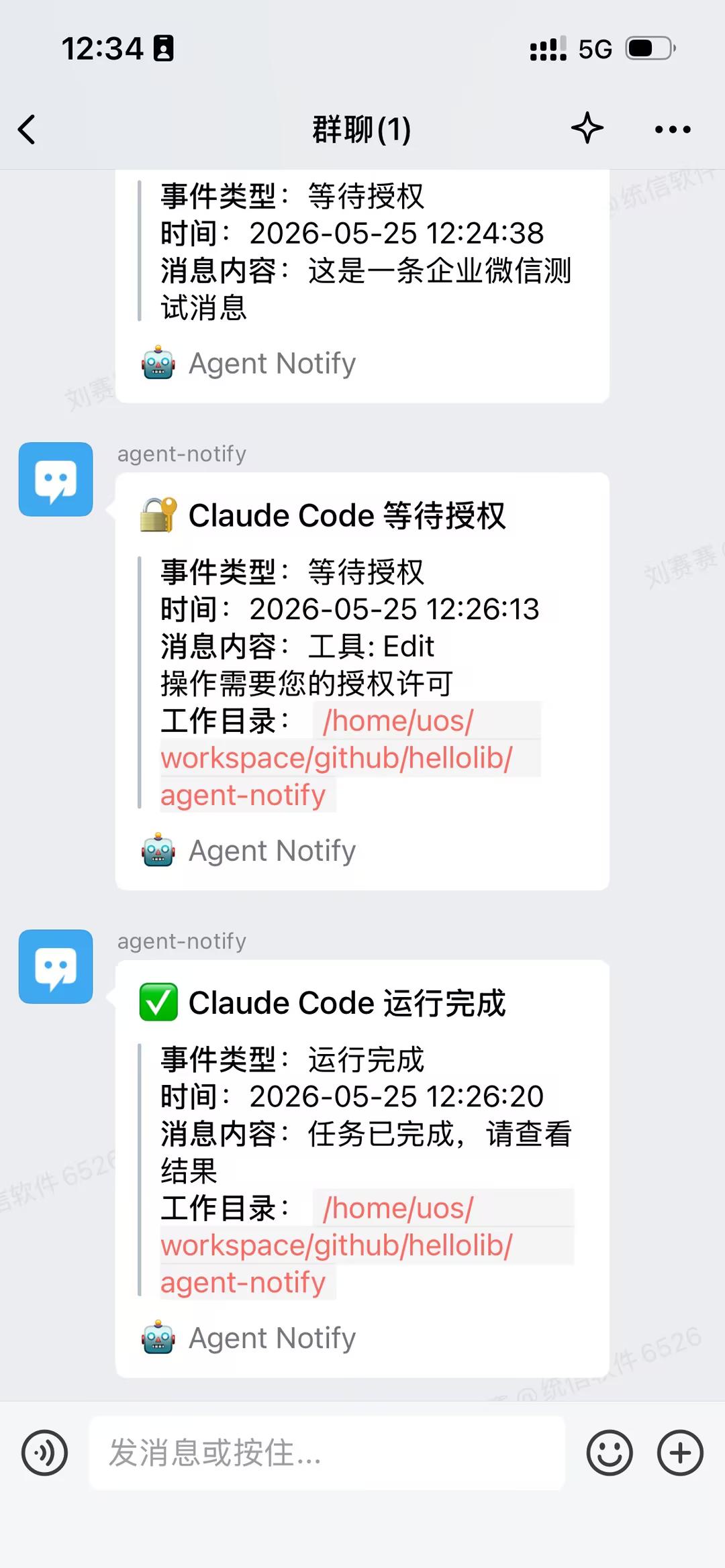 |
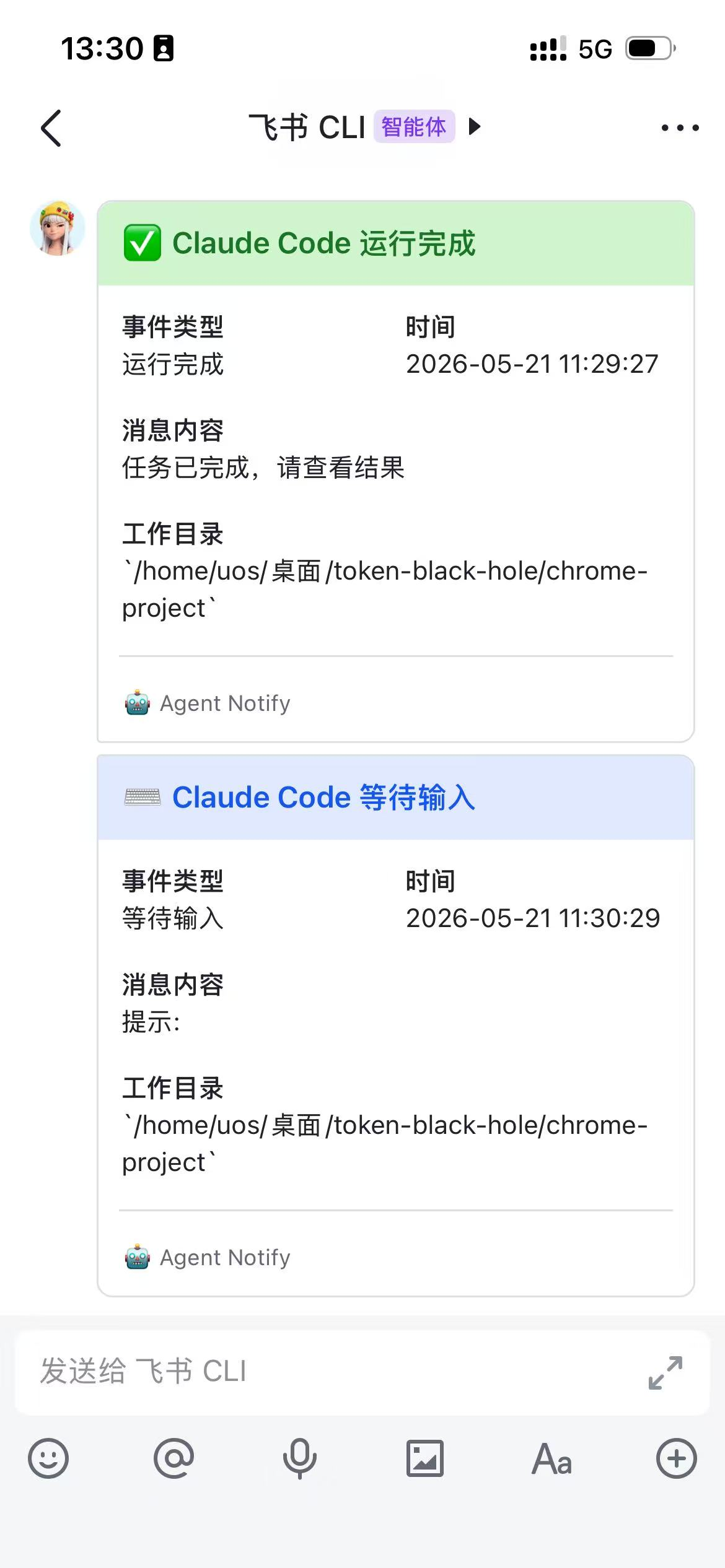
| Feishu Notification | WeChat Work Notification |
 |
|
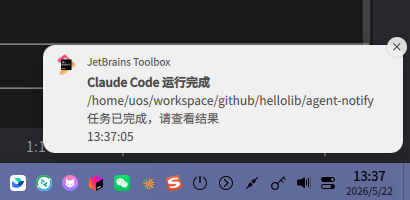
| System Notification |
Acknowledgments
Thanks for the support and feedback from the friends at LINUX DO.