@zosmaai/pi-llm-wiki0.12.5
Self-maintaining LLM Wiki for Pi — Karpathy-pattern knowledge base with immutable source capture, automated ingestion, search, linting, and Obsidian-compatible vault. auto-updating personal & company wiki.
Built for omp
The author tagged this package oh-my-pi.
Reports 0
No reports yet.
Readme
@zosmaai/pi-llm-wiki
English | 中文 | Español | 日本語 | Deutsch | Français | Português | Русский | 한국어 | हिंदी






基于 pi 的自维护、兼容 Obsidian 的知识库。 遵循 Andrej Karpathy 的 LLM Wiki 模式。
将原始来源(网址、PDF、Markdown、JSON、XML)转化为持久、互联、由 LLM 维护的 Wiki,并随时间不断积累。
原生 Open Knowledge Format (OKF) v0.2 支持
构建可随身携带的知识库——不再是另一个封闭的应用专属导出:
- 创建可移植的 OKF v0.2 文档,具有标准 frontmatter、标准 Markdown 链接和稳定的来源引用。
- 同时读取旧版和 OKF 页面,现有 vault 无需自动迁移或重写即可继续工作。
- 从权威页面生成确定性索引和日志,保持导航和元数据可重现。
- 从 Pi 或 MCP 使用相同的知识模型,支持 Claude Code、Cursor、Windsurf 和其他 MCP 客户端。
- 保持 Obsidian 兼容性,同时让知识准备好供支持 Open Knowledge Format 的工具使用。
从新的 OKF vault 开始,或将 pi-llm-wiki 指向现有 vault,按您的节奏采用该格式。查看 OKF Foundation 规范 了解实现细节。
演示
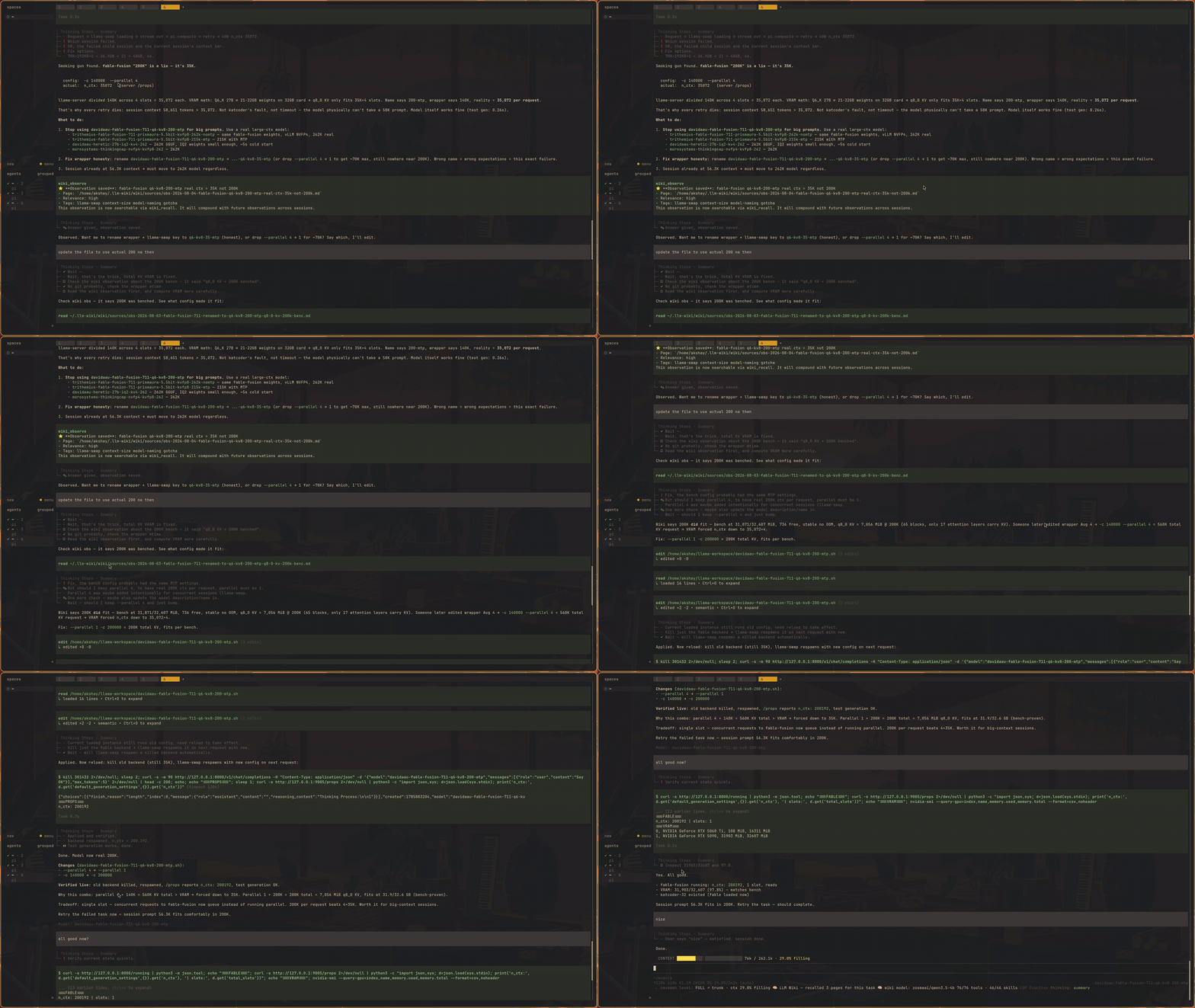
Quick Start
pi (@mariozechner/pi-coding-agent):
pi install npm:@zosmaai/pi-llm-wiki
oh-my-pi (omp):
omp install @zosmaai/pi-llm-wiki
Both hosts load the same extension, skill, and /wiki-* slash commands — see
Dual-host support for what differs.
Other harnesses via MCP
Claude Code, Codex, Cursor, Windsurf, Zed, Cline, and other MCP-capable harnesses use the packaged stdio server. Start with the Claude marketplace:
/plugin marketplace add https://github.com/zosmaai/pi-llm-wiki
/plugin install llm-wiki@zosmaai
/reload-plugins
For every other MCP client, install the package and register
dist/mcp/index.js as a local stdio server:
npm install --save-dev @zosmaai/pi-llm-wiki@latest
Use the client-specific JSON/TOML examples in
docs/harnesses.md. They cover Codex CLI, Cursor,
Windsurf, Zed, Cline, and a generic MCP configuration. Set WIKI_ROOT to pin
the vault; use an absolute server path because MCP clients do not expand ~.
The extension will proactively suggest creating a wiki on your first session. Alternatively:
/wiki-init "AI Engineering"
/wiki-ingest
/wiki-query What are the key patterns?
为什么选择这个包?
大多数基于文件的 LLM 工作流如同一键式 RAG:每次提问时模型都会搜索原始文档。综合结果转瞬即逝。
pi-llm-wiki 创建了一个中间层:
- 原始来源包 保留真实来源输入
- 来源页面 总结每个来源的内容
- 规范 wiki 页面 追踪 wiki 当前认定的内容
- 生成的元数据 保持所有内容可搜索和可导航
结果是:随着您捕获来源、提出问题并归档持久分析,wiki 会不断 积累。
特性
| 功能 | 描述 |
|---|---|
| 🏠 个人回退 | 始终开启的 ~/.llm-wiki/ vault——即使没有项目 wiki,知识也能跨项目积累 |
| 🔗 不可变的来源捕获 | URL、本地文件(PDF/md/txt/html/XML/JSON)或粘贴文本 → 结构化来源包 |
| 🧠 自动化摄取 | wiki_ingest 批量处理来源到概念、实体、综合和分析页面 |
| 🔍 全文搜索 | 生成的注册表,跨所有页面和来源的关键字查找 |
| 🩺 机械式 linting | 孤儿页面、断链、重复别名、覆盖缺口、过时捕获 |
| 📊 仪表板 | wiki_status——计数、来源状态、最近活动 |
| 🤖 自动更新监控 | wiki_watch——打印按计划运行完整周期的 crontab 行 |
| 🧠 分层召回 | 同时搜索个人(~/.llm-wiki/)和项目(.llm-wiki/)vault——个人知识随您到处 |
| 📝 自动引导 | 当前目录不存在 wiki 时扩展建议创建 |
| 💾 轻量级捕获 | wiki_retro——将原子洞察保存为单个 markdown 文件;通过 wiki_capture_source 也可用完整 4 层管道 |
| 🧭 代理工作记忆 (可选) | wiki_capture_trajectory 记录任务如何解决的(工具调用轨迹)→ 提炼为可重用的 skill/case 页面 → wiki_recall_skill 下次展示。默认关闭;用 /wiki-trajectories on 启用 |
| 🌐 OKF v0.2 原生 | 可移植 Open Knowledge Format 文档、双读旧版兼容、确定性投影 |
| 🌐 MCP 服务器 | 通过 stdio MCP 传输从 Claude Code、Cursor、Windsurf 使用相同的 OKF 感知 wiki |
| 📝 Obsidian 友好 | 文件夹限定 wikilinks、稳定来源 ID 引用、兼容 vault |
| 🛡️ 护栏 | 阻止直接编辑原始来源和生成的元数据 |
| 🔧 可配置的 PDF 提取 | 通过 WIKI_MARKITDOWN_TIMEOUT_MS 环境变量设置 MarkItDown 超时 |
| 🧪 Quality checks | TypeScript, Vitest, Biome, Codecov, CodeQL |
工具
| 工具 | 描述 |
|---|---|
wiki_bootstrap |
用配置、模板、模式和元数据初始化新的 wiki vault |
wiki_capture_source |
将 URL、本地文件或粘贴文本捕获到不可变的来源包中 |
wiki_recall |
搜索 wiki 中与任务相关的页面——搜索个人和项目 vault,去重 |
wiki_retro |
将已完成任务的原子洞察保存到 wiki |
wiki_ingest |
处理未摄取的来源包到 wiki 页面(批量) |
wiki_ensure_page |
解析或安全创建实体/概念/综合/分析页面 |
wiki_search |
搜索生成的 wiki 注册表 |
wiki_lint |
确定性健康检查(孤儿、缺口、矛盾、自动修复) |
wiki_status |
显示计数、来源状态和最近活动 |
wiki_observe |
记录当前会话的带时间戳、可搜索观察 |
wiki_rebuild_meta |
强制完整元数据重建(注册表、反向链接、索引、日志) |
wiki_reindex_embeddings |
为新增或过期的页面刷新语义嵌入(未配置 embedding 提供方时为空操作) |
wiki_log_event |
将结构化事件追加到 wiki 活动日志 |
wiki_watch |
打印自动 wiki 更新的 crontab 行(每日/每周/每小时)——不安装它 |
wiki_capture_trajectory (可选) |
捕获已完成任务的工具调用轨迹(代理工作记忆) |
wiki_distill_skills (可选) |
批量未提炼的轨迹以合成为可重用的技能页面 |
wiki_recall_skill (可选) |
召回提炼的技能+类似过去案例——"我以前做过这个吗?" |
三个代理轨迹工具 默认关闭(issue #80)。用
/wiki-trajectories on启用(设置llm-wiki.trajectories);关闭时完全不注册。
斜杠命令
| 命令 | 描述 |
|---|---|
/wiki-init <topic> |
初始化新的 LLM Wiki vault |
/wiki-ingest [path] |
处理新来源文件并更新 wiki |
/wiki-query <question> |
带引用向 wiki 提问 |
/wiki-discover [--topic <topic>] |
从网络自动发现新来源 |
/wiki-run [--schedule daily|weekly] |
完整周期:发现 → 摄取 → lint |
/wiki-lint [--fix] |
健康检查(孤儿、矛盾、缺口) |
/wiki-status |
显示简洁的操作摘要 |
/wiki-digest [--period daily|weekly] |
生成最近活动的摘要 |
/wiki-retro |
保存已完成任务的原子洞察 |
| `/wiki-model [provider/id | session]` |
/wiki-req <concept> |
将概念分解为原子、可追踪的需求页面 |
/wiki-trajectories <on|off> |
启用/禁用代理工作记忆(可选,默认关闭) |
/wiki-record <title> |
捕获已完成任务的轨迹(需要启用轨迹) |
/wiki-skills [query] |
搜索提炼的技能+过去案例(需要启用轨迹) |
/wiki-settings |
交互式设置屏幕 — 在 project/global 作用域下查看/修改全部 llm-wiki 设置 |
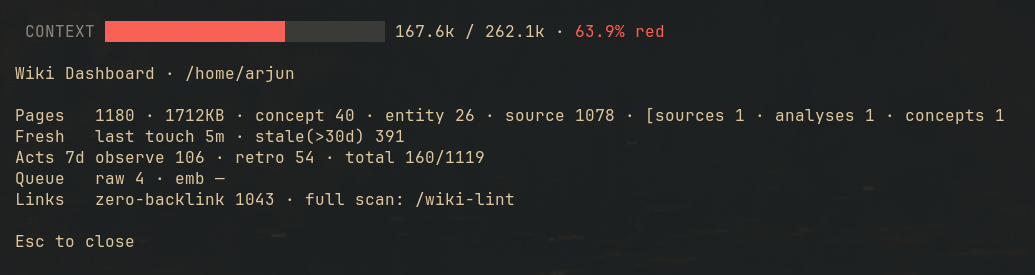
/wiki-dashboard |
只读知识库仪表盘 — 页面数量/类型、新鲜度、7 日活动、入库队列、零反链页面、embedding 覆盖率 |
Layered Vault Architecture
Knowledge follows you everywhere. pi-llm-wiki uses a layered vault system:
| Layer | Location | Purpose |
|---|---|---|
| 🏠 Personal | ~/.llm-wiki/ |
Always active. Zero setup. Knowledge compounds across all your sessions — regardless of which project you're in. |
| 📁 Project | {project}/.llm-wiki/ |
Explicit opt-in. Dedicated wiki per project, sharing personal knowledge when relevant. |
| 🏢 Company (future) | git-tracked | Shared wiki across a team. wiki_publish promotes personal/project pages to the company wiki. |
How it works:
resolveVaultRoot()checks: cwd → walk up for.llm-wiki/→~/.llm-wiki/wiki_recall(layered) searches both personal and project vaults, merging results with vault labels- Personal results are shown first in recall output, tagged as "📓 personal"
wiki_retrowrites to whichever vault is active (project takes priority)- Set
WIKI_HOMEenv var to override the personal wiki location
This means: you can have a project wiki for team documentation and a personal wiki for your own notes, and recall searches both simultaneously.
Quick Start (Detailed)
1) Create a new wiki
mkdir my-wiki
cd my-wiki
pi
Ask pi:
Initialize an llm wiki here for AI research.
This calls wiki_bootstrap and creates:
.llm-wiki/
├── config.json
├── templates/
├── raw/
├── wiki/
├── meta/
└── WIKI_SCHEMA.md
2) Capture a source
Capture this article into the wiki: https://example.com/some-article
Capture this PDF into the wiki: ./papers/context-windows.pdf
Capture these notes into the wiki: ...pasted text...
3) Integrate the source
- Capture the source
- Read
.llm-wiki/wiki/sources/SRC-*.md - Update that source page
- Search for impacted canonical pages with
wiki_search - Create missing pages with
wiki_ensure_page - Update concept / entity / synthesis pages with citations
- Mark the integration with
wiki_log_event kind=integrate
4) Query the wiki
Based on the wiki, what are the main tradeoffs between long-context models and RAG?
By default, query mode is read-only. To file a durable answer:
Answer the question and file the result as an analysis page.
Vault Layout
my-wiki/
└─ .llm-wiki/
   ├─ config.json               # Vault config
   ├─ templates/                 # Page templates
   ├─ raw/
   │  └─ sources/
   │     └─ SRC-2026-05-11-001/
   │        ├─ manifest.json
   │        ├─ original/           # Original artifact
   │        ├─ extracted.md        # Normalized text
   │        └─ attachments/
   ├─ wiki/
   │  ├─ sources/                  # Source pages (what each source says)
   │  ├─ concepts/                 # Concepts and recurring ideas
   │  ├─ entities/                 # People, orgs, products, papers, systems
   │  ├─ syntheses/                # Cross-source theses and tensions
   │  └─ analyses/                 # Durable filed answers from queries
   ├─ meta/
   │  ├─ registry.json             # Auto-generated search index
   │  ├─ backlinks.json
   │  ├─ index.md
   │  ├─ events.jsonl              # Append-only event log
   │  ├─ log.md
   │  └─ lint-report.md
   └─ WIKI_SCHEMA.md               # Operating manual
Ownership Model
| Path | Owner | Rule |
|---|---|---|
| Path | Owner | Rule |
| ------ | ------- | ------ |
.llm-wiki/raw/** |
Extension tools | Immutable after capture |
.llm-wiki/wiki/** |
Model + user | Editable knowledge pages |
.llm-wiki/meta/registry.json |
Extension | Generated |
.llm-wiki/meta/backlinks.json |
Extension | Generated |
.llm-wiki/meta/index.md |
Extension | Generated |
.llm-wiki/meta/events.jsonl |
Extension / tool | Authoritative append-only state; back up for activity continuity |
.llm-wiki/meta/log.md |
Extension | Generated from events |
.llm-wiki/meta/lint-report.md |
Extension | Generated |
.llm-wiki/WIKI_SCHEMA.md |
Human + explicit request | Operating manual |
Activity history, backup, and portability
meta/events.jsonl is the authoritative source for recorded extension activity. Unlike registry, backlinks, indexes, logs, and embeddings, it cannot be rebuilt from wiki pages or raw packets. Preserve it when backing up or Git-synchronizing a complete pi-llm-wiki vault.
meta/log.md and OKF-mode wiki/log.md are generated views. wiki/log.md can travel with the OKF bundle as a readable snapshot, but it cannot reconstruct or resume the originating JSONL stream. Manual page edits are intentionally absent, so this is selected extension activity rather than a complete revision audit.
File-capture events omit machine-local paths from the public log projection. Callers of wiki_log_event still control arbitrary detail fields and must not record secrets or private host paths.
Linking & Citation Style
Internal Navigation
[[concepts/retrieval-augmented-generation]]
[[entities/openai|OpenAI]]
[[syntheses/long-context-vs-rag]]
Factual Citations
[[sources/SRC-2026-04-04-001|SRC-2026-04-04-001]]
Stable source-page IDs keep provenance stable even if titles change.
Guardrails
The extension blocks direct tool-call edits to:
.llm-wiki/raw/**— immutable source artifacts.llm-wiki/meta/registry.json.llm-wiki/meta/backlinks.json.llm-wiki/meta/events.jsonl.llm-wiki/meta/index.md.llm-wiki/meta/log.md.llm-wiki/meta/lint-report.md
If the model directly edits .llm-wiki/wiki/** using Pi's built-in write or edit tools, the extension automatically rebuilds generated metadata at the end of the agent turn.
Source Packet Format
Each captured source is stored as a structured packet:
.llm-wiki/raw/sources/SRC-YYYY-MM-DD-NNN/
├─ manifest.json     # Capture metadata (title, URL, format, timestamp)
├─ original/         # Original artifact (preserved as-is)
├─ extracted.md      # Normalized text (PDF→md, XML→md, JSON→md, etc.)
└─ attachments/      # Future attachment downloads
This preserves both the original artifact and a normalized extracted view for reading.
MCP Server
Use the wiki from any MCP-compatible tool — Claude Code, Cursor, Windsurf, and others.
The package ships a standalone MCP server exposing 15 wiki tools over stdio:
| Tool | Description |
|---|---|
wiki_bootstrap |
Initialize a vault |
wiki_recall |
Search relevant wiki pages |
wiki_search |
Search the registry |
wiki_status |
Show wiki health and counts |
wiki_retro |
Save an atomic insight |
wiki_capture_source |
Capture a source packet |
wiki_ingest |
Synthesize captured sources synchronously over the configured task model |
wiki_reindex |
Rebuild/repair QMD indexes |
wiki_ensure_page |
Safely create a canonical page |
wiki_lint |
Run deterministic health checks |
wiki_log_event |
Append an activity event |
wiki_observe |
Save a timestamped observation |
wiki_rebuild_meta |
Rebuild metadata projections |
wiki_reindex_embeddings |
Refresh semantic embeddings |
wiki_watch |
Print an update cron line |
Usage
# Auto-discovered by pi:
pi install npm:@zosmaai/pi-llm-wiki

# Standalone with any MCP client:
WIKI_ROOT=~/my-wiki node node_modules/@zosmaai/pi-llm-wiki/dist/mcp/index.js
Set WIKI_ROOT to your wiki vault directory. If unset, the server auto-detects from the current working directory.
Claude marketplace installation
/plugin marketplace add https://github.com/zosmaai/pi-llm-wiki
/plugin install llm-wiki@zosmaai
/reload-plugins
Client configuration
The same server as an entry in .mcp.json (Claude Code) or claude_desktop_config.json:
{
  "mcpServers": {
    "llm-wiki": {
      "command": "node",
      "args": ["/absolute/path/to/node_modules/@zosmaai/pi-llm-wiki/dist/mcp/index.js"],
      "env": { "WIKI_ROOT": "/absolute/path/to/my-wiki" }
    }
  }
}
MCP clients spawn the command without a shell, so
~is never expanded. A~/my-wikiinargsorenvis passed through literally and the server fails to start, which the client reports only as a generic connection error — use absolute paths here. The shell snippet above is fine: your shell expands~beforenodesees it.
Dual-host support (pi + oh-my-pi)
The package targets two hosts from a single codebase:
pi (@mariozechner/pi-coding-agent) |
oh-my-pi (omp) |
|
|---|---|---|
| Extension entry | package.json#pi.extensions |
package.json#omp.extensions (falls back to #pi) |
| Skill | skills/llm-wiki/SKILL.md via pi.skills |
same file, found by directory convention |
| Slash commands | prompts/*.md via pi.prompts |
commands/*.md (generated mirror of prompts/) |
| Project config | <cwd>/.pi/settings.json |
<cwd>/.omp/settings.json, then .omp/config.yml |
| User config | ~/.pi/agent/settings.json |
~/.omp/agent/settings.json, then config.yml |
| MCP server | auto-registered via pi.mcpservers |
register manually (see below) |
| Ambient surfaces without a project wiki | on (personal vault) | off — see below |
No source changes are needed for the imports: oh-my-pi rewrites
@mariozechner/pi-* and bare typebox specifiers onto its own bundled
packages when it loads a legacy extension.
Settings are read from both layouts. llm-wiki config is merged from every
file above, host-native directory last. A vault configured under pi keeps
working after omp takes over the same repository, and writes land in whichever
config directory already exists (so a .pi-only repo does not sprout a second
settings file). Writes are always JSON — a hand-authored config.yml is read
but never rewritten.
Set LLM_WIKI_HOST=pi|omp to override host detection; by default it is derived
from the resolved agent directory.
Ambient surfaces are gated under oh-my-pi. The session notice, the periodic
observe/retro reminder, and before_agent_start recall all fire unprompted, and
vault resolution falls back to the personal vault — so once ~/.llm-wiki/
exists they would speak up in every directory. Under pi that is the historical
behaviour and it is kept; under omp the plugin is installed once and loads in
every project, so a repository that never ran /wiki-init stays quiet. Override
either default with llm-wiki.ambientPersonalVault. The wiki tools and slash
commands are registered regardless, so /wiki-init always works — and a project
with its own .llm-wiki/ gets every surface back.
MCP under oh-my-pi. pi.mcpservers is a pi-only manifest key, and the
server's vault auto-detection depends on the client's working directory, so it
cannot be declared with a relative path. Register it explicitly instead:
// <cwd>/.omp/.mcp.json
{
  "mcpServers": {
    "llm-wiki": {
      "command": "node",
      "args": ["/abs/path/to/node_modules/@zosmaai/pi-llm-wiki/dist/mcp/index.js"],
      "env": { "WIKI_ROOT": "/abs/path/to/your/wiki" }
    }
  }
}
You rarely need it: under either host the extension already registers the same capabilities as native tools.
Skill Behavior
The bundled llm-wiki skill teaches the model to:
- ❌ Never edit raw sources directly
- ❌ Never edit generated metadata files
- ✅ Capture first, integrate second
- ✅ Search before creating new canonical pages
- ✅ Cite facts using source-page IDs
- ✅ Keep query mode read-only by default
- ✅ Use "Tensions / caveats" and "Open questions" when evidence is mixed
Architecture
Vault Layers
See the Layered Vault Architecture section above for the personal/project/company layering.
Four-Layer Page Model
Each wiki vault has four layers with clear ownership:
.llm-wiki/raw/sources/SRC-*/     # Immutable source packets (extension-owned)
.llm-wiki/wiki/                   # Editable knowledge pages (you + LLM)
.llm-wiki/meta/                   # Durable event source + generated internal projections
.llm-wiki/                        # Config and templates
Read docs/architecture.md for the full design document.
Documentation
| Document | What it covers |
|---|---|
| Architecture | How the four layers work, ownership model |
| Commands | All slash commands and tool reference |
| Obsidian Integration | Vault setup and recommended plugins |
| Configuration | Wiki modes, topics, environment variables |
| API | Extension tool parameter reference |
Contributing
See CONTRIBUTING.md for development setup, test patterns, and PR workflow.

If you find pi-llm-wiki useful, ⭐ star the repo — it lets us know we're building something that matters.
Contributors
Thanks to everyone who has contributed! This list is regenerated automatically by .github/workflows/contributors.yml — see #60 for the rationale.

Arjun Nayak |

Shanvit S Shetty |

James Fraser |

Mike P. Kuhl |

Akshay |

PrestaLab |

wooksong |

xcsf |

Daniel Naab |
Matt Mayfield |

Superdao |

标准萌新 |
Full history: contributors graph.
License
MIT
Harness support
Runs natively in pi, and as an MCP server in Claude Code (plugin), Codex, Cursor, Windsurf, Zed and opencode. See docs/harnesses.md.