@yunazgr/pi-companion0.3.13
Local-first remote control for Pi sessions: live activity feed, steering, git diff, file drop and phone pairing from a single Rust daemon.
Untested on omp
This is a pi package. No one has reported whether it works on omp yet. If you try it, add your result below.
Reports 0
No reports yet.
Readme
Pi Companion
Lightweight, local-first remote control for Pi sessions.
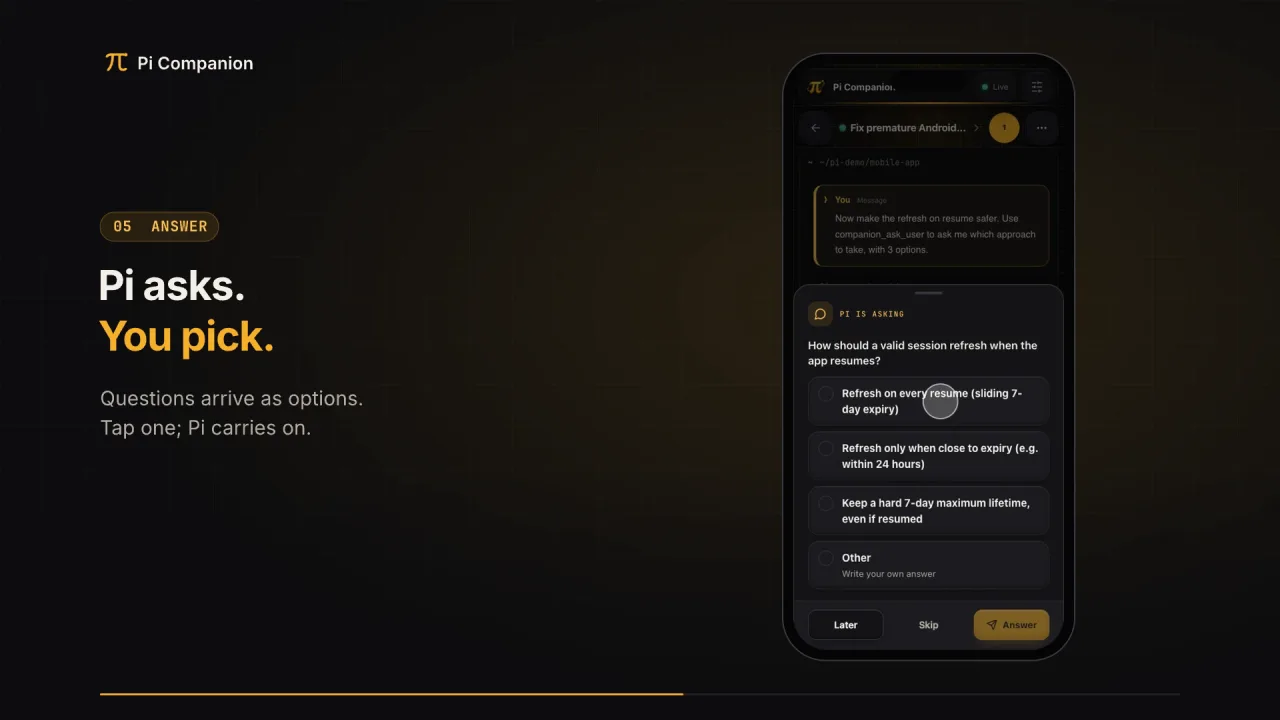
Watch the 2-minute narrated walkthrough: a real Pi session shared with /remote-control, a phone paired from the dashboard, Pi's questions answered from the phone, and an automation created, triggered and reviewed. It is recorded from the actual terminal and UI and composed in code in tools/promo-video.
New in 0.3.13: Changes is scoped to session-recorded edits and applied Pi Jar subagent files, with compact mobile review controls. The session menu contains background work with elapsed timers and a scrollable Tasks popup for Pi Jar and compatible extensions. Claymorphism error pages provide safe recovery actions and explain failed page downloads.
0.3.12: Browse Changes one file at a time with a file picker and previous/next controls; the complete file inventory remains visible even when previews are limited. Automations support IANA timezone selection, daylight-saving changes, and the next scheduled run. Pair devices from the terminal with npm run --silent pair. Settings accumulates weekly observed tokens and estimated cost across retained sessions while keeping account-limit snapshots separate.
0.3.11: Changes includes worktree selection, branch and file counts, and new-file previews. Provider usage snapshots survive closed and archived sessions and daemon restarts, with accurate quota labels. Clay background-work badges open shell/subagent lists, and automation phases open scrollable flowcharts with failure and retry paths.
0.3.10: Shell output uses one collapsed full-output section without a duplicate preview, with larger expand/collapse controls. Sessions show compact counts of reported running background shells and active subagents.
0.3.9: Model-written session titles are saved in the session file (keyed by a hash of the prompt, not the prompt itself), so resuming or reloading a session shows the same title without asking the model again.
0.3.8: The session feed is easier to scan: shell calls show a one-line, human summary ("Check git status, Run tests +1 more") instead of the raw script, while output stays intact. Agent thinking renders as Markdown with a live animated state and "Thought for Ns" once done. Unnamed sessions get a short title that summarises the first prompt, inferred by the session's own model while shared, with an instant local fallback.
When a session is shared, Companion fetches OpenAI Codex and Anthropic subscription usage via Pi's existing OAuth resolver, independently per provider with five-minute caching and failure backoff. Credentials are never sent to the browser or stored by the daemon. API-key accounts and unsupported providers have no built-in subscription lookup; extensions can still publish the neutral telemetry contract. Provider rate-limit, quota and authentication failures are shown in the activity feed with safe remediation guidance rather than raw provider payloads.
Filename search is case-insensitive. New browser uploads are marked You; local agent uploads can declare Agent by posting to /api/sessions/{session_id}/files?source=agent. This query is honored only on the local admin endpoint; remote uploads always remain user uploads. Older files without provenance show Unknown. Source badges describe upload provenance, not file-content authorship.
New in 0.3.2: responsive automation and run-history tables, rounded status chips, matching clay-icon headers, and a single-column automation workspace with full-width mobile controls. Edit automation scrolls to and focuses the inline editor. Pull to refresh Overview, Sessions, Automations, or Settings—with a gesture; unsaved settings stay intact. Camera-policy guidance now explains HTTPS proxy configuration. Existing rich results, staged job editing, optional retries, and answers-only automation sessions are retained. See automations.
Pi Companion is deliberately not another agent runtime. Pi owns execution and conversation state. A single Rust daemon owns session discovery, pairing, temporary file exchange, browser fan-out, and the embedded web UI.
The UI is a static SvelteKit application. There is no Node runtime in production and no Tauri shell. Rust embeds the generated frontend into the daemon binary.

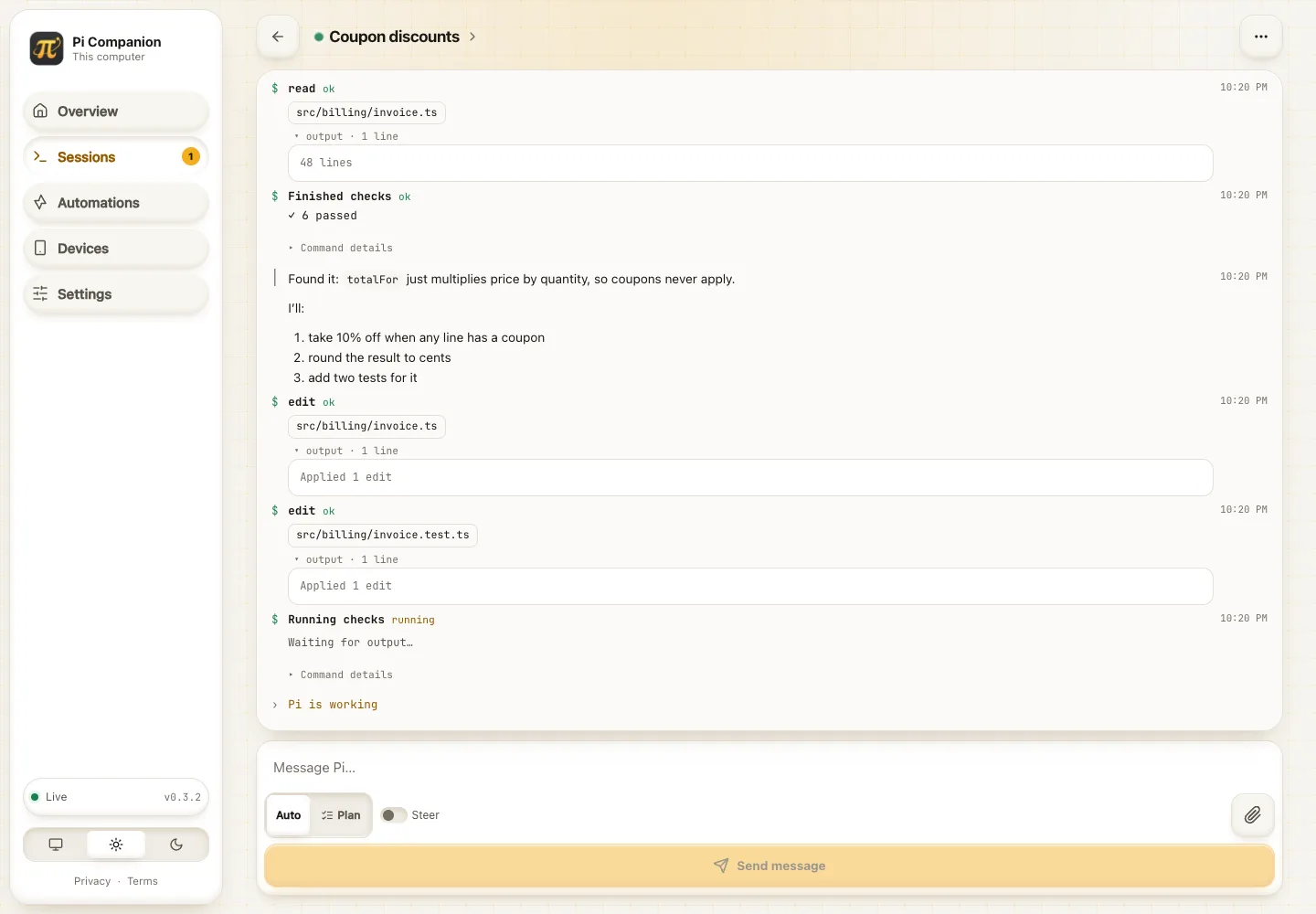
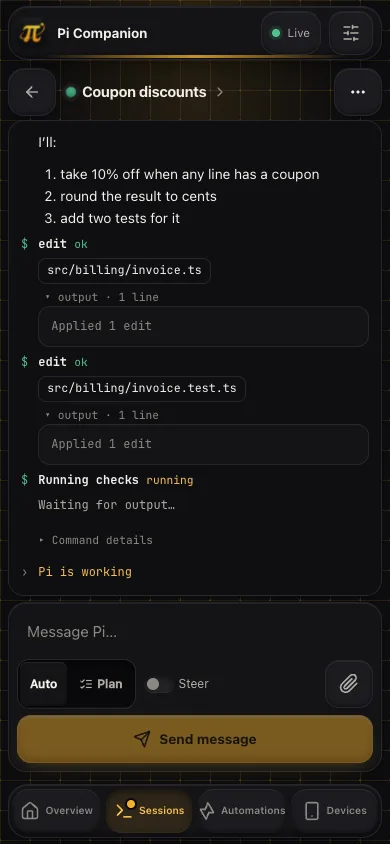
Screenshots use demo sessions, not private conversation data, and are regenerated with node tools/screenshots.mjs (see Running locally from source). See the session menu, desktop session rows and mobile session list, plus attachment previews, file-grouped changes and connection recovery. Explore the new automation list, summary, run history, job editor, and rich results.


Install
pi install npm:@yunazgr/pi-companion
or straight from git:
pi install git:github.com/ygrip/pi-companion
Then start Pi as usual. When the extension loads, it checks the local daemon and starts it if needed, downloading the matching sha256-verified release into ~/.pi/agent/pi-companion/bin/<version>/. Daemon startup does not share your session.
Use /remote-control in any session to toggle sharing; /remote-control on and /remote-control off are explicit alternatives. No /companion prerequisite. /companion and /companion off remain compatibility aliases.
You do not need to run pi-companion-server manually for a normal npm install. Manual daemon startup is mainly for local development, debugging, or when PI_COMPANION_AUTOSTART=0 is set.
Architecture
local browser :43721
        |
        v
+---------------------------+
| pi-companion-server       |
| single Rust daemon        |
|                           |
| live session registry     |
| pairing/device registry   |
| per-session temp sandbox  |
+-------------+-------------+
              |
      localhost WebSocket
    +---------+---------+
    v                   v
Pi session A        Pi session B
extension           extension

paired phone
     |
  HTTPS/WSS
     |
tunnel / reverse proxy
     |
     v
remote surface :43722
     |
     +---- same daemon
The local administration surface and paired-device surface are separate listeners. If you expose Pi Companion through a tunnel, target only port 43722. Never expose port 43721.
Install the web app on your phone
Open the daemon’s HTTPS device URL and pair the phone first. On Android/Chromium, choose Install app (or Add to Home screen) in the browser menu. On iPhone/iPad, open Safari and choose Share → Add to Home Screen; enable Open as Web App if offered. Installation does not grant additional session permissions.
Service workers require HTTPS; http://localhost is permitted for desktop development, but ordinary LAN HTTP addresses are not. An insecure-origin banner explains this in the UI. Install prompts vary by browser and may not appear inside in-app browsers.
After an online visit, the public app shell and visited immutable assets are cached. This is not an offline agent: sending, live activity, pairing, uploads and changes require the daemon connection. No credentials, API responses or session files are stored in the service-worker cache. Reopen online after an update to load the new build.
How the daemon runs
For a normal install:
pi install npm:@yunazgr/pi-companion
Start Pi normally; daemon availability is automatic. Sessions stay private until /remote-control enables sharing. Updating the package and reloading Pi upgrades the daemon to the matching release; older Pi processes do not downgrade a newer daemon.
The lifecycle is:
- Extension startup probes the daemon and repeats the check every 30 seconds while Pi is open, without publishing this session.
- A process-owned startup lock serializes concurrent sessions, including long downloads. The daemon also refuses duplicate port binds.
- Resolve/download and version-check the replacement before stopping the existing daemon. Missing releases or invalid binaries leave the old daemon untouched; there is no latest-release fallback.
- When starting a managed daemon, register one per-user background service: macOS
launchd, Linuxsystemd --user, or Windows Task Scheduler. Its supervisor restarts the daemon after crashes and reads the updated binary configuration after upgrades. - If service registration is unavailable (for example no Linux user systemd or insufficient Windows permissions), warn and start a detached daemon instead. Extension-load and periodic checks remain the fallback.
/remote-controltoggles only the current session. Session switches reset sharing; turning sharing off never shuts down the daemon.- Upgrades close sockets so browsers and opted-in Pi sessions reconnect. Active automation runs are stopped during daemon shutdown; the in-memory feed and temporary-file registry do not survive daemon replacement.
Services run with your user privileges, not administrator/root privileges. Login/logout behavior depends on the OS: Linux may need user lingering for logout persistence, and Windows scheduling may be restricted by policy. A pre-existing same-version manual daemon is reused without takeover; service registration happens when Companion needs to start or upgrade it. Package installation alone does not execute a downloader—Pi must load the extension once.
The daemon binary is resolved in this order:
| Order | Source |
|---|---|
| 1 | PI_COMPANION_SERVER (explicit path override) |
| 2 | a cargo build inside the package checkout: newest of server/target/release and server/target/debug |
| 3 | cached download: ~/.pi/agent/pi-companion/bin// |
| 4 | pi-companion-server on PATH |
| 5 | download of the GitHub release matching the package version, verified against SHA256SUMS, then cached |
To remove background startup, first set PI_COMPANION_SERVICE=0 for Pi, then disable the per-user service: macOS launchctl bootout gui/$(id -u)/dev.pi-companion.daemon and remove ~/Library/LaunchAgents/dev.pi-companion.daemon.plist; Linux systemctl --user disable --now pi-companion.service and remove ~/.config/systemd/user/pi-companion.service; Windows schtasks /End /TN "Pi Companion" then schtasks /Delete /TN "Pi Companion" /F. Package removal alone does not uninstall an OS service. The supervisor/configuration lives under the daemon home directory's service/ folder.
Optional environment variables (none are required):
| Variable | Effect |
|---|---|
| PI_COMPANION_SERVER | use this daemon binary |
| PI_COMPANION_URL | daemon WebSocket URL (default ws://127.0.0.1:43721); autostart only happens for loopback URLs |
| PI_COMPANION_AUTOSTART=0 | disable automatic starts/upgrades and startup monitoring (does not uninstall a previously registered service) |
| PI_COMPANION_SERVICE=0 | use detached startup instead of registering a background service (does not uninstall an existing service) |
| PI_COMPANION_QUOTAS=0 | disable Companion's OAuth subscription-limit requests |
| PI_COMPANION_PUBLIC_URL | daemon-side: public URL embedded in pairing QR codes |
| PI_COMPANION_ALLOWED_ORIGINS | daemon-side: extra comma-separated browser origins accepted besides the loopback addresses and the public URL |
| PI_COMPANION_ADMIN_ADDR, PI_COMPANION_DEVICE_ADDR | daemon-side: loopback listen addresses (default 127.0.0.1:43721 / 127.0.0.1:43722), for running a second daemon next to the usual one, e.g. for screenshots. The extension still looks for 43721 unless PI_COMPANION_URL points elsewhere |
Local admin:
http://127.0.0.1:43721
Paired-device surface:
http://127.0.0.1:43722
The remote listener is still loopback-only. Use an authenticated HTTPS tunnel or reverse proxy for access outside the machine.
Set the externally reachable paired-device URL before starting the daemon:
PI_COMPANION_PUBLIC_URL=https://companion.example.com pi-companion-server
The configured public URL is used to construct pairing invitations and is the browser origin the paired-device surface accepts (see Security boundary).
Per-session remote control
Inside any Pi session:
/companion          # enable for this session (and print the dashboard address)
/companion off      # stop sharing this session
/remote-control     # toggle sharing on/off
A paired device cannot access sessions that have not explicitly enabled remote control. Turning /remote-control off or running /companion off closes this session’s daemon channel: it disappears from paired devices and becomes Ended on the local dashboard. Pi continues locally; local Pi history is untouched. Sharing does not reconnect itself while disabled. /remote-control can enable sharing directly, including on a fresh session; /companion can also resume it. Temporary uploads follow the usual disconnected-session cleanup below.
Questions from Pi
Pi's companion_ask_user tool asks one to four questions at once. Each question can offer options with descriptions, allow several choices (multiSelect), and accept a free-text "Other" answer; a question without options is free text. The browser shows them in a bottom sheet within thumb reach; "Later" hides it until you tap the waiting-question badge.
Dialogs from other extensions (ctx.ui.select, ctx.ui.confirm, ctx.ui.input) are relayed to the same sheet while the terminal dialog stays open: whichever side answers first wins and the other closes. Question tools that draw their own ctx.ui.custom picker can use a native-sheet adapter: pi-jar's jar_ask is supported, and a companion answer completes its terminal picker. Standard dialogs work for any extension, not just jar_ask. Pending questions are part of the session snapshot, so a browser that connects later still sees them.
Other ctx.ui.custom components are mirrored in a terminal-style popup, including custom slash-command screens. ANSI colors and selection highlighting are preserved inside a clay-styled, vertically and horizontally scrollable viewer. Text-size controls and view-scroll buttons make long or wide screens easier to read; separate navigation controls and expandable extra keys operate the original component. The input bar stays available while the popup body scrolls, and unsent text is retained if the connection drops. Enter submits according to the extension's keybindings; Close sends Escape so the component supplies its own cancellation result. Components that ignore Escape may remain open. Local completion closes the companion view, and pending frames survive browser reconnects. Ending sharing stops mirroring without closing the local component.
Custom popups use the local terminal's rendered width (scroll horizontally on narrow screens), not an independently resized terminal. Mouse-only interactions, terminal images, and direct terminal I/O are not mirrored. RPC automation sessions cannot mirror custom terminal components because Pi does not create them in RPC mode. ctx.ui.editor remains terminal-only.
Refreshing your workspace
On Overview, Sessions, Automations, and Settings, pull down from the top of the page and release when prompted to refresh current data. Each page also provides a keyboard-accessible Refresh button with progress and error feedback. This refreshes data without reloading the app; Settings preserves unsaved edits. Gestures inside inputs and nested scrollable lists are left alone.
The Sessions, Devices, and Settings pages now share the automation page’s clay-icon header style. See device management, settings, and mobile settings.


Notifications, camera and catching up
Settings → Notifications and camera (on every device, not just the console) asks the browser for both permissions from a tap, as browsers require, and shows whether each is allowed, blocked or unavailable. Overview also offers a one-time "Turn on notifications" banner.
With notifications on, the device gets a system notification (through the service worker, so it works for installed apps and Android) when Pi asks a question, finishes a turn or a session ends. Tapping it opens that session. Nothing is sent while you are already looking at that session. iPhone and iPad only allow web notifications from an app added to the Home Screen. The camera is used only for the pairing QR scanner. Camera access requires HTTPS or localhost; plain HTTP LAN/phone links cannot prompt. After upgrading, restart the daemon and reload the app to refresh cached camera policies. Settings distinguishes browser denial, page/proxy policy blocks and transient camera errors, with retry or manual-code pairing guidance.
Activity no longer lives only in the open tab. The daemon keeps a bounded, in-memory log of each session's recent feed (streamed text is merged, up to 800 entries) at GET /api/sessions/{id}/activity on both surfaces (paired devices: shared sessions only). The UI rebuilds the feed from it when a session opens and after every reconnect or resync, so a phone that slept, dropped its connection or was closed catches up without sending a new message. Prompts, steers and answers from any device are added to that log too. The log is cleared when the daemon restarts or the session is archived.
Attaching files uses plain HTTP, so it keeps working while the live socket is reconnecting (common right after a phone's file picker closes); only a deliberate disconnect or revoked access blocks it.
Pairing and devices
For a terminal-only host, run npm run --silent pair from the Companion package directory (daemon must already be running). It prints a unique single-use pairing code, a pairing link, and the expiry time without opening a browser. Open the link on the device, or enter the code on its Pair page. Treat the printed invitation as a secret; it uses the same expiry, revocation, and device permissions as browser-created invitations. PI_COMPANION_URL may override the local admin address; remote admin targets are refused.
Pairing is daemon-wide rather than session-specific. Everything lives on the Devices page of the local console (port 43721):
- Choose Pair a device. The daemon creates a single-use invitation (5 minutes by default, configurable in Settings) and shows it as a QR code, a copyable link and a short code (
XXXX-XXXX). - On the phone, open the paired-device address. An unpaired device gets a connect screen: scan the QR code with the in-app camera (HTTPS required), use the phone's camera app to open the invitation link, or type the short code shown beside the QR, then give the device a name. Pi Companion explains why camera access is needed before triggering the browser permission prompt.
- The daemon issues a long random credential and stores only its SHA-256 hash.
Typed codes are short, so wrong ones are counted: after ten misses within ten minutes every open invitation is withdrawn and code entry is refused (HTTP 429) until the window passes.
Each paired device shows a live Connected / Disconnected status (with the number of open tabs), when it was last seen and when it was paired. From the console you can:
- Disconnect: end the device's live connections (WebSocket close code 4001). It stays paired and can reconnect when its user chooses.
- Revoke: delete its credential and drop its connections (close code 4003). The device clears its stored credential and must scan a new code.
Paired devices (name, browser user agent, pairing and last-seen times, credential hash) and settings survive daemon restarts. They are stored in ~/.pi/agent/pi-companion/state.json, created with mode 0600 inside a 0700 directory and replaced atomically; a looser mode found on startup is tightened. Override the directory with PI_COMPANION_HOME.
A phone pairs once with the daemon. Individual Pi sessions opt in using /remote-control. This choice is saved in Pi session history: resuming that same session restores sharing unless you used /remote-control off. New sessions and forks do not inherit another session's opt-in. After upgrading from 0.3.6 or earlier, enable sharing once to save this choice; older versions did not record it.
Network loss and daemon restarts reconnect automatically with bounded backoff. Heartbeats detect silent connections, and returning to the foreground or restoring network access retries immediately. Pairing credentials and unsent drafts survive outages; session snapshots, pending questions, and previously loaded upload lists refresh on reconnect. Recent activity is replayed from the daemon’s bounded log, but prompts/answers are never automatically resent. A deliberate Disconnect waits for the device’s explicit retry; Revoke removes access and requires pairing again.
Session metadata and usage
Shared session title, model, effort and working directory refresh on Pi events and once per second while sharing, including while idle. Session detail shows context-window usage and estimated session cost. Native Pi context and recorded usage costs take precedence; independent extension reports fill unavailable fields. Missing usage is shown as unavailable, not zero.
Settings → Usage is available on the console and paired devices. It displays the latest snapshot per provider: weekly usage, 5-hour usage when reported, reset times, source and snapshot age. Quota snapshots are not added across sessions or accounts. Those limits are extension-reported, not billing totals or locally inferred quotas. Companion additionally accumulates observed token consumption and estimated cost by provider across retained sessions for the current week (Monday 00:00 UTC). The daemon persists per-session counters and adds only new consumption, avoiding duplicate counts on reconnect or restart; live updates refresh Settings without reloading. The initial saved report includes the session’s known totals, and retention is bounded to 500 sessions, so these estimates are not a complete account-wide bill. Quota freshness and consumption timestamps remain independent. When no quota adapter is installed, 5-hour and weekly quotas still show as unavailable rather than fabricated percentages.
Extensions can publish a provider-neutral event without importing Companion:
pi.events.emit("companion:telemetry", {
  source: "my-usage-extension", // distinguish independent producers
  // sessionId: ctx.sessionManager.getSessionId(), // optional session guard
  context: { tokens: 24000, window: 200000, percent: 12 },
  cost: { amount: 0.25, currency: "USD" },
  providers: [{
    provider: "openai-codex", updatedAt: new Date().toISOString(),
    weekly: { usedPercent: 35, resetsAt: "2026-10-12T00:00:00Z" },
    fiveHour: { usedPercent: 20 } // omit windows the provider doesn't supply
  }]
});
Publish complete snapshots per provider; session context and cost may be supplied independently by different extensions. Companion also accepts usage:update, session:usage and provider:usage with this shape. On opt-in and every 30 seconds it emits companion:telemetry:request with the Pi sessionId and companionSessionId, allowing adapters to respond with their cached snapshots. It never reads provider credentials or calls quota APIs itself. Extensions with private, non-exported quota data need an adapter to publish this contract.
As a legacy fallback, ctx.ui.setStatus reports with explicit ctx 12% / context 12% and cost: $0.25 (or cost/usage/footer keys containing $0.25) are recognized. Quota status lines must identify provider=… and label 7d/weekly and 5h/5-hour percentages (used, left, or remaining). Unlabelled percentages mean used. Status rendering is preserved. Invalid reports are ignored; extension context/cost expires after five minutes without a fresh reading. Context estimates are also invalidated on model changes, compaction and tree navigation; quota snapshots retain their original timestamps and visibly age.
Settings
The Settings → General page provides appearance and device permissions on every device; daemon configuration is local-console-only:
| Setting | Default | Notes |
|---|---|---|
| Theme | System | Light, dark or follow the OS. Stored per browser. |
| Public address | empty | The tunnel / reverse-proxy URL embedded in pairing codes. PI_COMPANION_PUBLIC_URL overrides it and locks the field. |
| Pairing code lifetime | 5 minutes | 1 to 60. |
| Largest file | 25 MB | 1 to 100 MB per upload. |
| Allowed file types | any | Optional MIME allowlist such as image/*, application/pdf. Uploads outside it get HTTP 415. |
It also shows the daemon version, both addresses, and where settings and session files are stored.
Temporary files
Each session has an isolated temporary directory beneath the operating system temp directory:
<temp>/pi-companion/<session-id>/
On Unix the daemon attempts to set the Pi Companion and session directories to mode 0700.
The browser can upload a file using the composer’s attachment button, or from Shared files in the session menu. Composer attachments show previews, file names, sizes and upload status; validation and upload failures appear beside the file. Image thumbnails are limited to safe raster image types. Removing a preview removes that attachment from the draft; deleting a shared upload remains an explicit action. The current daemon upload policy is checked before selection is uploaded, and the daemon remains authoritative. Current constraints:
- 25 MiB maximum per upload by default (Settings); a rejected or interrupted upload leaves no partial file
- optional MIME allowlist: the type guessed from the file name and any specific declared Content-Type must both be allowed
- session ids in paths are limited to
[A-Za-z0-9_-], so they can never name a directory outside the sandbox - filename is reduced to its final path component
- generated opaque file id prefixes the on-disk name
- the daemon never accepts a client-provided destination path
- file deletion accepts only the opaque file id
- deletion verifies the stored path is still inside that session sandbox
- sandbox content is removed 30 seconds after a disconnected session fails to reconnect
The Pi extension exposes:
companion_temp_files
which returns the sandbox file paths available to the agent, and:
companion_delete_temp_file
which destroys one temporary file by opaque id.
This means the agent can consume uploaded artifacts using its normal file capabilities while Pi Companion retains ownership of upload placement and cleanup.
Camera access through Cloudflare or another HTTPS proxy
Camera scanning works through an HTTPS tunnel; Companion serves Permissions-Policy: camera=(self). A proxy response-header rule that replaces it with camera=() blocks the camera before the browser can ask permission. JavaScript cannot override that restriction.
For a Cloudflare Modify Response Header rule scoped to your Companion hostname (for example, http.host eq "companion.readynaz.com"), set Permissions-Policy to:
geolocation=(), camera=(self), microphone=(), payment=(), usb=(), accelerometer=(), gyroscope=(), magnetometer=()
Exclude the Companion hostname from any broader rule that still sets camera=(), and check Workers or other proxies for duplicate overrides. Keep Cloudflare Access authentication enabled and tunnel only the paired-device listener. Open Companion directly, not inside an iframe. After signing in, verify the final page response in browser DevTools → Network: its camera directive must be camera=(self). The Access login redirect is not the app response. Reload the app (and restart an older daemon after upgrading), then allow Camera in browser site permissions. Manual pairing-code entry remains available.
Workspace and tunnel connection errors
If a tunnel closes, the workspace stops, or your device loses its network, Companion shows an actionable Workspace connection interrupted notice with Retry now and reconnect instructions. On initial connection failure, it shows Workspace unavailable, not a misleading empty session list or “session not found.” Gateway errors (including HTTP 502/503/504 and tunnel-provider errors) are translated into readable messages rather than raw HTML or JSON parse errors. A browser cannot always distinguish a closed tunnel from a daemon, DNS or network failure, so these messages describe possible causes rather than claiming certainty.
- Ordinary API requests and live-connection handshakes time out after 10 seconds; uploads allow 60 seconds.
- Reconnection uses bounded backoff and retries when the device returns online. Retry now is available immediately.
- Previously loaded activity may be stale. Failed sends keep your draft; messages and uploads are never automatically resent.
- Network/tunnel errors preserve pairing. Explicit computer disconnects still require manual reconnect; revoked credentials still require pairing again.
- Restart the tunnel, keep the workspace running, and run
/companionin Pi if the daemon is not running. If the tunnel URL changed, open the new HTTPS device URL; a different hostname/origin may require pairing again in that browser.
A previously cached PWA shell can also explain gateway failures on reload. If the app has never loaded successfully on that device and no shell is cached, the browser/tunnel provider owns the initial error page; Companion cannot display its own UI until its assets are reachable.
Session identity
Companion uses Pi's persistent session ID, so restarting, resuming, or re-enabling sharing replaces the same dashboard entry instead of creating a duplicate. Unnamed sessions use the first text-bearing user prompt in the current branch as their title (whitespace-normalized and capped at 120 characters), with the project folder as a fallback before a prompt exists. /name overrides that title and updates the dashboard live; clearing the name restores the prompt-derived title.
Every registered Pi session publishes a compact display model to the daemon:
- session name
- short title
- status: active, idle, or stopped
- main model
- thinking effort
- working directory and process id
- remote-control state
Stopped sessions remain visible in the daemon registry so the dashboard does not lose context when a Pi process exits. Their controls are disabled and their temporary sandbox is cleaned after the reconnect grace period. Use Archive session on the list or in the session menu to remove a disconnected/stopped entry. The daemon rejects removal of active, idle, waiting, or otherwise connected sessions. Archiving removes only the daemon entry; it never deletes Pi history, project files or other files on disk. Temporary uploads still follow the existing disconnect cleanup lifecycle. Reopening a previously shared Pi session registers it again automatically; otherwise use /companion. Entries created by older versions with random IDs can be archived once disconnected.
UI
A single-page SvelteKit app, embedded in the daemon binary:
| Page | Who sees it | What it is for |
|---|---|---|
| Overview | everyone | Dot-field hero, live counts, sessions that need your answer, a labeled live-session table, and a spaced onboarding/help panel with Claymorphism actions |
| Sessions | everyone | Searchable, filterable full-width session rows (Working / Waiting / Ended); the whole row opens the session, the status badge sits top-right, and ended sessions offer a safe Archive action. Paired devices only see shared sessions |
| Session detail | everyone | Activity-first transcript with Markdown, highlighted code, Mermaid diagrams, collapsible tool output/thinking and question sheets. Compact header and navigation leave more space for the shell. The expanding composer includes Auto/Plan selection, attachment previews and a full-width labeled Send/Steer action; Plan uses the existing /plan command, not an agent permission setting. The top-right session menu opens Shared files, Changes and Archive session. The session header shows a status dot; clicking its title reveals status and session metadata. Changes offers worktree selection, staged/unstaged counts, a filename filter, and a file picker with previous/next navigation. Files without previews remain listed; selecting a file resets patch scrolling |
| Devices | local console only | Pairing, connection status, disconnect and revoke |
| Settings | everyone | Theme, notification and camera permissions; on the console also daemon settings with a save bar that appears only for unsaved edits |
| Help, Privacy, Terms | everyone | Setup stepper, commands, tools, troubleshooting; data handling; terms of use. Help is opened from the Overview |
The Live indicator in the header and sidebar opens the connection sheet (status, version and, on this computer, the console and device addresses and data folders).
Changes shows dirty files with successful file-operation records in that session, including Pi Jar subagent files explicitly applied to the parent checkout—not every dirty file in the repository. Worktree selection, filtering and attribution warnings are under Options so the patch has room on mobile. Shell-only edits or delegates without an applied-file report may be missing, and a shared file’s patch can contain other sessions’ hunks. Reload the Pi extension to enable this scope in an existing session.
The session’s three-dot menu opens Background work (shells and subagents with live elapsed time) and Tasks (a scrollable checklist with statuses and subtasks). Elapsed time uses the source start timestamp when available, otherwise the first active report; it freezes while disconnected. Older extensions without timestamps show “Time unavailable.”
Pi Jar tasks are restored from complete task events on the active session branch, including lists larger than its tool-result preview. Other task extensions can publish complete snapshots without importing Companion:
pi.events.emit('companion:tasks', {
  sessionId: ctx.sessionManager.getSessionId(), // guards against late reports from another session
  items: [
    { id: 'review', title: 'Review changes', status: 'in_progress', activeForm: 'Reviewing changes' },
    { id: 'tests', title: 'Run tests', status: 'pending' }
  ]
});
Statuses are pending, in_progress or completed. Use at most 50 items, short alphanumeric/hyphen IDs, and one subtask level with parents listed first. Optional details supplies context; { items: [] } clears the list. Snapshots are saved on the active branch; malformed snapshots and mismatched session IDs are ignored. Arbitrary todo-tool output is not interpreted as a complete task list.
Git problems in the Changes panel (for example a folder that is not a git repository) show as a toast, never in the transcript.
Design notes:
- light and dark themes with a system default, applied before first paint so there is no flash
- claymorphism: solid surfaces with an outer drop shadow plus inset highlight and shade (no blur or glass); small icons are Lucide line icons on raised clay wells, feature art is 3D clay renders from 3dicons (CC0)
- warm amber on graphite or paper, matching the logo; system fonts only, so nothing loads from the network. highlight.js and Mermaid load only when a reply contains code or a diagram
- the window never scrolls. The sidebar, page content, activity feed, file list, diff, chips and tabs each scroll inside their own container, and the composer and mobile tab bar stay put
- the shell gently breathes while the displayed session is working, with a slower thinking animation and a soft progress sweep on the mobile header; it stops when idle or disconnected and respects reduced-motion preferences
- the activity feed follows new output and stops following when you scroll up ("Jump to latest" brings you back)
- installable PWA: scoped manifest with explicit 192×192 and 512×512 PNG icons plus a maskable icon, standalone display mode, Apple home-screen metadata, and a service worker that caches only the public shell and static assets; API/session traffic and uploads are never cached
- mobile: bottom tab bar, safe-area insets, 44px touch targets, 16px inputs (no iOS zoom), Enter inserts a newline on touch keyboards
- accessibility: skip link, visible focus rings, labeled controls and table metadata, accessible session menus, live regions for the feed and questions, reduced-motion support
- the dot field is Raksara's component, loaded when the browser is idle, paused when hidden, and static under reduced motion. It opens on the Pi Companion mark, then morphs through a computer, a phone and a terminal
- dropping a file anywhere outside the Shared files drop zone is ignored. Without this, the browser tries to open the file itself (Firefox reports this as "may not load or link to file:///")

Caching and updates
The UI is built with adapter-static in SPA mode (200.html fallback) and embedded with rust-embed:
/_app/immutable/**is content-hashed and served withCache-Control: public, max-age=31536000, immutable- the shell,
version.jsonand icons are served withno-cacheand a strong ETag, so a reload costs a 304 until something changes - unknown file-like paths return 404 instead of the HTML shell, so a stale tab never parses HTML as JavaScript
- the app polls
version.jsonevery minute; when a new build is detected it shows a reload banner and the next navigation loads the new version - HTML responses carry a same-origin Content-Security-Policy and
X-Frame-Options: DENY
Generated server/web-dist files are not committed. CI builds them once and every native build embeds the same bundle.
Browser controls
The initial slice supports:
- multiple live Pi sessions
- prompt
- steer
- abort
- /plan
- git diff
- streamed lifecycle/tool/message events
- companion ask-user requests
- temporary file upload/list/delete
- paired-device management
- per-session remote-control opt-in
There is deliberately no arbitrary shell, arbitrary tool invocation, or arbitrary filesystem API.
Running locally from source
Use this only when developing Pi Companion itself. A published install does not require these steps.
Requirements: Node 22.17+ and stable Rust.
Clone the repository, then:
npm install
npm run serve
npm run serve builds the embedded Svelte UI and starts the Rust daemon in the foreground. It prints:
  Pi Companion v0.3.2

  Console          http://127.0.0.1:43721
  Paired devices   http://127.0.0.1:43722
  Pairing links    http://127.0.0.1:43722  (default, this computer only; set one in Settings)
  Data             ~/.pi/agent/pi-companion  (0 paired)
If a daemon is already running (for example one a Pi session started automatically), npm run serve prints its console address and exits instead of starting a second copy. Stop the running one first (pkill -f pi-companion-server) if you want your fresh build to take over. Set RUST_LOG (for example RUST_LOG=debug) for more detailed logs.
Type checks cover the extension (tsc) and the UI (svelte-check, warnings fail):
npm run check
Tests cover the question relay, deferred per-session startup and remote-off/re-enable behavior (including an executable extension/bridge harness), attachment validation and path references, changed-file grouping/filtering, workspace error classification and actual connection-store recovery, install icon dimensions and service-worker cache isolation (node --test), plus the daemon's wire protocol, safe session archiving, pairing expiry and code throttling, origin policy, bridge and device reconnects, path traversal, upload limits, MIME allowlist, state-file permissions and multi-session isolation (cargo test):
npm test
UI modules import shared code through the #lib/* subpath import declared in ui/package.json (SvelteKit 3 replaced $lib). Subpath imports do not guess extensions, so always write the full file name: #lib/format.ts, #lib/companion.svelte.ts, #lib/Icon.svelte. ui/tsconfig.json extends SvelteKit's generated $app/tsconfig.
Then, in another shell, start Pi with the extension from this checkout:
pi -e ./src/index.ts
After you run /companion, the extension detects the development daemon already listening on port 43721 and does not launch another daemon.
For hot-reloading UI work, keep the daemon running and use:
npm run ui:dev
which proxies /api and /ws to the daemon on 43721.
If you start Pi from the checkout without running npm run serve, running /companion can still auto-start a local daemon build if one exists under server/target/debug or server/target/release. For predictable UI work, prefer npm run serve in one terminal and pi -e ./src/index.ts in another.
To regenerate the README screenshots from demo sessions (your running daemon is left alone; the demo daemon uses ports 43731/43732 and a throwaway data folder):
npm run ui:build && cargo build --release --manifest-path server/Cargo.toml
node tools/screenshots.mjs
The generator also refreshes automation list/detail/history/editor/results, automated session, and slash-command suggestions screenshots. Type / in a shared session to search its available extension commands, skills, and prompt templates; use ↑/↓ and Tab/Enter to choose, then send when ready. Built-in terminal-only commands and ordinary tool names are not included. Automated answers-only sessions never expose this picker.

It needs Playwright and cwebp. Set PLAYWRIGHT=/path/to/node_modules/playwright/index.mjs if Playwright isn't installed in this repo, and CHROME=/path/to/chrome to use an existing browser.
To test the same behavior as a published install, stop any development daemon first and install the package normally:
pi install npm:@yunazgr/pi-companion
Then start Pi. Extension startup ensures the released daemon is available; use /remote-control only for sessions you want to share.
Releases
The package carries the required pi-package keyword, which makes the published npm package eligible for discovery in the Pi package gallery (https://pi.dev/packages). The manifest also includes focused discovery keywords such as pi-extension, pi-coding-agent, remote-control, and session-dashboard. Host-provided packages (@earendil-works/pi-coding-agent, typebox) are peer dependencies, as Pi requires.
GitHub Actions run only for release tags. Pushing ordinary commits or opening pull requests does not trigger any workflow; CI can also be started manually with workflow_dispatch.
A tag matching vX.Y.Z triggers both the CI and release workflows.
Before publishing, the workflow requires X.Y.Z to match both package.json and server/Cargo.toml. It then runs TypeScript and Rust checks, builds native daemon archives for Linux x86_64, macOS arm64, macOS x86_64, and Windows x86_64, generates SHA-256 checksums, and creates a GitHub Release.
Only after the GitHub Release exists, the same tag publishes @yunazgr/pi-companion to npm with provenance through npm Trusted Publishing (GitHub OIDC). No long-lived NPM_TOKEN is required. The trusted publisher should point to GitHub owner ygrip, repository pi-companion, workflow release.yml. Git installs need no npm credential.
On extension load, Companion downloads pi-companion-server-<os>-<arch> for its own package version (releases/download/v<version>/) if needed, verifies SHA256SUMS and the binary version, and caches it under ~/.pi/agent/pi-companion/bin/<version>/. Upgrades prepare the replacement before gracefully stopping the older daemon. Git installs ahead of the newest release must provide a matching local build; missing releases never trigger a downgrade or shutdown.
Security boundary
The design follows a few non-negotiable rules:
- local admin and remote device surfaces use different ports
- both listeners bind to loopback
- only the remote listener should ever sit behind a tunnel
- pairing invitations are single-use and expire after five minutes; wrong short codes are throttled
- paired-device secrets are stored only as SHA-256 hashes, in a 0600 state file
- strict Origin checks: the paired-device surface accepts WebSocket upgrades and POST/DELETE only from its own loopback address, the public URL or
PI_COMPANION_ALLOWED_ORIGINS, and refuses any foreign Origin; the console accepts only its own loopback origin, so a web page cannot drive Pi through it - remote devices only see sessions with remoteEnabled=true
- uploads are placed only in daemon-created session sandboxes, within the size limit and optional MIME allowlist
- file deletion is id-based and boundary checked
- there is no generic shell endpoint
- Pi remains the authority that performs agent actions
Next hardening milestones
- Add per-device session permissions in addition to session opt-in.
- Bound browser event queues by both item count and bytes, dropping low-priority deltas first.
- Add upload count/quota limits per session.
- Package signed/notarized daemon binaries and service installation for macOS/Linux/Windows.
License
MIT. See LICENSE.