@yangguang760/pi-teammate0.7.0
Pi agent-to-agent team communication via shared SQLite message bus with MAMORU guardian — fork of pi-teammate with identity-takeover rejoin fix, presence leases, and an outbound watchdog
Untested on omp
This is a pi package. No one has reported whether it works on omp yet. If you try it, add your result below.
Reports 0
No reports yet.
Readme
Fork notice (@yangguang760/pi-teammate v0.7.0): this is a maintained fork of ross-jill-ws/pi-teammate (MIT).
Fork features
Project-local persona registry
No more per-role directories. Keep identities in the repo and launch from the project root:
<proj>/persona/developer.yaml
<proj>/persona/reviewer.yaml
pi --agent-name developer # loads persona/developer.yaml
The launch cwd is the workspace (permission scope). Resolution order:
--agent-name → persona/<name>.yaml → legacy persona.yaml.
persona v2 fields:
name: "dev"
description: >
  Fullstack developer...
workspace: /abs/path            # permission scope (default: launch cwd)
channels: [proj-a, managers]    # declarative membership, auto-joined
channelName: projx-dev          # channel identity when the bare name collides
                                # across projects sharing a channel
skills: [code, test]            # advertised to teammates
Sessions inject <active_agent name="...">, so
@gotgenes/pi-permission-system
per-agent frontmatter (<cwd>/.pi/agents/<agent>.md) keys on the teammate
identity with zero changes to that extension.
Multi-channel sessions
One session, one identity, N channels — each with its own SQLite DB and MAMORU instance:
pi --agent-name manager         # joins ALL channels declared in persona.channels
/team-join proj-b                # add a channel mid-session
/team-leave proj-b               # or /team-leave all
send_messageroutes across channels by roster (session_id or display name); ambiguous names error with channel candidates; addchannel:to disambiguate; broadcasts default to the primary (first-joined) channel./team-status,/team-roster,/task-status,/task-listaggregate with[channel]sections;/task-cancelsearches every joined channel.- Milestone gates are per channel;
/team-resume [channel|all].
Informational digests
broadcast / info_only messages (need_reply=false) no longer interrupt the
LLM per message. They buffer per channel and merge into one [DIGEST] block
at the next turn boundary (cap 50 entries, shows the last 20).
need_reply=true broadcasts and all task traffic still inject immediately.
Crash safety (reliability line)
- Identity takeover — crash → new session → rejoin replays every message sent while the teammate was down (the old code skipped them forever).
- Presence leases — 2s extension-timer heartbeat; dead peers are tombstoned after 30s.
- Outbound watchdog — a worker that dies mid-task is detected within one poll cycle and its task requeues to a live teammate (≤3 attempts, then dead-letter).
- Milestone gates —
gate: "milestone"on a task_req pauses the requester's reception until a human runs/team-resume.
See documents/design-v2.md for the full design.
Upstream documentation
Everything below is the original pi-teammate README, still accurate unless noted above.
pi-teammate
A pi extension that turns multiple pi sessions into a collaborative team of AI agents. Instead of a top-down orchestrator dispatching tasks to subordinate subagents, pi-teammate creates a peer network where every agent is equal, can communicate with any other agent, and retains context across tasks.
From version 0.5.0, pi-teammate also supports Claude Code sessions as teammates — your team can consist of both pi and Claude Code agents on the same channel, each a full peer with the same roster, tasks, and messaging. See Claude Code Teammates below.
For the full motivation behind why a teammate system beats traditional subagent architectures, see Why Build a Teammate System?.
Documentation
| Document | Description |
|---|---|
| Why Build a Teammate System? | Subagent vs. teammate architectures — why decentralized collaboration wins |
| Designing a Teammate-Based Multi-Agent System | Design principles, architecture, and a full walkthrough example |
| Communication & Messaging | SQLite message bus, payload schema, event types, MAMORU internals |
| Command Reference | Complete manual for CLI flags, slash commands, and TUI shortcuts |
| Claude Code as a Teammate | Run a Claude Code session as a full peer on the channel — architecture and message flow |
| Claude Code Teammate — Setup & Launch | The artifacts, launching mixed pi/Claude Code teams, troubleshooting |
Install / Uninstall
# Install
pi install npm:pi-teammate

# Uninstall
pi remove npm:pi-teammate
Quick Start
Each teammate runs from its own working directory, and every working directory must contain a persona.yaml file that defines the agent's identity (name, role, system prompt). No other files are required. See Writing a persona.yaml below for the full field reference and examples.
You can clone ready-made examples from pi-teammate-samples, or skip the manual setup entirely and let the bundled pi-teammate-template skill generate the folders for you — see Generating teammates with the bundled skill.
Set up three directories like this:
project/
├── designer/
│   └── persona.yaml
├── developer/
│   └── persona.yaml
└── tester/
    └── persona.yaml
Then open three terminal windows, cd into each directory, and start a pi session:
# Terminal 1 — cd into designer/, create a new team and join (joins as "Rachel")
cd project/designer
pi --team-channel forex-rt --team-new

# Terminal 2 — cd into developer/, join the team (joins as "Drew")
cd project/developer
pi --team-channel forex-rt

# Terminal 3 — cd into tester/, join the team (joins as "Joseph")
cd project/tester
pi --team-channel forex-rt
You can also pass --agent-name <name> to override the agent's display name, but since each persona.yaml already has a name field (Rachel for the designer, Drew for the developer, Joseph for the tester), it's picked up automatically and --agent-name is unnecessary.
Now type a prompt into any agent (e.g. the designer):
Build a website to show realtime forex data.
The agents will autonomously delegate tasks, ask each other for clarification, review code, run tests, and iterate — all without human orchestration. In the forex example above, three agents built a fully working realtime dashboard in about 8 minutes.
For a detailed walkthrough of this example, see Designing a Teammate-Based Multi-Agent System.
How It Works
Each teammate is a regular pi session with the pi-teammate extension installed. There is no central orchestrator. The key components:
- Persona — Each agent has a
persona.yamldefining its name, role, and system prompt. The name and description are broadcast to all teammates so they know each other's capabilities. - Shared message bus — Teammates communicate through a shared SQLite database (one per channel, WAL mode). Messages carry structured events like
task_req,task_ack,task_clarify,task_done, etc. - MAMORU — A background loop (named after the Japanese word for "to protect") that guards each agent's LLM from noise. It auto-handles mechanical work (ack tasks, reject when busy, update rosters) and only forwards messages that require real reasoning to the LLM.
- Live roster — MAMORU maintains a roster of all teammates and embeds it in the
send_messagetool description, so the LLM always knows who's available and what they can do.
The core principle is decentralization. Communication is N-to-N — any agent can send a task to any other agent, ask for clarification mid-task, or broadcast to the whole team. Agents can sub-delegate (e.g. a developer asking a tester to review code it received from a designer). Teammates can join or leave at any time — a broadcast notifies everyone, and the roster updates instantly. There is no fixed team definition; the team is whoever is on the channel right now.
For the full design rationale, see Designing a Teammate-Based Multi-Agent System.
Claude Code Teammates
A teammate does not have to be a pi session. Set provider: "anthropic" in a persona and that teammate runs as a Claude Code session — joining the same channel, appearing on the same roster, and exchanging the same task messages as every pi agent, while bringing the whole Claude Code ecosystem (skills, MCP servers, subagents, Anthropic's strongest models) into the team. A small stdio MCP server (mcp-teammate) runs MAMORU inside the session and exposes the pi-teammate commands under /mcp__mcp-teammate__*:
cd project/developer   # persona.yaml with provider: "anthropic", plus a .mcp.json
claude --dangerously-skip-permissions --dangerously-load-development-channels server:mcp-teammate
Mixed rosters just work: launch-team.sh auto-starts the pi teammates and gives each Claude Code teammate a pane that prints its launch command. See Claude Code as a Teammate for the architecture and Setup & Launch for the artifacts, launcher behavior, and troubleshooting.
Step-by-Step Guide
1. Create a Team
From the first teammate's working directory (which contains their persona.yaml), create the team with --team-new (this creates a fresh channel database). Since persona.yaml already defines the name field, --agent-name is not needed:
cd project/designer   # contains persona.yaml with name: "Rachel"
pi --team-channel my-project --team-new
Rachel is now on the channel. If you're already in a pi REPL instead, use the slash command:
/team-create my-project
2. Join the Team
Other agents join the same channel from their own working directories:
cd project/developer  # persona.yaml → name: "Drew"
pi --team-channel my-project

cd project/tester     # persona.yaml → name: "Joseph"
pi --team-channel my-project
Or from an existing REPL:
/team-join my-project
When Drew or Joseph joins, a broadcast goes out and everyone already on the channel (Rachel) immediately sees the new member's name and capabilities. Teammates can also leave at any time — the remaining members are notified instantly.
3. Add More Teammates Anytime
The team is fully decentralized — there is no fixed roster. If a task turns out to be more complex than expected, simply prepare a new teammate directory with a persona.yaml, open another terminal, and join:
cd project/accessibility-reviewer   # persona.yaml → name: "Alex"
pi --team-channel my-project
A broadcast message goes out to Rachel, Drew, and Joseph, and they immediately know Alex's capabilities. No restart, no config change — just join and start collaborating.
4. Start Working
Send a prompt to any teammate. They will collaborate autonomously — delegating tasks, asking questions, sharing results — until the job is done.
5. Monitor the Team
Use these keyboard shortcuts in the TUI to see what's happening:
| Shortcut | View |
|---|---|
Ctrl-t r |
Roster — see all teammates, their roles, and current status (available/busy) |
Ctrl-t t |
Task Tracker — see active tasks, who assigned them, and elapsed time |
Ctrl-t m |
MAMORU Log — live feed of all messages sent and received |
Writing a persona.yaml
Each agent's working directory should contain a persona.yaml that defines its identity. The name and description are shared with all teammates; systemPrompt, provider, and model are private.
Fields
| Field | Required | Description |
|---|---|---|
name |
yes | Agent's display name, broadcast to teammates |
description |
yes | What this agent does — teammates use this to decide who to delegate to |
provider |
yes | LLM provider (anthropic, openai, etc.) |
model |
yes | Model identifier (e.g. claude-opus-4-6) |
thinkingLevel |
no | Reasoning effort: off, low, medium, high (default: inherited from pi settings) |
systemPrompt |
no | Private instructions that shape the agent's behavior |
contentWordLimit |
no | Max word count for message content |
voiceId |
no | ElevenLabs voice ID for TTS, or "none" to hard-disable audio for this agent |
Example: Designer
name: "Rachel"
provider: "anthropic"
model: "claude-opus-4-6"
description: >
  UI/UX designer with modern tastes. Reviews visual output, browses
  reference websites for inspiration, and provides actionable feedback
  to the developer. The only agent on the team with browser access.
systemPrompt: >
  You are a UI/UX designer with a keen eye for modern, clean aesthetics.
  You have access to the browser skill — use it to visit reference sites,
  inspect design trends, and verify the visual result of implemented
  features. No other teammate has browser access.
Example: Developer
name: "Drew"
provider: "anthropic"
model: "claude-opus-4-6"
description: >
  Fullstack developer specialized in React Router v7. Builds everything
  using TypeScript and React — from UI components and routing to server-side
  logic and API integrations.
systemPrompt: >
  You are a senior fullstack developer. Your stack is TypeScript and React
  with React Router v7 (framework mode). You write clean, type-safe code
  with proper error handling.
Example: Tester
name: "Joseph"
provider: "anthropic"
model: "claude-opus-4-6"
description: >
  Code reviewer and functional tester. Reviews code changes for
  correctness and style, runs builds and tests, and ensures zero
  build errors and all functions pass before sign-off.
systemPrompt: >
  You are a meticulous code reviewer and QA engineer. You own build and
  test execution. There must be zero build errors and all tests must pass
  before sign-off.
The key to a good persona is a clear boundary — tell the agent what it owns and what it should hand off to others. The designer should never write code; the developer should never make design decisions; the tester should never approve without running builds.
Generating teammates with the bundled skill
Instead of writing each file by hand, run the bundled pi-teammate-template skill and describe the team you want:
/skill:pi-teammate-template Generate 3 teammates: Tom (code writer); Jerry (code Reviewer, openai-codex/gpt-5.3-codex-spark); Spike (DevOps, e.g. initialize repo, start/stop servers, check logs etc.)
The skill creates one folder per teammate, each with a complete persona.yaml. It writes the hand-off boundaries into every systemPrompt, validates each file through the same loader pi uses at session start, and prints the launch command for each teammate. Fields you don't specify fall back to provider: openai-codex, model: gpt-5.6-sol, thinkingLevel: high — override them per teammate as with Jerry above. If names, roles, or personalities are missing, it asks first and offers suggestions to pick from.
The skill is model-invoked, so plain language works too — "set up a designer, developer and tester team in this repo" triggers it just as well.
Voice (ElevenLabs TTS)
Teammates can speak their messages aloud using ElevenLabs text-to-speech. When enabled, every outbound message (task requests, updates, broadcasts, etc.) is synthesized and played through your speakers — giving you an audio feed of the team's activity without watching the screen.
Setup
Set the ELEVENLABS_API_KEY environment variable:
export ELEVENLABS_API_KEY=sk-...
By default, when the key is present, TTS activates automatically and the footer shows audio: on.
You can override that default at startup with:
pi --team-audio on
pi --team-audio off
And you can change it live from inside the session with:
/team-audio        # toggle
/team-audio on
/team-audio off
--team-audio overrides the env-based default for the current session.
Per-Agent Voice
Each agent can have its own voice by setting voiceId in persona.yaml:
name: "Rachel"
voiceId: "21m00Tcm4TlvDq8ikWAM"  # ElevenLabs voice ID
description: "UI/UX designer"
If voiceId is omitted, the default voice Rachel (21m00Tcm4TlvDq8ikWAM) is used. You can browse available voices at elevenlabs.io/voices.
To hard-disable audio for a specific agent, set:
voiceId: "none"
When voiceId: "none" is present, that agent does not enqueue speech, does not call ElevenLabs, and stays audio-off even if ELEVENLABS_API_KEY or --team-audio on is set.
How It Works
- Each agent voices its own outbound messages only — no duplicates across the team
- A shared
voice_queuetable in the team SQLite DB ensures messages are spoken in order with no overlap, even with multiple agents on the same machine - Audio is cached as MP3 in
~/.pi/pi-teammate/audios/(keyed by voice ID + text), so repeated messages play instantly - Playback uses the best available player:
mpv→ffplay→afplay(macOS)
Testing
Use the /tts-test command to verify your setup:
/tts-test Hello, this is a voice test
Or run the test script:
bun run experiments/test-tts-harness.ts
Team Monitor UI
While pi-teammate runs inside each terminal, it can be hard to track the whole team's progress at a glance. For that, install pi-teammate-ui — a standalone web dashboard that visualizes the team's activity in real time: who's online, what tasks are in flight, message flow, and more.
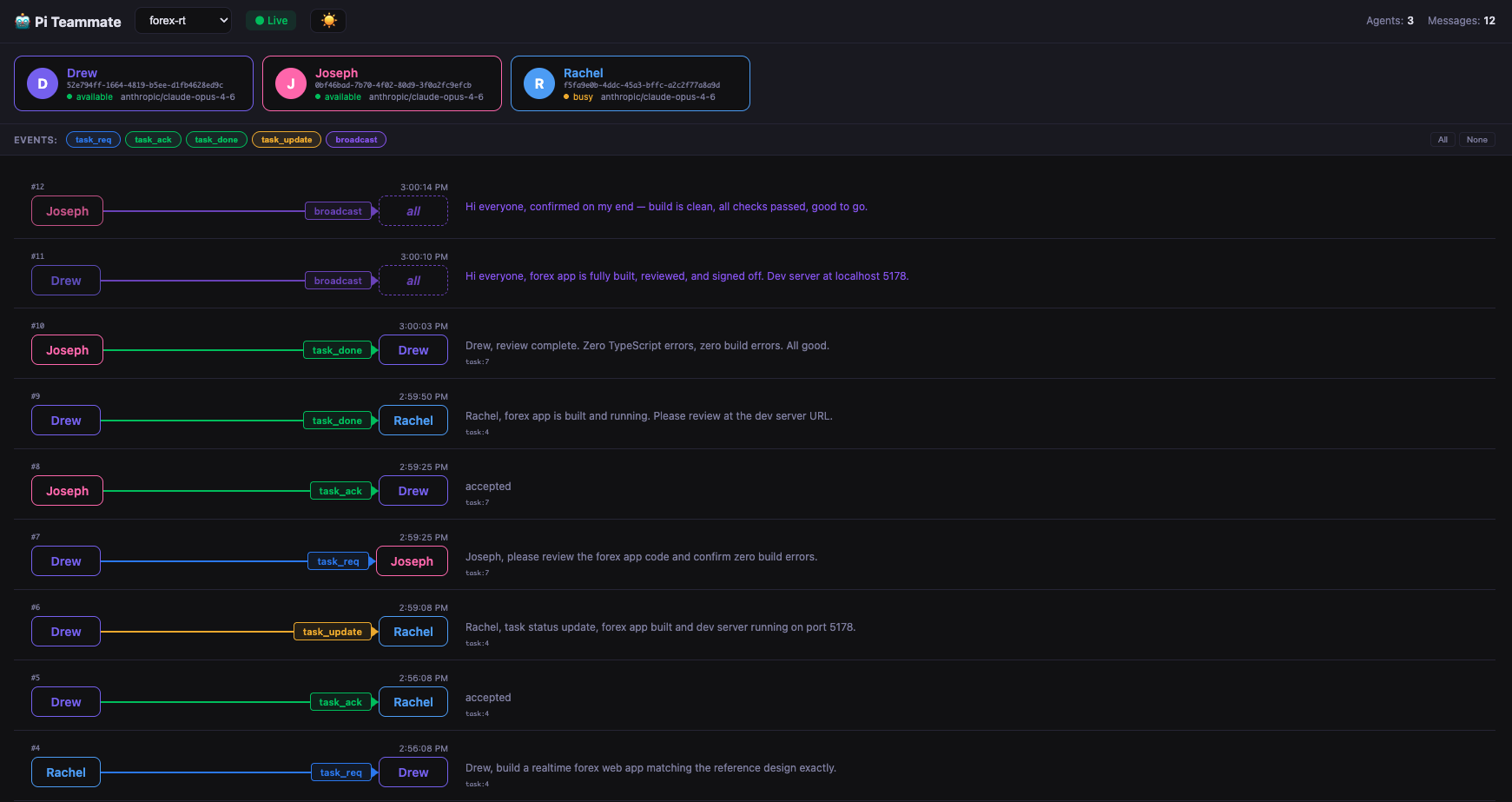
You can click any message to see the details, useful for debugging and monitoring.

Run
No install needed — just run it alongside your team:
npx pi-teammate-ui
It reads directly from the shared team SQLite database in ~/.pi/pi-teammate/<channel>/team.db, so no additional configuration is needed — just start it while your agents are running.