@wolfiesch/side0.1.1
Fork a running coding-agent session into a nearby terminal pane: Claude Code, Codex, and omp, in tmux, Tern, WezTerm, Kitty, cmux, or Ghostty
Built for omp
The author tagged this package oh-my-pi.
Reports 0
No reports yet.
Readme
side
Fork the Claude Code, Codex, or omp session you are in, at this exact point, into a nearby terminal pane. Ask the tangent there. Your main thread stays clean.
/side why would that cache miss?
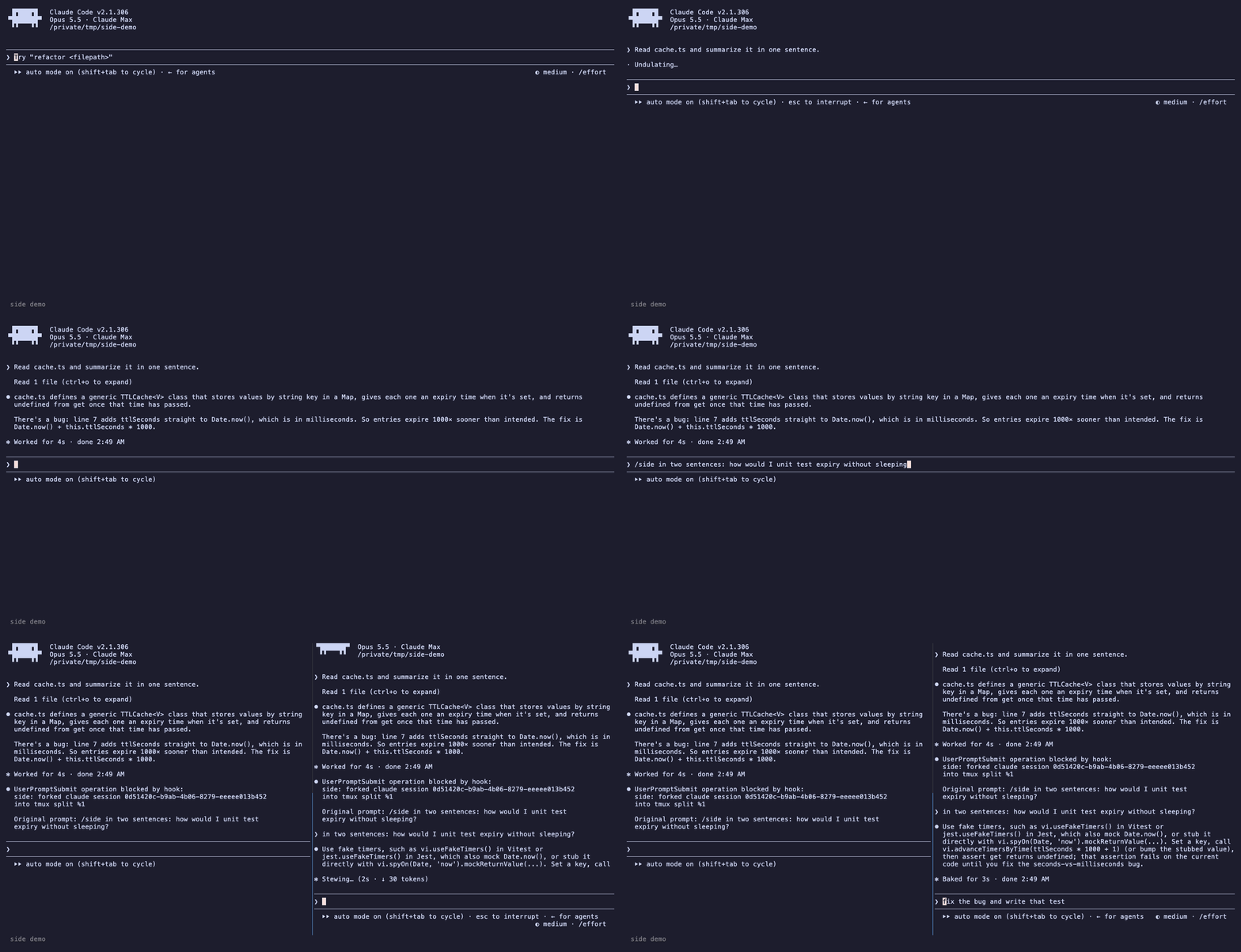
The fork is a real session created by the agent's own fork command (claude --resume <id> --fork-session, codex fork <id>, omp --fork <transcript>): it gets the whole transcript and its own session file, and nothing it does reaches the original conversation.
Placement comes from omp-side, the /side command for Oh My Pi, with launch adapters for tmux, Tern, WezTerm, Kitty, cmux, and Ghostty.
Requirements
- Bun
- Claude Code, Codex, or omp
- One supported terminal: tmux, Tern, WezTerm (
wezterm cli), Kitty (remote control throughkitten @), cmux, or Ghostty - macOS or Linux
Install
bun add -g @wolfiesch/side
This puts side on your PATH. From a checkout, run bun install && bun link instead.
Then add the in-agent command to the agents you use:
side install-hook claude    # /side in Claude Code
side install-hook codex     # $side in Codex
Restart running sessions afterwards. Codex skips a new hook until you trust it: open /hooks in Codex once and trust the side hook. omp users get /side from omp-side. side uninstall-hook claude|codex removes exactly what install-hook added.
Usage
Type the command in place of a prompt:
/side <prompt>                         Claude Code: fork and ask, placed automatically
$side <prompt>                         Codex (its own /side is an inline side chat)
/side --bg <prompt>                    open without taking focus
/side --tab <prompt>                   force a new tab
/side --down <prompt>                  split below only
/side --model sonnet -- <prompt>       fork with a different model
The command runs in a UserPromptSubmit hook that forks the session and then blocks the prompt, so the main thread never sends it to the model and spends no turn on it. The agent shows the fork result, or the error, where its reply would be. No shell is involved, so the prompt needs no quoting.
Without the hook, use the agent's shell escape instead. This works in all three agents, but the main thread then sees the command output:
!side <prompt>
!side --bg -- '<prompt>'
Quote !side prompts that contain ?, *, or quotes. The agent's shell expands them otherwise.
| Flag | Effect |
|---|---|
--bg |
Keep focus here. |
--tab |
New tab. In tmux, a new window. |
--split |
Split even when no pane meets the minimum size. |
--left --right --up --down |
Split in that direction only. |
--harness claude|codex|omp |
Choose the agent when it cannot be detected. |
--session <id> |
Fork that session id. For omp, a session id or transcript path. |
--pane-pid <pid> |
Fork the agent running under that pane's shell. |
--pid <pid> |
Fork the session of that agent process. |
--dry-run |
Print the resolved session, transcript, working directory, and fork command as JSON. |
| anything else | Passed through to claude, codex, or omp. |
Use -- to separate flags from the prompt. Without it, a leading - means flags only, and anything else is the prompt. /side and $side also take the value-free flags above (--bg, --tab, --split, directions, --dry-run) before the prompt without --.
While the agent is busy
/side, $side, and !side wait for the current turn: both Claude Code and Codex queue a prompt submitted mid-turn and run its hook only once the queue drains. To fork mid-turn, run side against the pane from outside the agent. The fork starts from the last point the agent saved, and the running turn continues undisturbed.
tmux. Bind a key:
bind-key S run-shell 'TMUX_PANE=#{pane_id} side --pane-pid #{pane_pid} >/dev/null'
>/dev/null keeps the success message from switching the pane into view mode. Errors still appear there; press q to dismiss them.
Tern. Link the bundled plugin:
tern plugin link ./tern
Press ctrl+alt+shift+s, or run "Fork this agent session beside it" from the command palette. The result appears as a toast. The plugin finds side in ~/.bun/bin, ~/.local/bin, /opt/homebrew/bin, or /usr/local/bin when Tern was opened from the Dock.
Both find the agent under the pane's shell, or the pane's own process when the pane runs the agent directly.
| Agent | --pane-pid finds the session from |
|---|---|
| Claude Code | ~/.claude/sessions/<pid>.json, written by every interactive session |
| Codex | the TUI's codex resume <id> arguments only |
| omp | the session transcript the process holds open (lsof, or /proc on Linux) |
Codex TUIs share one background codex app-server that keeps every open thread, and Codex records no link from a TUI process to its thread. A Codex pane started with plain codex or codex fork therefore cannot be forked from outside; side says so and exits. Use $side or !side in those panes.
How it works
- Find the session. The
/sideand$sidehook gets the session id in its input.!sidereads the id the agent exports to shell commands (CLAUDE_CODE_SESSION_ID,CODEX_THREAD_ID). omp exports none, sosideasks the omp process above it which transcript it holds open. When agents are nested, the nearest agent process abovesidedecides. - Find the transcript (
~/.claude/projects/*/<id>.jsonl,~/.codex/sessions/**/rollout-*<id>.jsonl, or the open omp transcript) and the working directory it recorded. The fork starts there. - Find the agent binary from the running agent process, so shell wrappers and version managers do not matter. Codex runs
!commands from its sharedcodex app-serverdaemon rather than under the TUI, so theresidereuses the daemon's binary.PATHis the fallback. - Place a pane and run the fork command in it.
Automatic placement
In tmux, Tern, and WezTerm, side reads each pane's size and splits only where both halves stay at least 80 columns wide and 30 rows tall.
- Your pane first. Split along whichever axis leaves the roomier halves. Wide panes go side by side, tall panes stack, and ties go side by side.
- Another pane only when yours is too small. In tmux, prefer a fitting pane that shares an edge with yours. Choose the roomiest split, preferring the largest pane on ties.
- A new tab when nothing fits.
Direction flags restrict the search to that direction. --split without a fit divides your pane along its better axis. Set SIDE_MIN_COLS and SIDE_MIN_ROWS to change the minimum.
A cell is assumed to be twice as tall as it is wide, except in Tern, which reports pixel sizes. cmux and Kitty use a simpler rule: a one-pane tab gets a split, and an already split tab gets a new tab. Ghostty always opens a new window.
Development
bun install
bun test
bunx tsc -p .
To re-record the demo with VHS, run demo/setup.sh, open claude in /tmp/side-demo once to trust the folder, then run vhs demo/side.tape. The recording drives a real session, so each take differs.
To release, bump version in package.json on main, then push a matching tag, for example git tag v0.1.1 && git push origin v0.1.1. The Release workflow runs the checks and publishes to npm through trusted publishing, so no npm token is stored and each release carries provenance.
License
MIT