@vanillagreen/pi-session-bridge3.0.1
Pi extension and CLI for controlling visible interactive Pi sessions over a structured Unix-socket side channel.
Untested on omp
This is a pi package. No one has reported whether it works on omp yet. If you try it, add your result below.
Reports 0
No reports yet.
Readme
@vanillagreen/pi-session-bridge
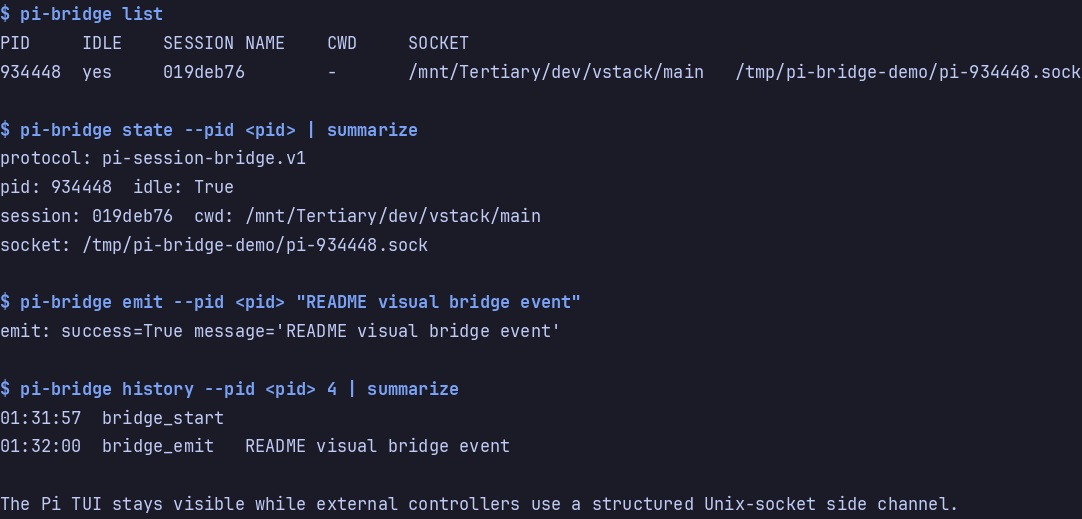
A local connection to a running Pi session. The pi-bridge CLI lets another terminal send prompts and inspect session activity.
Install
- npm:
pi install npm:@vanillagreen/pi-session-bridge. - kendex: add the declaration below to the project's
kendex.toml, or to~/.config/kendex/kendex.tomlfor user scope. Runkendex update-pi.
[pi-extensions."@vanillagreen/pi-session-bridge"]
source = "kendex"
Restart Pi after installation. Use kendex update-pi --check to preview the installation. kendex links the CLI at .pi/bin/pi-bridge for a project or ~/.pi/agent/bin/pi-bridge for user scope. Add that directory to PATH or run the CLI by path.
Features
- Find running Pi sessions and select a target.
- Send prompts, corrections and follow-up messages.
- Read recent events or subscribe to live activity.
- Answer pending questions when pi-questions is installed.
How it works
- Each Pi session opens a connection on your own machine and writes a small file saying where that connection is.
- The CLI reads those files to find the session you asked for.
- It sends your request down that channel, and the session sends the result back.
- A session you subscribed to keeps sending you what it does next.
pi-bridge history --rawreads a saved event in full when it was too large to return inline. Raw data exists only for events that fire while an event subscriber is attached and raw spill is enabled. The request waits for queued writes. A full queue or disk budget leaves compact data with arawErrorreason. Streaming events are the exception:message_updatearrives once per token andtool_execution_updateonce per partial tool result, and both are kept in reduced form only, so the finished value comes frommessage_endortool_execution_end.
Memory use
Raw writes and disk compaction run in one asynchronous queue. The queue holds at most 64 events and 16 MiB of serialized data, including the current write. These queue bounds also apply when
maxRawSpillBytesdisables the disk cap. Compaction copies data through a 64 KiB buffer. Session shutdown cancels queued events, waits for the current write, and removes the raw file.The bridge holds at most 8 MiB of unsent data for one client, plus the line it is sending. A client that still leaves more unread when the next line is due is disconnected, and a session with a UI shows a
bridge-client-stalled=<bytes>warning. One response larger than 8 MiB still reaches a client that reads it.At session end, reload or session replacement, the bridge gives each client one second to close its connection, then disconnects it, so a stopped or wedged client cannot hold the session open.
pi-bridge streamstops reading from the bridge while its own output is not yet written. When the bridge closes the stream (the session ended, or the reader was disconnected), it printsbridge-stream-closedand exits 1.The activity list keeps at most 100 events, 1,048,576 characters of serialized events, and nothing older than one hour. One event larger than the character bound is still kept, alone. The list is shared by every session in one Pi process and is not cleared at session end; these bounds are what release it.
Settings
The settings editor writes project values to .pi/settings.json. The default user file is ~/.pi/agent/settings.json. PI_CODING_AGENT_DIR changes the user directory. Package values are stored under kendex.extensionManager.config["@vanillagreen/pi-session-bridge"].
Open /extensions:settings; settings appear under the Session Bridge tab. Project settings in .pi/settings.json apply only after Pi marks the workspace trusted.
enabled: package toggle for the socket, the registry entry and the status badge.bridgeDir: where sockets and registry files live; thePI_BRIDGE_DIRenvironment variable overrides it.- History and payload bounds:
historyLimit,maxEventBytes,maxHistoryBytes,maxHistoryResponseBytes,eventPreviewBytes,spillRawEvents,maxRawSpillBytes,maxLineBytes. heartbeatMs,notifyOnStart,showStatus.
The socket triggers real agent work in the owning Pi process. Keep PI_BRIDGE_DIR private to your user, and never expose it to other users or untrusted containers.
Protocol and broker details for client authors and maintainers are in DEVELOPMENT.md.