@utpalsinghdev/pi-context-window0.2.1
Show the agent the context window size, usage, and a planning threshold you set.
Untested on omp
This is a pi package. No one has reported whether it works on omp yet. If you try it, add your result below.
Reports 0
No reports yet.
Readme
pi-context-window
Dexter Horthy, founder of Human Layer, says a model gets worse once the context window is about 65% to 70% full. He calls that range the dumb zone, and he describes staying under it as context engineering. Matt Pocock keeps sessions around 60% to 70% and hands off past that line. I follow that limit. I stop the session before the window fills past the percent I set.
This extension shows the agent that line while a long task is running. I set a percent with /context-threshold or a fixed token count with /context-threshold-static. I tell the agent to call context_window and watch the threshold status. The agent keeps working while the report is under the threshold. When the report says threshold reached, the agent stops and writes a handoff for a new session. I pass that handoff into the new session and continue from there. The handoff I use is Matt Pocock's handoff skill.
context_window reports the window size, tokens used, tokens remaining, and the active planning threshold. The gap to a percentage threshold is a percent. The gap to a static threshold is a token count. It does not compact the session. It does not write the handoff. Pi's compaction settings stay as they are.
Demo
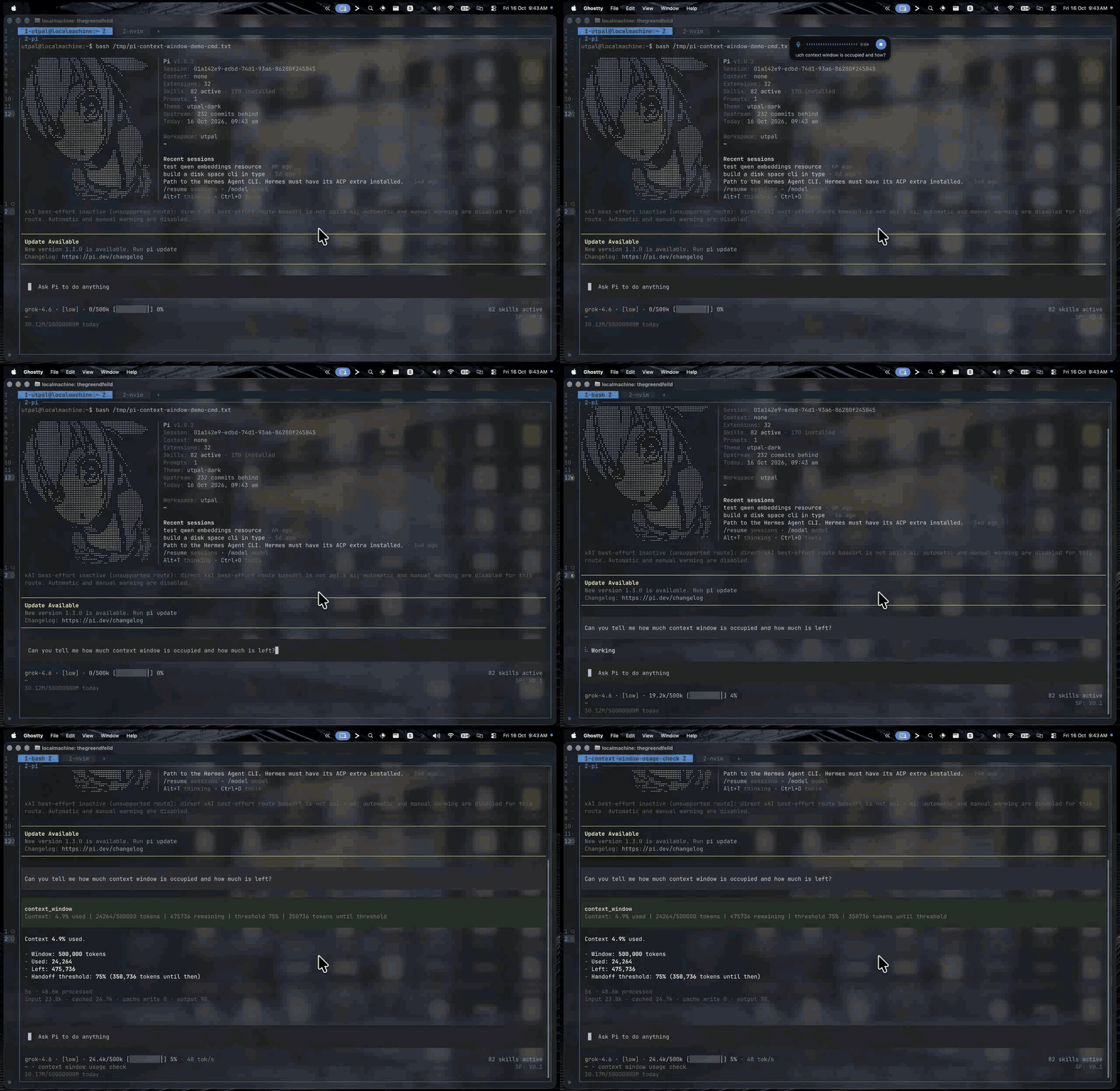
The recording uses a customized Pi UI.
Install
pi install npm:@utpalsinghdev/pi-context-window
If you already have a personal context-window extension, disable that copy first. Both register the context_window tool.
Update and release notes
See the changelog for release notes and usage examples.
pi update npm:@utpalsinghdev/pi-context-window
Run /reload or restart Pi after updating.
Try from source
From the repository root, use Node.js 22.19 or newer:
npm ci --ignore-scripts
npm run context-window
This loads only pi-context-window, without your other extensions, skills, prompt templates, themes, or context files. It does not change your saved Pi package settings.
If Pi is already installed:
pi --no-extensions --extension ./packages/pi-context-window
For a manual check that cannot change your personal threshold, use a temporary agent directory:
PI_CODING_AGENT_DIR="$(mktemp -d)" npm run context-window
Use
/context-thresholdor/context-threshold-staticshows the active threshold and the current context report./context-threshold 70sets the threshold to 70% of the active context window.70%is also accepted./context-threshold-static 200ksets a fixed threshold of 200,000 tokens.200000and200Kare also accepted.- Either command accepts
clearoroffto remove the active threshold. - Percent must be an integer from 1 to 99. Static input must be a positive integer, optionally followed by
korKfor thousands. The resulting count must be a safe JavaScript integer.
Only one threshold is active. Setting a static threshold replaces the percentage threshold, and setting a percentage replaces the static threshold.
A static threshold stays fixed when you switch models. A 200k threshold remains 200,000 tokens on both 500k and 1M windows. The report still shows the model's actual window size and usage. A static threshold does not enlarge a smaller model's window. The model can run out of context or compact before reaching that threshold.
The next context_window call reads the saved value. You do not need /reload.
On a long task, tell the agent to call context_window and to write a handoff when the report says threshold reached. I set the threshold in the 60% to 70% range. Until you set one, the report says threshold not set. The agent is told not to invent a limit.
What the agent sees
A normal report looks like this:
Context: 42% used | 84000/200000 tokens | 116000 remaining | threshold 70% | 28% until threshold
At or above the threshold, the line ends with threshold reached. If Pi does not know usage yet, the line says unknown used and does not claim the session is under the threshold. Token counts in the line are exact. In percentage mode, the gap is rounded to one decimal. If the gap is under 0.1% and the threshold is not reached, the line says under 0.1% until threshold. The agent should trust threshold reached or the reported gap until threshold, and should not recompute the limit from the used percent.
With /context-threshold-static 200k on a 1M window, the report looks like this:
Context: 8.4% used | 84000/1000000 tokens | 916000 remaining | threshold 200000 tokens | 116000 tokens until threshold
At 200,000 tokens or more, the report says threshold reached, regardless of the model's window size.
The tool also returns those fields as structured data for programmatic callers. thresholdTokens holds the configured static limit, or null in percentage mode. thresholdPercent holds the configured percentage, or null in static mode. tokensUntilThreshold works in both modes. percentPointsUntilThreshold is null in static mode. The model-facing result is the text line.
Storage
The threshold is stored in ~/.pi/agent/context-window.json, or the directory set by PI_CODING_AGENT_DIR. It survives /reload, /new, and process restarts.
Existing percentage settings remain valid without migration. Static settings store thresholdPercent as null and thresholdTokens as the token count.
An invalid file is reported instead of being treated as unset. Setting a threshold with either command replaces an invalid file. Showing the threshold does not.
A failed save leaves the previous file unchanged.
Verify
From the repository root:
npm run check
npm test
npm pack --workspace @utpalsinghdev/pi-context-window --dry-run
Manual check, without touching a personal threshold:
agent_dir="$(mktemp -d)"
PI_CODING_AGENT_DIR="$agent_dir" npm run context-window
- Run
/context-thresholdand check that the threshold is not set. - Run
/context-threshold 70, then/context-thresholdagain. Check that the report includesthreshold 70%. - Run
/context-threshold-static 200k, then/context-threshold. Check that the report showsthreshold 200000 tokens, notthreshold 70%. - Try
/context-threshold-static 200000and/context-threshold-static 200K. Both must show the same limit. - Ask the agent to call
context_window. Check that the reply includes the actual window size, usage, and the fixed-token threshold. - Switch to a model with a different window size. Check that the threshold remains 200,000 tokens.
- Run
/reload, then/context-threshold-static. Check that the static threshold survives. Restart withPI_CODING_AGENT_DIR="$agent_dir" npm run context-windowto check persistence across restarts. - Run
/context-threshold 70. Check that percentage mode replaces static mode. - Run
/context-threshold-static clear. Check that the report saysthreshold not set. - Set
/context-threshold-static 1, then ask the agent to callcontext_windowafter a response. Check forthreshold reached. - Try
/context-threshold-static 0and/context-threshold-static 70%. Both must report usage help without changing the saved threshold.
Package layout
extensions/index.tsregisters the tool,/context-threshold, and/context-threshold-static.lib/settings.tsreads and writes the threshold file.lib/report.tsbuilds the context report.lib/command.tsparses and applies the threshold command.
Pi loads the TypeScript source directly. No build step is required.
License
MIT.