@underactive/pi-topping-splash0.5.3
A Pi extension that replaces the default startup header with an informative splash screen and optionally adds an interactive startup gate menu
Untested on omp
This is a pi package. No one has reported whether it works on omp yet. If you try it, add your result below.
Reports 0
No reports yet.
Readme
pi-topping-splash
Pi extension that replaces the default startup header with an edge-to-edge full-color splash, adds an interactive startup gate menu to the session launch flow, and adds a /local-changes command that summarizes uncommitted changes in the transcript.
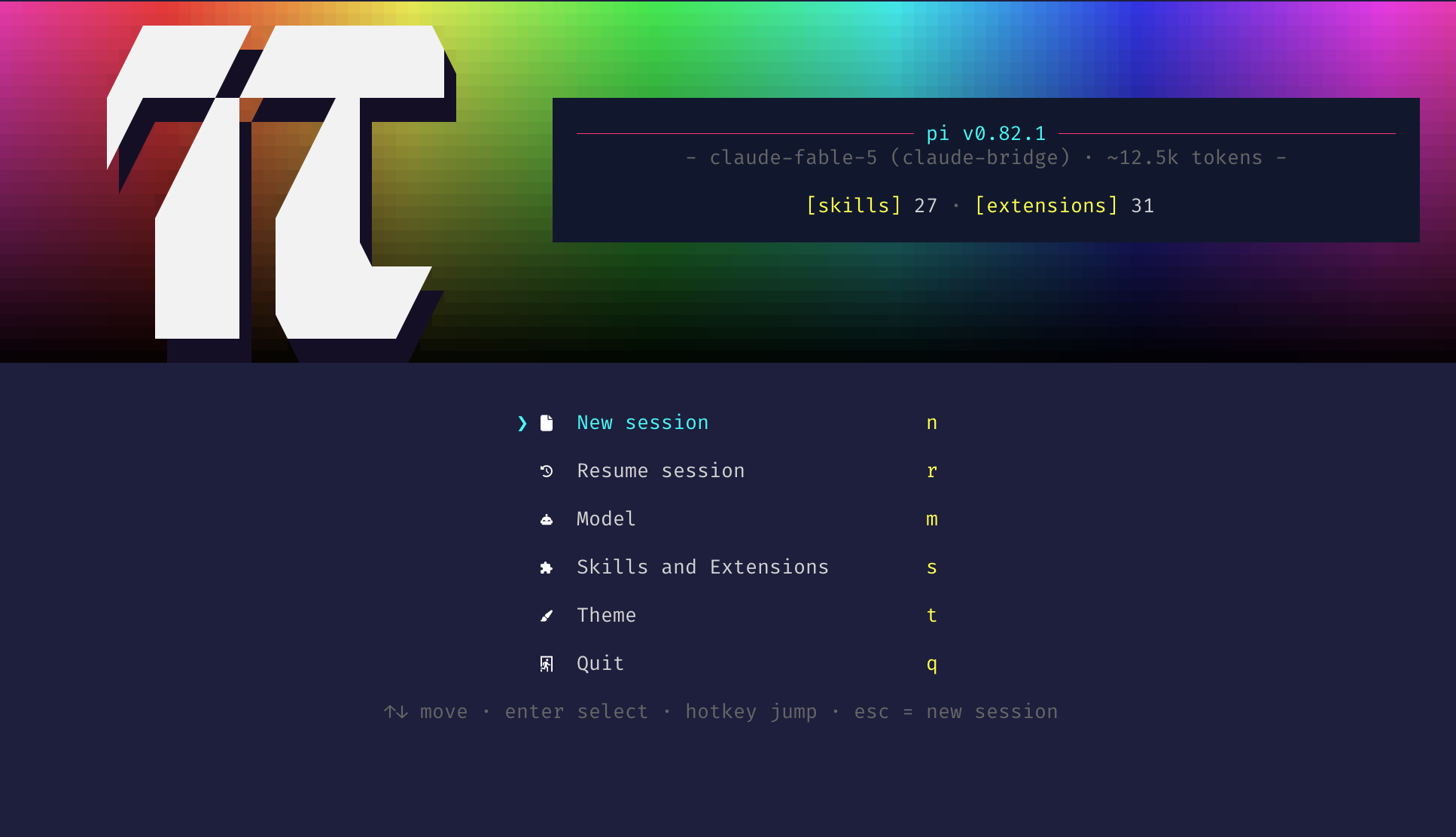
Install
pi install npm:@underactive/pi-topping-splash
Restart Pi (or run /reload) to pick it up.
Compatibility
Requires Node.js 22.19.0 or newer. The current release is developed and tested against Pi 1.3.0; Pi package peer dependency ranges remain unrestricted.
Settings
Run /topping-splash-settings (TUI mode only) or pick Settings in the startup gate menu
to open a settings menu in three sections: the startup gate toggle, the splash banner's background
color and gradient animation, and the info panel's reveal animation and startup changes
summary:
╔═[ Pi Topping Splash: Settings ]══════════════════════════════════════════╗
╟─ Startup Gate ───────────────────────────────────────────────────────────╢
║  ❯ [■] Startup gate menu                                             ON  ║
║                                                                          ║
╟─ Splash Banner ──────────────────────────────────────────────────────────╢
║    [■] Background color                                     ‹ rainbow ›  ║
║    [■] Animate gradient                                         ‹ off ›  ║
║                                                                          ║
╟─ Info Panel ─────────────────────────────────────────────────────────────╢
║    [■] Model + prompt size reveal animation                          ON  ║
║    [■] Summarize uncommitted changes                                 ON  ║
║    [■] Summary model                                    session model ›  ║
║                                                                          ║
╟──────────────────────────────────────────────────────────────────────────╢
║                                                 [ Apply ]    ‹ Cancel ›  ║
╟──────────────────────────────────────────────────────────────────────────╢
║  ↑↓ move  ␣ toggle  ←→ cycle  ⏎ pick  ⌫ clear  ⇥ actions  esc cancel     ║
╚═══════════════════════════════════════════════════════════════════[ 1/6 ]╝
Move with ↑/↓, toggle with Space, and cycle with ←/→. Tab jumps to the action bar at the bottom, where ←/→ choose Apply (save and close) or Cancel and Enter fires the highlighted button; Esc also cancels. Enter on a toggle or cycle row does nothing; it only opens the Summary model picker.
- Startup gate menu — show the startup gate menu below the splash on launch (OFF by default; turn it on here if you want the gate)
- Background color — cycle with ←/→ through
rainbow(a full-width hue sweep), the seven active theme colors (accent,border,borderAccent,borderMuted,success,error,warning), anddynamic(last in the cycle). A theme color fades vertically from the full color at the top of the splash to black at the bottom and stays constant horizontally, unlike the rainbow's left-right hue sweep.dynamicuses the last theme color you applied as the background (accentuntil you apply one), shows it at full strength in early afternoon and dims toward 35% around 01:00 local time, with the same vertical fade. To pick its tint, apply that theme color first, then applydynamic. Its brightness is sampled when the splash layout rebuilds (such as after resizing or applying settings) and on each gradient-animation frame; ordinary menu navigation does not resample it. Animations wrap it like any backdrop. Theme colors resolve through Pi's owncolorToRgb, so indexed (256-color) and terminal-default colors render as the terminal resolves them; the backdrop still needs a truecolor-capable terminal to display the escapes it emits. - Animate gradient — cycle with ←/→ through
off(the default) and four animations that work on any backdrop,rainbowincluded:breatheeases the whole backdrop's brightness on a slow sine,flowrolls brightness bands down the fade,sheensweeps a diagonal highlight across every few seconds, andwaveripples the fade sideways as a traveling wave. Onrainbowthey modulate the sweep's brightness while the hue run stays put; on a theme color they modulate the vertical fade. The animation runs while the splash is on screen — during the gate, or with the gate off until the first agent turn — then stops for the rest of the session, since the splash scrolls away once the conversation grows. - Model + prompt size reveal animation — shimmer-reveal the model · prompt-size tagline on the splash, and stream the changes summary in a character at a time; when OFF both render their final text immediately (ON by default)
- Summarize uncommitted changes — show the info panel's
[local changes]section with a model summary of uncommitted changes (ON by default); turning it off skips the startup git scan and model request, but does not disable/local-changes. - Summary model — Enter (or Space) opens the same two-pane model picker as the startup gate:
type to filter, Tab or ←/→ to switch panes, Enter to select. The thinking pane belongs to that
shared picker but is ignored here, since summaries always run with thinking off. It starts on the
chosen model, or on the active model when none is chosen. Backspace or Delete resets the row to
session model, which uses the active model.
The gate, reveal, and changes-summary toggle take effect on the next launch. Startup reads the
Summary model at launch. /local-changes reads that model each time a run starts. The background
color and gradient animation also apply immediately to an already-visible splash. All seven keys
are stored together in pi-topping-splash.json inside pi's agent directory (~/.pi/agent unless
PI_CODING_AGENT_DIR says otherwise); delete that file to return to the defaults (gate/reveal/
changes summary ON, session model, background rainbow, dynamic tint accent, animation off).
Splash Inventory
The info panel lists five categories of loaded resources in startup order:
- Shortcuts — five compact Pi startup hints with effective keybindings (interrupt, clear/exit, commands
/, bash!, more). Keys reflect user-customized bindings when Pi's global keybinding manager is initialized. - Context — loaded context files (
AGENTS.md/CLAUDE.md,SYSTEM.md,APPEND_SYSTEM.md), displayed as cwd-relative or~-shortened paths. - Skills — names of every loaded skill, discovered from Pi's
skill:-prefixed commands. - Prompts — registered prompt templates displayed as
/name, discovered from Pi's commands withsource === "prompt". - Extensions — installed extensions with Pi's compact labels, discovered through Pi's own package-manager logic.
When the panel would exceed 60% of the terminal height or any name/hint is too wide to fit, the lists collapse to a compact counts summary: [shortcuts] 5 · [context] N · [skills] N · [prompts] N · [extensions] N. The summary wraps onto as many lines as the panel width needs, breaking only between whole [label] N counts, so no count is truncated to an ellipsis.
Startup changes summary
Unless turned off in settings, a genuine TUI startup with the splash and a trusted project closes the info panel
with a [local changes] section after [extensions], styled like the panel's other sections. The
heading carries the per-kind path counts ([local changes] +3, ~4, -3: added, changed, deleted, zero
kinds omitted), and each row below it lists a path in pi-topping-statusline's git colors with a
churn bar and its line counts against HEAD, which fill in just after the listing appears, and the
summary sits a blank row below the last file row. Untracked files show new and binary files
bin; narrow panels drop the bars, then the line counts. The section spends only the rows the gate
or editor leaves free below the splash, growing the panel and the gradient around it downward while
the lists above stay put and the logo stays centered beside the taller panel. When those rows cannot
hold the listing, the section is one line instead: [local changes] +3, ~4, -3 · ~ src/changes-summary.ts +12 · Refactors… (counts, most changed file, and summary preview, as space permits). Added, changed, and
deleted paths appear before the model request finishes, and the summary streams in under the file
rows when room permits, a character at a time at twice the tagline's pace, the way a chat reply
prints. The first prompt settles it on the whole text, and turning off the reveal animation setting
prints it whole. Clean repositories, non-repository directories, disabled or untrusted projects
produce no section and no model request. The pending line is
summarizing local changes with provider/id…; failures remain visible as
summary unavailable: <reason> while the path listing stays on screen. A summary the provider
returns with no text at all is requested again, up to three retries, before that line settles on
summary unavailable: empty response; the pending line stays up through the retries, so the
listing never flickers. Other failures (a cancelled, timed out, or refused request) are not retried.
The section survives the startup gate's New session choice as a slim changes-only header, laid
out the same way at the splash margin, at most 100 columns wide, on the plain terminal background
since the splash is gone by then. The
summary uses the session model by default, or the configured picker choice, and always requests
with thinking off. Bounded file lists and diff excerpts are sent to the selected model provider.
Sensitive-looking file contents are withheld and common secrets are redacted best-effort; this is
not a guarantee. Because the summary is on by default, turn it off with
/topping-splash-settings (or "changesSummary": "off" in pi-topping-splash.json) when that
privacy trade-off is not acceptable. Pi's project-trust setting is also required because Git
filters can execute during status/diff.
Local changes command
Run /local-changes in a trusted project in TUI mode. The command ignores arguments. It allows
one active run at a time. The footer reports collecting local changes…, then
summarizing local changes with provider/id… when a model is available.
The command adds a display-only entry. It shows file paths with churn bars and line counts. The
entry uses the same plate as the splash, up to 100 columns wide. It shows up to 20 file paths.
When more files exist, it shows the first 20 paths and an extra … N more row. It shows at most 6
summary rows. The summary lands whole and does not stream. The editor stays usable during the run.
A clean tree displays none. Git failure displays not a git repository, or git is unavailable.
Summary failure displays summary unavailable: <reason>. An empty answer gets the same three retries as
the startup summary.
The command runs when the startup summary toggle is off. It uses the configured Summary model, or the active session model when no model is set. It reads the Summary model each time a run starts. Each run collects fresh data and requests a new summary; it does not use a cache.
Pi stores the entry in the session file. The entry stays out of model context after /reload,
resume, and /compact. Each run sends the same bounded file lists and diff excerpts as the startup summary to the Summary
model's provider, with sensitive-looking contents withheld and common secrets redacted best-effort.
Session shutdown aborts an active run. An aborted run adds no entry.
Troubleshooting
Splash or gate not showing?
- Ensure Pi is running in TUI mode (
--no-tuidisables the splash). - Both the splash and the gate are skipped when the environment variable
PI_SPLASH_GATE_DONE=1is set — an internal guard the extension sets on sessions it relaunches so the gate cannot re-trigger in a loop; relaunched sessions start on a clean screen. - Splash shows but the gate does not? The startup gate menu is off by default and stays off until you turn it on — run
/topping-splash-settingsand enable Startup gate menu if you want the gate on every launch. - On
reloadevents the gate is intentionally skipped — only a genuinestartupreason triggers it. - Check that the package is installed under
~/.pi/agent/npm/node_modules/@underactive/pi-topping-splashand thatpi --verboselists the loaded extension (it overridesquietStartup). - Truecolor (24-bit color) support in your terminal is required for the rainbow swatch backdrop and the shimmer effect. On a 256-color theme the shimmer falls back to the settled tagline; the info panel's plate is still chosen from your terminal's resolved text color, and the backdrop's truecolor escapes are left to the terminal's own handling.