@taoc/pi-mlx-models0.4.0
Local MLX model launcher extension for Pi
Untested on omp
This is a pi package. No one has reported whether it works on omp yet. If you try it, add your result below.
Reports 0
No reports yet.
Readme
@taoc/pi-mlx-models
Local MLX model launcher for pi on Apple Silicon.





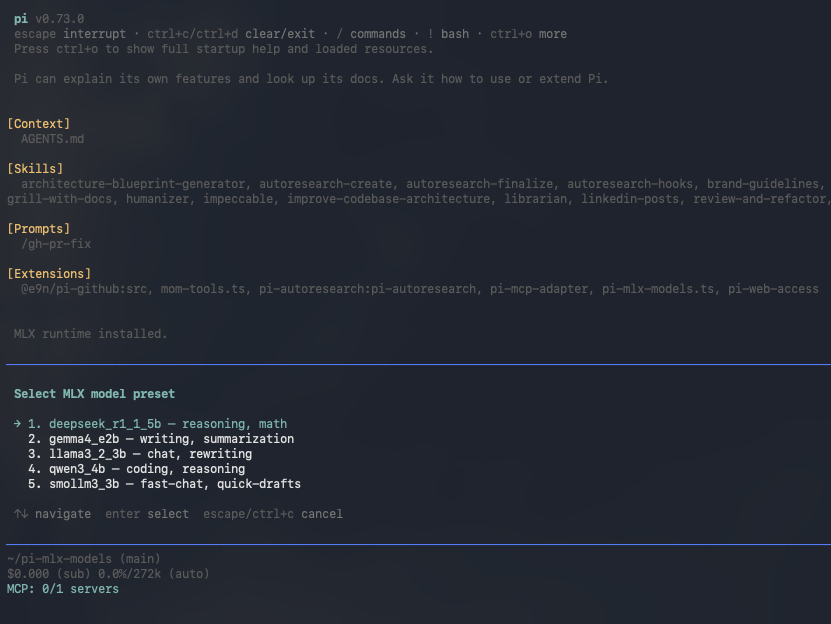
@taoc/pi-mlx-models adds a local OpenAI-compatible provider to pi, with a guided startup flow for MLX models.
What you get
- A preset selector with
/mlx-start, or any Hugging Face model id - A local runtime built by
/mlx-init(virtual environment andmlx-lm), with an optional mlx-lm version pin and pip index - Day-to-day commands:
/mlx-laststarts the last model again,/mlx-restartapplies a changed setting,/mlx-statusshows the server /mlx-config, a menu to edit the global config file without leaving pi- Optional auto-start of the last model when pi opens (off by default)
- Layered configuration: a global file, a project file, environment variables and flags
- Named profiles per model, and sampling values that also reach the requests pi sends
- The context window pi is told about each model is read from the model's own
config.json - Server tuning: concurrency, prompt cache and KV cache options, draft model, adapter, chat template
- A permission check for settings that run code or open the network
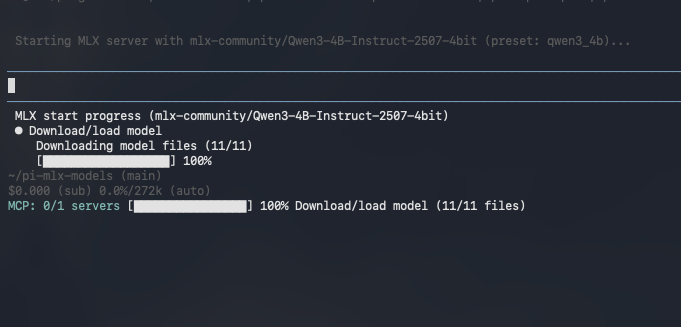
- Startup progress with stage and status updates and a warm-up timer
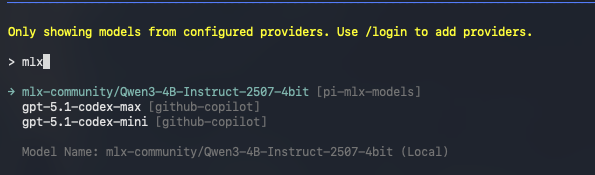
- Provider models appear only when the server is actually ready
Requirements
- macOS on Apple Silicon
- Python 3.11 or newer (to use another interpreter, see How to use a different Python)
Install
From npm:
pi install npm:@taoc/pi-mlx-models
From GitHub:
pi install git:github.com/The-Artificer-of-Ciphers-LLC/pi-mlx-models
Quick start
In pi:
/mlx-init
/mlx-start
/mlx-init builds the runtime the first time. /mlx-start with no arguments opens a selector: pick a preset with the arrow keys and Enter. When the server is ready, pi says so. A step-by-step walk-through is in Get started.
To start a model directly, give a preset number or key, or any Hugging Face model id:
/mlx-start qwen3_4b
/mlx-start mlx-community/Qwen3-4B-Instruct-2507-4bit
Stop it with /mlx-stop.
Commands
Details, arguments and the preset list are in the commands reference.
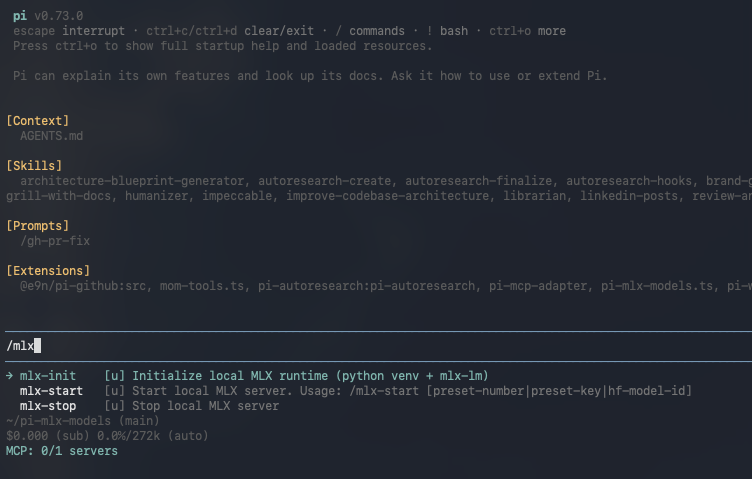
/mlx-init: create or update the local runtime (Python virtual environment and mlx-lm)/mlx-start: start the server for a preset, a model id or a profile/mlx-last: start the model and profile of the last successful start/mlx-restart: start the running model again through the settings as they are now/mlx-stop: stop the server/mlx-status: show the server's health, model, profile and flags/mlx-config: view and edit the global config file in a menu
The default port
The server listens on 127.0.0.1:8080 by default, not on 11434. Set PI_MLX_MODELS_PORT (or server.port in a config file) to change it. The host, base URL and default model can be set the same way: see How to set a connection value from the environment.
Configure it
Create ~/.pi/agent/pi-mlx-models/config.json to set a port, allowed origins or a log level for every launch, or .pi/pi-mlx-models.json in a project to override them there. The next /mlx-start picks the change up.
{ "server": { "port": 8090, "logLevel": "INFO" } }
Every setting is in the configuration reference, with an example file; the precedence order says which source wins when two of them set the same value.
Security
--trust-remote-code lets a model repository run Python on your machine, and a non-loopback host makes the server, which has no authentication, reachable from your network. Both ask for confirmation at every start, and a project file may not turn either on. See How to allow remote code or network access.
Documentation
Tutorials
- Get started: install, build the runtime, start a model and send a first prompt
How-to guides
- How to configure the MLX server
- How to edit the configuration from inside pi
- How to set model options (draft model, adapter, chat template)
- How to use profiles and sampling
- How to set a model's context window, thinking flag and output limit
- How to restart, check and re-launch a model
- How to start a model automatically when pi opens
- How to allow remote code or network access
- How to release a new version (maintainers)
Reference
- Commands, including the presets
- Configuration: files, settings, flags, environment variables and precedence
- Glossary: the terms used for settings, model entries and profiles
Explanation
See the changelog for what changed in each release.
Development
npm install
npm run build
npm test
The pi package manifest is in package.json: pi.extensions is ["dist/index.js"].
Screenshots
Startup progress
Command menu
Model selection
License
MIT. This project is a fork of vmarinogg/pi-mlx-models; the original copyright notice is kept alongside The Artificer of Ciphers LLC's.