@sfgartland/better-pi-voice0.2.1
Streaming voice input for pi: Deepgram (nova-3, repo-aware keyterms) or local Parakeet, with Claude-Code-style recovery so speech is never lost.
Untested on omp
This is a pi package. No one has reported whether it works on omp yet. If you try it, add your result below.
Reports 0
No reports yet.
Readme
@sfgartland/better-pi-voice
Streaming voice input for pi. Hold a key, talk, and the words land in the editor — in the right spelling, including the jargon and filenames generic speech recognition gets wrong. (8-second demo)
Two interchangeable backends behind one pipeline:
| Backend | Biasing | Needs | |
|---|---|---|---|
| Cloud | Deepgram nova-3 streaming |
keyterm prompting (native) |
a Deepgram API key |
| Local | Parakeet via transcribe-cpp |
post-hoc correction pass only | a Parakeet GGUF |
Why this exists
Generic dictation is tuned for English prose, not for a terminal. It writes
"sub agent" and "work tree", guesses at filenames, turns tsconfig into "T's
config", and has no idea what your project is even called. That is not mostly a
model-quality problem — it is a missing-context problem, and it is fixable: tell
the recogniser the words the project actually uses. Cloud dictation is also a
black box: when the socket drops mid-sentence, most tools lose the sentence.
Local dictation usually trades accuracy for privacy and gives up on both.
better-pi-voice attacks all three: vocabulary biasing mined from the repo and
session, a recovery layer that will not drop a sentence, and a real local option
behind the same pipeline.
Claude Code's dictation is unusually good, and it isn't the model. Reverse-engineering
it (claude-code@2.1.295) turned up three things worth stealing:
- Vocabulary biasing from the repository. Before every session it pushes the
project name, the paths already in play, and a hardcoded list of developer jargon
(
subagent,worktree,OAuth,gRPC…) to the recogniser. This is the single biggest accuracy lever and it costs nothing. - Server-side endpointing at 16 kHz mono, so finals land promptly instead of waiting for you to press stop.
- A recovery layer that never loses a sentence — one retry before the first transcript, replaying buffered audio when a stream silently drops, salvaging a partial transcript when the socket dies, promoting an unreported interim to a final, and a circuit breaker so a broken microphone fails loudly.
All three are reproduced in this extension. The design document with the full extraction notes is
at docs/superpowers/specs/2026-10-15-pi-voice-input-design.md.
What it actually buys you
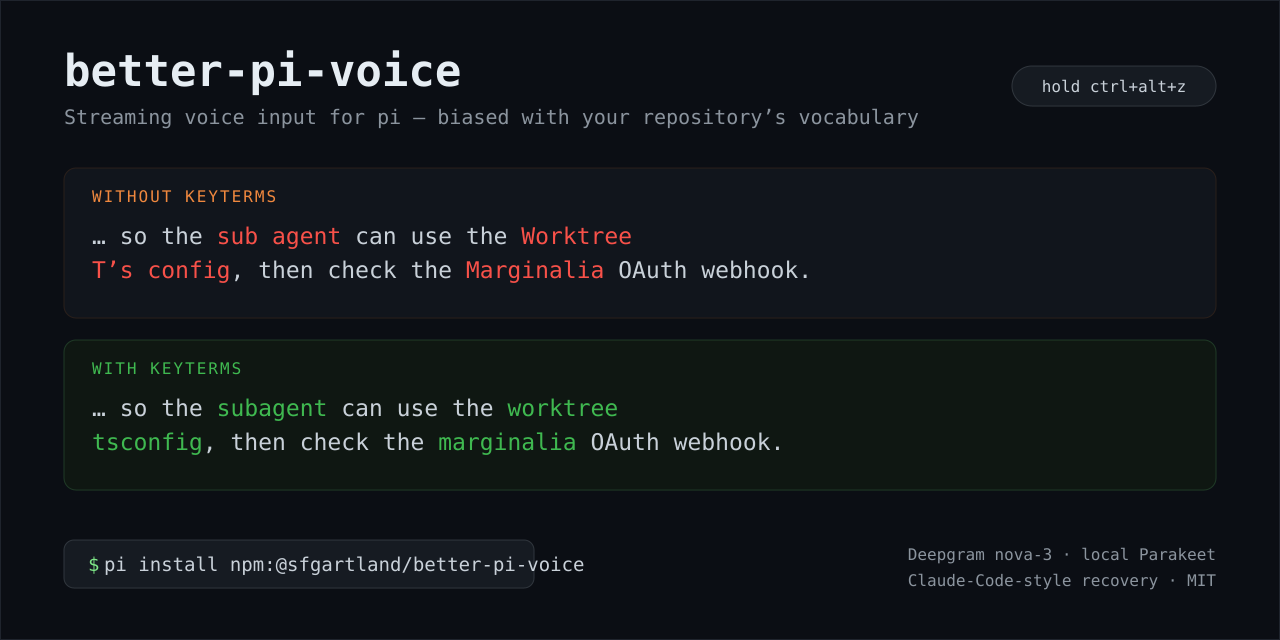
A fixed sentence containing five terms, transcribed twice through the live Deepgram API — once with no keyterms, once with the repository's terms:
without keyterms   … so the sub agent can use the Worktree T's config, then check
                   the Marginalia OAuth webhook.
with keyterms      … so the subagent can use the worktree tsconfig, then check the
                   marginalia OAuth webhook.
tsconfig → "T's config" is the failure mode in miniature: correct English, wrong
words. Two of the five terms came back wrong without biasing and all five were right
with it.
How it compares to the other pi voice extensions
Three voice extensions are in play, and they optimise for different things. This one is for accurate dictation of code vocabulary, from the cloud or locally:
@earendil-works/pi-voice |
pi-voice-stt |
better-pi-voice | |
|---|---|---|---|
| Recognition | local only (transcribe-cpp) |
several cloud providers + OpenAI-compatible | Deepgram nova-3 streaming or local Parakeet |
| Repo-aware vocabulary biasing | no | no | yes — keyterms mined from the repo and session, native on Deepgram |
| Never-lose-a-sentence recovery | no | no | yes — retry, silent-drop replay, partial salvage, circuit breaker |
| Capture | bundled pvrecorder |
ffmpeg (or a Mac bridge) |
arecord, falling back to SoX rec |
| Transcribe an audio file | yes (transcribe_file) |
yes (transcribe_audio) |
no — this extension is for live dictation |
| Guided setup | /voice-settings onboarding, model download |
config file / environment | /voice setup wizard, model download |
| Best for | a fully local, offline dictation tool | choosing among many cloud providers | dictating code accurately, with a private fallback |
All three are MIT and coexist as pi packages, so there is no need to pick
ideologically: use pi-voice if you want everything strictly local, pi-voice-stt
if you want a particular provider, and this one if the words that come back are the
thing you care about.
Install
pi install /path/to/better-pi-voice        # from a local checkout
pi install npm:@sfgartland/better-pi-voice      # once published
The npm package is gallery-discoverable: it carries the pi-package keyword and
declares its extension, so pi install npm:@sfgartland/better-pi-voice also works from
the pi package gallery.
Then add a Deepgram key. The easiest way is /voice key:
/voice key <path-to-dotenv>— use a key from an existing dotenv file (it checks one is actually in there first), then switches to Deepgram./voice key— paste the key at the prompt; it is written to~/.pi/agent/better-pi-voice.keywith0600permissions and referenced from the settings, so the secret never lands inbetter-pi-voice.json(which is the file people sync into dotfiles repos)./voice key --inline— store the key inbetter-pi-voice.jsonitself. Explicit opt-in: only do this if that file is not tracked by git.
You can also export it, which overrides everything the settings point at:
DEEPGRAM_API_KEY=... pi
or set deepgram.apiKeyFile to any dotenv by hand. Precedence is: environment variable,
then deepgram.apiKey (inline), then deepgram.apiKeyFile.
Guided setup
Run /voice setup, or just press the shortcut on a fresh install and it walks you
through it. The wizard asks, in order: how voice should run (Deepgram cloud or local
Parakeet), how to supply the key or which model to use, whether to hold or tap, and
which shortcut. Then it saves, and ends with an overview pane: the settings it
wrote, how to use them (hold or press the shortcut, where the text goes), and how to
change any of it later with /voice setup. Enter closes it; Esc goes back and
re-runs the wizard. There is no live microphone test to sit through — try the
shortcut yourself when you are ready.
For the key, if DEEPGRAM_API_KEY is already in your environment the wizard offers to
just use it; otherwise you can paste a key (kept 0600, never in settings) or point at
a dotenv file. For the local backend, the model menu lists the known GGUFs best-first
with their download size — selecting one downloads it (checksum-verified, with a
progress line) — then falls back to any GGUF already on disk or a path you give.
If the model you chose can stream, the wizard then asks how it should run and spells out the tradeoff: Batch transcribes in short slices while you talk (works with every model, and faster on most machines) versus Streaming, which decodes continuously for lower delay but needs a fast CPU to keep up in real time. A batch-only model skips the question and says why. See Batch mode below for the detail.
Use
The default binding is ctrl+alt+z; hold it while you speak and release. The
status line names the active backend and model (● deepgram nova-3: listening,
transcribing with parakeet parakeet-unified-en-0.6b…) and keeps showing it while
idle, so it is always obvious which one is listening. An audio-level meter appears
above the editor while recording.
| Mode | Start | Stop | Safety |
|---|---|---|---|
hold (default) |
press | release | falls back if the terminal never reports release |
tap |
press | press again | 15 s of silence, 120 s hard cap |
A hard cap applies in both modes so a stuck key cannot leave the microphone open.
Commands:
/voice— backend, model, mode, shortcut, keyterm count, whether the key is visible, state/voice setup— guided setup (backend, key/model, mode, shortcut, then an overview of the result)/voice backend— pick a backend from a menu/voice backend deepgram|parakeet— switch directly, then reload/voice model— pick a local GGUF already in the Hugging Face cache, then reload/voice model /path/to/model.gguf— use a specific model file/voice key <path-to-dotenv>— use a key from a dotenv file, then switch to Deepgram/voice key— paste a key; stored0600in~/.pi/agent/better-pi-voice.key/voice key --inline— store the key in the settings file (explicit opt-in)/voice set <key> <value>— setbackend,model,mode,language,correction,submitOnStop,chunkSeconds,silenceLevel,shortcut,apiKeyEnvorapiKeyFile, then reload/voice-keyterms— list custom terms/voice-keyterms add <term>/remove <term>
The backend is Deepgram by default. Switching rewrites better-pi-voice.json
(fully expanded, so it stops looking like the minimal file you hand-wrote) and then
reloads the extension so the change takes effect immediately. You can also just edit
"backend" in the settings file and restart.
On a first run with no settings file, voice configures itself: Deepgram when an API key is already reachable, otherwise the best local model already on disk. It then tells you which backend it chose and which key to hold. If neither is available it writes nothing and says what to set.
Keyterms
Terms are gathered from four places, most specific first:
keyterms.user— your own list- a built-in seed list of developer jargon
- the project directory name and the git repository name
- files touched by
read/write/edittool calls and paths mentioned in your messages
They are normalised (camelCase split, separators split, 3–20 characters, printable ASCII, deduplicated) and capped well inside Deepgram's documented 100-term / 500-token limit. A comma-joined keyterm list is accepted by Deepgram and silently boosts nothing, so terms are sent as repeated query parameters — there is a test for that.
The local backend, honestly
Parakeet cannot be vocabulary-biased. transcribe-cpp 0.4.0 does have a
vocabulary input, but only for models that advertise supports("vocabulary"), and
the Parakeet GGUFs do not — loading parakeet-tdt_ctc-110m, the recommended model,
returns false for both vocabulary and context_prompt. So locally you get live
interims or native biasing, not both.
This extension takes interims, and makes up the difference with a deliberately dumb deterministic repair pass that runs on finals only. It does two things:
- Rejoin identifiers the recogniser split.
tsconfigcomes back as "TS config". Two adjacent tokens are joined only when their concatenation is exactly a keyterm, they are separated by exactly one space, and the shorter one is an abbreviation (uppercase, or at most two characters). "TS config" qualifies; "back end" and "work tree" deliberately do not, because in the next sentence those are two words. - Repair a single misheard token, within one edit of a keyterm for words up to 7
characters or two edits for longer ones, and never for tokens under 5 characters.
Distance is Damerau, so an adjacent swap counts once — that is how ASR mangles a
technical term most often (
subagent→subagnet).
On the real output of the local backend for the test sentence, that turns
the Worktree TS config into the Worktree tsconfig. It does not rescue
DRAM backend from deepgram backend — too many edits, and below the length floor.
"correction": "safe" // "off" | "safe" | "report"
"report" changes nothing and logs what it would change — use it to find out
whether the pass is earning its keep before trusting it.
If you want true local biasing instead, a whisper-family model with initialPrompt
plus a batch re-pass at finalize is the route; this extension does not implement it.
It is also the slow part. How fast it runs depends on the machine; the numbers below
come from one reference machine — an 8-core x86_64 laptop using the bundled
linux-x64-cpu-vulkan build on the CPU path (its GPU was not usable there):
| measured | |
|---|---|
| first model load (698 MB, cold page cache) | ~2.7 s |
| warm reload (file already cached) | ~0.4 s |
| streaming decode | ~0.9× real-time — only just keeps up |
| batch transcribe of the same audio | 3.5× real-time |
| first interim out of the stream | ~0.6 s |
So live streaming works, but without headroom: the decoder consumes audio about as fast as you speak it, and text drifts further behind over a long utterance. The batch path is nearly four times faster, which is why a record-then-transcribe mode is worth considering (see below). Treat the local backend as the private/offline option rather than the fast one until it is running on usable compute.
Which local models can stream
transcribe-cpp ships 27 models; only these four can do live dictation at all:
| model | size | languages |
|---|---|---|
parakeet-unified-en-0.6b |
731 MB | English |
multitalker-parakeet-streaming-0.6b-v1 |
734 MB | English |
nemotron-3.5-asr-streaming-0.6b |
751 MB | 32 languages |
Voxtral-Mini-4B-Realtime-2602 |
4.7 GB | 13 languages |
There is no streaming model lighter than parakeet-0.6b. The genuinely small ones —
medasr (128 MB), parakeet-tdt_ctc-110m (135 MB), canary-180m-flash (218 MB),
SenseVoiceSmall (253 MB), whisper-small (270 MB) — are all batch-only, so using one
means giving up live text and transcribing after you release the key. With batch running
at 3.5× real-time that is a reasonable trade, and the pipeline retains the whole
utterance, chunk-transcribes it while you speak, and finishes the tail when you release.
For non-English dictation, nemotron-3.5-asr-streaming-0.6b is the only streaming option
that is not parakeet, at the same size.
Batch mode (the default)
parakeet.mode chooses how the local backend works, and batch is the default
because it is typically several times faster than streaming, and because it is the only
option for the small models, none of which can stream.
In batch mode the audio is transcribed in pieces while you are still speaking, so only the tail is left when you release the key:
parakeet.chunkSeconds(default 15) is a target, not a limit, and only its lower 70% matters: the audio is cut at the first real pause at or after that point and transcribed in the background. A pause arriving later than the target still triggers a cut, and unbroken speech simply grows a longer chunkparakeet.chunkSeconds: 0disables chunking and transcribes once, at the end- a chunk is only cut where the signal is quiet enough to be a pause. The threshold is
derived from each recording (
parakeet.silenceLevel: "auto"): the noise floor is the second-lowest level in the buffer, speech is the 75th percentile, and a boundary counts as a pause when it falls in the lowest 30% of that range. The floor is a near-minimum rather than a low percentile because pauses are brief — two silent chunks in forty leave a percentile reporting pure speech, while the minimum still finds them. A fixed number cannot span rooms — of two real recordings, one never dropped below 0.05 (music playing) and the other paused around 0.3. Pin a number to override. - when the level barely varies there is no pause structure to find, so nothing is cut and the whole utterance is transcribed in one piece. That is the safe answer for unbroken speech and for steady background noise.
- the default is calibrated for a model that tolerates a chunk starting mid-word,
which the recommended
parakeet-tdt_ctc-110mdoes. It matters:canary-180m-flashreturns an empty transcript for any clip that starts mid-utterance — in testing, at offsets 4, 6, 8 and 10 s into a 24 s clip it produced 0 characters every time, while parakeet-tdt_ctc-110m produced 292, 253, 215 and 192. If you use canary, setsilenceLevelto 0.05 so cuts only happen at true silence.
That last rule is not fussiness. Cutting mid-utterance loses words outright: canary returns an empty transcript for any clip that begins mid-sentence, so a chunk cut at merely the quietest moment silently discarded everything in it. Requiring real silence costs tail latency on unbroken speech instead of costing speech.
Recording queue
Recordings never block each other. Press the shortcut again while an earlier recording is still being transcribed and a new one starts immediately; results are always emitted in the order the recordings started, even when a later one finishes first.
- one capture at a time; each recording carries a sequence number and its own audio
- at most 4 recordings may be waiting, and at most 8 MiB of buffered audio. When either is reached the new press is refused with a notification rather than silently dropped
- a job that never settles is abandoned after
jobReapMs(default 30 s) so the queue always advances; a recording that produced nothing stores""and is skipped, which keeps the order intact - the status line shows the depth (
1 recording,3 recordings), so a backlog is visible without opening anything - with
submitOnStop, a drained queue is submitted once, not once per recording
Keeping the model loaded
The model is held for a minute after the last recording by default
(parakeet.idleUnloadMs is 60000). Queued recordings arrive in bursts, and a warm
reload of a 135 MB–700 MB GGUF is felt between each one, so keeping it resident across a
burst is the better trade. Residency is released by whichever of these happens first:
- the idle window expires (
parakeet.idleUnloadMs; set it to0to release as soon as the queue empties) - the machine gets busy — one-minute load average per CPU reaching 0.8
(
parakeet.loadShedRatio), checked once a minute
A new recording cancels a pending release, and session shutdown releases immediately.
Settings
~/.pi/agent/better-pi-voice.json. Every field is optional; anything missing or
malformed falls back to a default and warns rather than breaking the microphone.
{
  "backend": "deepgram",              // "deepgram" | "parakeet"
  "mode": "hold",                     // "hold" | "tap"
  "shortcut": "ctrl+alt+z",
  "language": "en",
  "deepgram": {
    "apiKeyEnv": "DEEPGRAM_API_KEY",
    "apiKey": null,                   // inline key, only written by /voice key --inline
    "apiKeyFile": null,               // dotenv file, used when the env var is unset
    "model": "nova-3",
    "smartFormat": true,
    "endpointingMs": 300,             // silence before an utterance is finalised
    "utteranceEndMs": 1000
  },
  "parakeet": {
    "modelPath": null,                // null = read pi-voice's config if present
    "mode": "batch",                  // "batch" (faster, chunked) | "streaming"
    "chunkSeconds": 15,               // cut at a pause near this length; 0 = only at the end
    "silenceLevel": "auto",           // "auto" derives the pause threshold per recording; a number pins it
    "idleUnloadMs": 60000,            // hold the model this long after the queue empties; 0 = release at once
    "loadShedRatio": 0.8              // with residency on, release early once load per CPU reaches this
  },
  "keyterms": {
    "enabled": true,
    "seed": true,
    "mineSessionFiles": true,
    "maxTerms": 60,
    "user": []
  },
  "correction": "safe",
  "submitOnStop": false               // false = leave the text in the editor
}
When something goes wrong
Failures are reported with a cause rather than "check your network":
- The microphone starts first. Capture begins as soon as the key goes down, and audio is buffered and then sent the instant the backend is ready — so the first syllable is not lost while a model loads or a websocket connects. The microphone is also probed at session start, so a missing device is reported then rather than when you first hold the key.
- Connection failures are diagnosed. When the websocket fails, the extension makes
a small authenticated REST call to Deepgram and reports which it was:
Deepgram rejected the API key,could not reach Deepgram (getaddrinfo ENOTFOUND ...), orDeepgram returned HTTP 503. The websocket close code alone cannot distinguish those. - Errors carry their detail. Whatever the socket's error event holds is included in the message instead of a bare "connection error".
- Speech is never lost. One retry before the first transcript, replay of the retained audio when a stream silently drops, partial transcripts salvaged, unreported interims promoted to finals, and a circuit breaker after three fast failures.
Privacy
Cloud mode sends your microphone audio to Deepgram. It is billed per minute of audio, it transcribes on their servers, and it is the default because it is the more accurate of the two. Local mode sends nothing anywhere; use it for anything sensitive. Buffered audio is held in memory only, is never written to disk, and is discarded when the session ends.
Requirements
- Linux with
arecord(alsa-utils), or SoX'srecas a fallback. macOS/Windows userecand are a degraded path — untested by us. - Hold-to-talk needs Kitty keyboard protocol flag 2 for key release. It is verified working on Kitty. Everywhere else it falls back to tap-to-toggle and says so once.
- The local backend needs
transcribe-cppand a Parakeet GGUF.
Development
bun test          # no network or microphone required
bunx tsc --noEmit
bunx biome check .

# live check against Deepgram, with and without keyterms
DEEPGRAM_API_KEY=... bun scripts/deepgram-smoke.ts speech.pcm
DEEPGRAM_API_KEY=... bun scripts/deepgram-smoke.ts speech.pcm subagent,worktree,tsconfig

# live check of the local backend (loads the GGUF, so it is slow)
bun scripts/parakeet-smoke.ts speech.pcm
The pipeline is tested without a microphone, a network, or a model: capture, the backend, and time are all injected seams, so every recovery rule has a test that runs in milliseconds.