@pnpancholi/pi-review-panel0.1.0
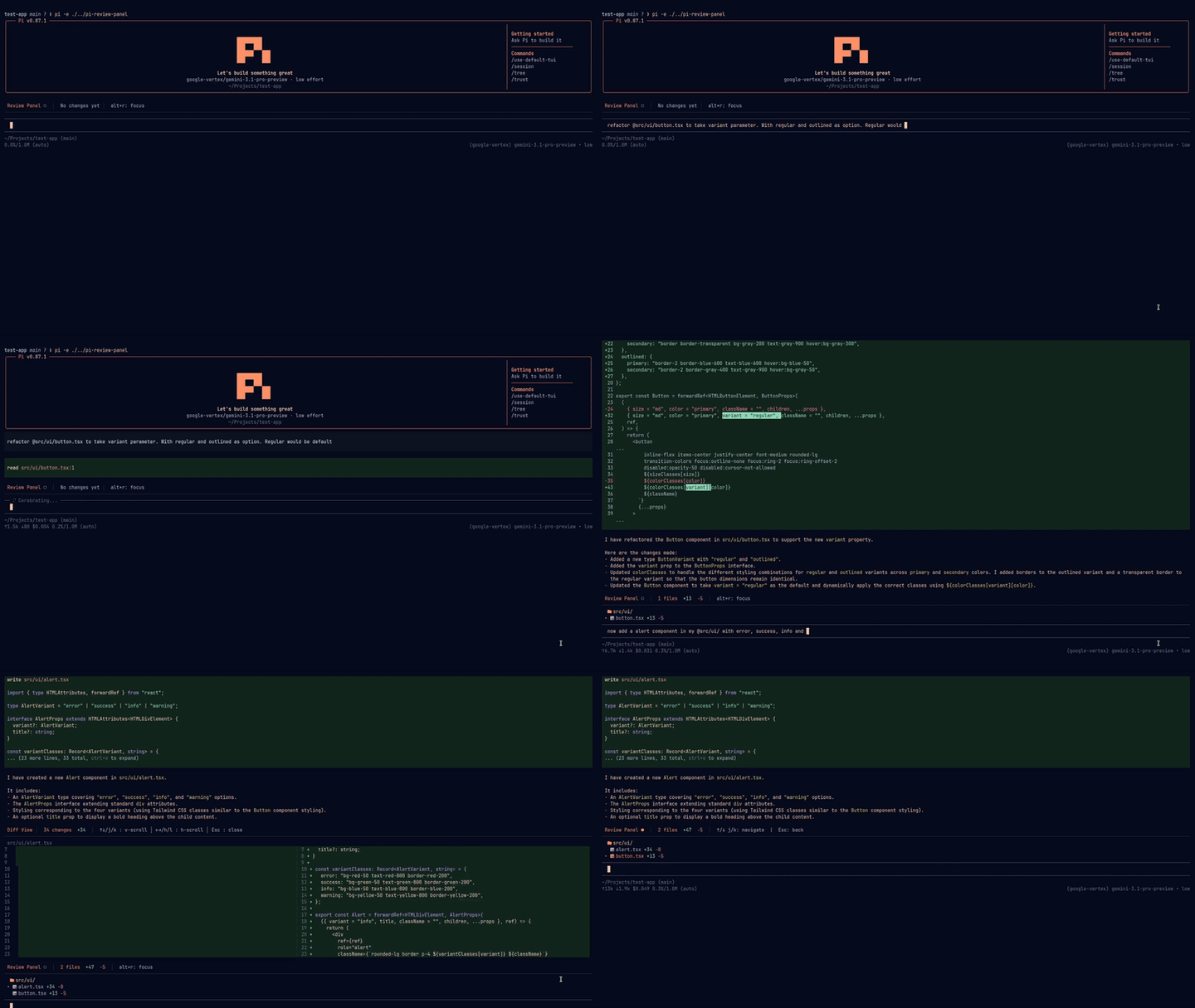
A git-based, session-aware review panel for the pi coding agent. Tracks every file the agent changes during a session and presents an interactive, keyboard-navigable diff view so you can review changes before committing.
Untested on omp
This is a pi package. No one has reported whether it works on omp yet. If you try it, add your result below.
Reports 0
No reports yet.
Readme




A session-aware review panel for the pi coding agent. See exactly which files the agent changed during your session and navigate the diffs — before you commit.
Installation
pi install npm:@pnpancholi/pi-review-panel
Usage
Run
/reviewinside a pi session to toggle the review panel. It opens by default when you start a session.Press
Alt+rto toggle focus between the editor and the review panel.
Panel navigation
| Key | Action |
|---|---|
↑ / ↓ or k / j |
Move through the file list |
Enter |
Open diff for selected file |
Esc |
Deactivate panel |
Diff view
| Key | Action |
|---|---|
↑ / ↓ or k / j |
Scroll vertically |
Page Up / Page Down |
Scroll by page |
← / → or h / l |
Scroll horizontally |
Esc |
Close diff, return to panel |
Features
- Review panel — see every file changed during the current session in one place
- Session-aware tracking — changes are tied to your session ID, so you can resume or start fresh without conflicts
/reviewcommand — toggle the panel open or closed from anywhere in your session- Side-by-side diff view — clean before/after comparison with add/remove markers and line numbers
- Theme-aware syntax highlighting — code highlights match your terminal theme
- Nerd Font support — file-type icons for a better visual experience, with a built-in installer if you don't have one
- Vim keybindings — navigate with
j/k,h/l, and other familiar vim motions, in addition to arrow keys
Scenarios
Co-working sessions (same branch, different session) — running multiple sessions on the same branch, each focused on a different part of the codebase. One session handles components like
button.tsxandtoast.tsx, another handles API routes. The review panel keeps each session's changes isolated, so you can thoroughly review what each agent did without cross-contamination. Cognitive focus matters when shipping with LLM velocity.Agentic engineering with thorough review (one session, thoroughly reviewed) — one session, one task, every line reviewed. Whether you're a new dev or a seasoned one, if your workflow demands careful human oversight of every change an agent makes, the session-aware review panel gives you a clean, focused view of exactly what changed — no noise, no distractions.
Agent maxxing (multiple sessions, multiple branches via worktrees) — multiple sessions across branches via worktrees. You're mid-feature when a hotfix lands, and you still need to finish docs. With herdr or similar, you spin up parallel sessions across branches. The review panel keeps each branch's changes scoped to its session, so you can context-switch without losing track of what changed where.
Caveats
- Tool-call tracking only — the review panel captures changes made through pi's
writeandedittool calls. Manual edits (e.g., opening a file in your editor, creating a file or directory via bash) won't appear in the panel. This is intentional — it keeps each session's changes isolated, so you can switch between sessions without cross-contamination.
Roadmap
/diff <filename>(inspired by OpenCode) — jump directly to a file's diff without scrolling through the full list. For example,/diff button.tsxopens a full-screen diff view of that file. If the file hasn't been changed, you'll get a clear notification instead of an empty pane.
Support
- Bug reports — open an issue
- Questions — open a discussion or reach out on X/Twitter