@pi-archimedes/diff2.11.1
Shiki-powered diff rendering for pi-archimedes
Untested on omp
This is a pi package. No one has reported whether it works on omp yet. If you try it, add your result below.
Reports 0
No reports yet.
Readme
@pi-archimedes/diff
See what changed. Not just that something changed.
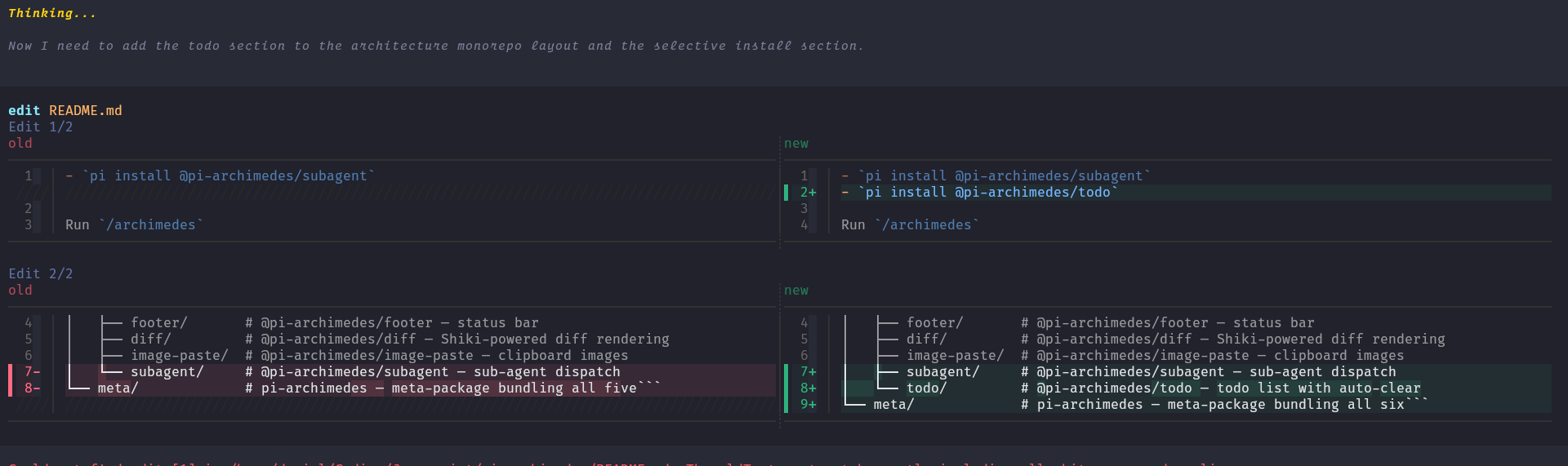
Raw text diffs make it easy to miss the one line that matters. Diff puts Shiki-syntax-highlighted changes in front of you — side by side when there's room, unified when there isn't — with word-level emphasis on the parts that actually moved inside each line.
Install
Standalone:
pi install npm:@pi-archimedes/diff
Or the full suite instead:
pi install npm:pi-archimedes
New to Pi? Pi itself is a one-time global install and needs Node.js ≥ 22.19.0:
npm install -g --ignore-scripts @earendil-works/pi-coding-agent
After installing Pi, choose one installation command above, then cd into your project and run pi. Inside the session, /login signs you in and /model picks a model — the setup section walks through the first run. A running session picks the diff renderer up with /reload.
What you get
- Split view, and unified when it isn't — side-by-side diffs when the terminal is wide enough; a traditional unified view when it isn't. The choice is made automatically from the column width.
- Syntax highlighting — language-aware colouring of the diff body, from a Shiki theme.
- Word-level emphasis — sub-line highlighting that shows exactly which tokens changed inside an otherwise similar line.
- Graceful fallback — when Shiki is unavailable or the format isn't recognised, the change is shown as a plain text diff.
What it does (and doesn't) do
The renderer displays edit and write tool changes in the tool UI, including call previews. It is not an approval gate — it helps you read changes as they happen; it doesn't hold changes back.
Appearance
Standalone, the renderer runs on fixed defaults — the github-dark theme, a 150-column minimum for split view, 60 code columns per side, and line-wrap safety checks enabled — and it does not read settings, because standalone has no config reader. In the suite, its archimedes.diff namespace supplies the settings through the suite's config reader:
| Setting | Type | Default | Description |
|---|---|---|---|
diffTheme |
string | github-dark |
Shiki syntax-highlighting theme |
diffSplitMinWidth |
number | 150 |
Minimum terminal columns for split view (≥ 100) |
diffSplitMinCodeWidth |
number | 60 |
Minimum code columns per side in split view (≥ 30) |
diffSplitWrapCheck |
boolean | true |
Fall back to unified view when lines wrap (>20% or ≥8 lines) |
The palette is derived from the chosen Shiki theme; it does not automatically pick up Pi's active theme colours. If you want a different look, pick a closer theme rather than expecting a live match.
On/off is managed by the suite: toggle via /plugins (archimedes.diff.enabled, default on).