@openlines/openpi-memory0.3.10
Global persistent memory for pi coding agent sessions via MEMORY.md injection
Untested on omp
This is a pi package. No one has reported whether it works on omp yet. If you try it, add your result below.
Reports 0
No reports yet.
Readme
openpi-memory


Global persistent memory for pi coding agent sessions. Open. Configurable. Inspired by Claude Code's auto-memory — your agent remembers what it learns, across every session, globally.
A port of openclaude-memory to pi's extension API.
A local-first, small, and deterministic SQLite core (FTS5/BM25) for coding-agent memory is currently in development - which also has a pi adapter. Feel free to check it out, specially if you're already tired of flat-files as memory store (I won't stop you, though).
Considering that vast majority of people who use pi literally creates their own extensions, I'm shooting my shot on this memory extension that I believe is good enough to be your ultra-simplest memory handler.
Compatibility verified on pi 0.87.0, 0.99.1, 1.1.0, and 1.2.0v0.3.10 - pi 1.2 compatibility
- custom-message runs do not advance the user-prompt injection interval or consume compaction handoffs
- legacy events remain supported; typecheck and 134 core checks pass on pi 0.87.0, 0.99.1, 1.1.0, and 1.2.0
- 17 extension checks pass on pi 0.99.1/1.1.0/1.2.0; 15 pass on 0.87.0, where built-in collision checks are skipped
v0.3.9 - shared-store coordination (feat. openclaude-memory)
- missing-index reads stay in memory; startup recap retirement runs under the directory lock
- local lock contention refuses instead of hanging; mutations retain the acquired directory across config changes
- migration locks local then shared and respects removal lists; unrelated unindexed slug owners are preserved
- atomic writes flush and clean temporary files, no-follow reads verify descriptors, and failed writes attempt rollback
- append and replace refresh current frontmatter metadata; 134 core tests and 12 real-loader checks pass on pi 0.99.1 and pi 1.0.0
v0.3.8 - pi 0.99 compatibility
- re-assessed against pi 0.99.1 with no source changes; hooks, tools, overlay UI, and theme tokens are all unchanged
- supported floor is now pi 0.87.0 (
>=0.87.0),engines.node>=22.19.0, and the host-load smoke test now guards against shadowing pi's built-in tool/command namesv0.3.7 - pi 0.87 compatibility
- dev/typecheck baseline bumped to pi 0.87.0; hooks verified against 0.84.2 – 0.87.0 with no source changes
- added a host-load smoke test that loads the extension through pi's real loader
see CHANGELOG for more details
Table of contents
Docs — deeper dives, not needed to get started:
- How pi Handles Memory Injection — why injection is scheduled, not persistent, and what that means for what the agent sees each turn
- Shared Storage Across Tools (shared_dir) — the opt-in
~/.agents/memory/migration, fresh-install and upgrade walkthroughs - Compaction Handoff & Auto-Resume — resuming work across context compaction
- Configuration & Index Reference — full
memory.jsoncreference, index format, stale flagging, maintenance - Architecture & Internals — hooks, model compatibility, token overhead, dev setup
- Known Limitations & FAQ — watch-outs, especially around
shared_dirtoggling
Why
I built this because I genuinely like how Claude Code handles memory: no complex algorithms, no external LLM for heavy lifting, no vector databases. It just works — the agent reads a markdown file and acts on it. Simple, transparent, effective.
I also wanted something local-first. My memories and notes stay on my machine, in plain markdown files I can read, edit, and audit at any time. No cloud sync, no embeddings pipeline, no black-box retrieval. If I want to know what the agent remembers, I open a file.
When something worth remembering happens (a bug fixed, user preferences, a config discovered, a command identified), the agent writes it to a structured markdown memory store — or you tell it to. The next session, that context is already there — injected automatically into the system prompt before the first message.
But this project wasn't born because I wanted to reinvent memory systems. It was born out of frustration.
Over the past several months, I experimented with nearly every approach I could find: vector databases, embedding models, external memory services, MCP memory servers, and LLM-powered memory management. Some were incredibly clever. Some were feature-rich. But almost all of them came with trade-offs that didn't fit how I work.
Running a separate LLM just to decide whether a memory should be saved felt wasteful. Maintaining embedding models and vector indexes consumed resources I'd rather dedicate to the coding model itself. I found myself spending more time configuring the memory system than actually using it.
I also discovered that more intelligence didn't always mean better memory. During my own testing, I audited memories produced by automated systems and found that many retained facts were incomplete, misleading, or simply wrong. If the memory layer itself isn't trustworthy, every future conversation starts from a weaker foundation.
Eventually I asked myself a simple question:
Why does remembering something require another AI model?
For the kinds of things I actually wanted to remember — project architecture, debugging notes, shell commands, configuration quirks, design decisions — the answer was: it doesn't.
A markdown file is deterministic. It's searchable with Git. It can be reviewed in code reviews. It survives model changes, provider changes, and framework changes. Most importantly, it never hides what the agent knows.
So instead of building another "AI memory," I built a memory system that stays out of the way.
- No embeddings.
- No vector databases.
- No background services.
- No hidden retrieval algorithms.
Just files, structure, and an agent that knows where to look.
If you've ever spent hours configuring a sophisticated memory stack only to realize you just wanted your coding agent to remember yesterday's bug fix, this project is for you.
How it works
~/.pi/agent/memory/          # or ~/.agents/memory/ if shared_dir: true
├── MEMORY.md              # index — injected into every session automatically
└── <topic>.md             # per-topic detail files, created by write_memory

~/.pi/agent/memory.jsonc    # persist rules + config — always per-tool, never shared
~/.pi/agent/HANDOFF.md      # compaction handoff entries (auto-managed, always local)
All files are plain text. You can read, edit, and delete them at any time. The default location respects PI_CODING_AGENT_DIR if set (pi's config-dir override).
MEMORY.md is the index that gets injected into the system prompt. Each entry points to a topic file. Topic files hold the full content — they are read on-demand, not injected wholesale; extension previews and body search inspect only their first 50 KiB. memory.jsonc holds your persist rules and config scalars. HANDOFF.md is managed automatically by the compaction handoff feature.
On the first user prompt of each session, MEMORY.md and the rendered rules from memory.jsonc are injected into the system prompt. They are re-injected every inject_every_n_turns user prompts thereafter (default: 5). Custom-message runs triggered by other extensions do not advance this interval or consume handoffs. After context compaction, injection state resets so the very next user prompt always re-injects.
See Shared Storage Across Tools (shared_dir) for the opt-in cross-tool shared directory, and fresh-install / upgrade walkthroughs. See How pi Handles Memory Injection for why injection is scheduled rather than persistent.
Tools
The extension registers three tools the agent uses for all memory operations:
| Tool | Args | What it does |
|---|---|---|
write_memory |
topic, content, summary, pin?, mode? |
Creates or appends/replaces a topic file; upserts MEMORY.md index |
remove_memory |
topic |
Removes the index entry (refuses if pinned); topic file preserved |
pin_memory |
topic, pin (bool) |
Pins or unpins an index entry |
mode: "replace" replaces the body; append retains it and adds a dated section. Both refresh name, description, and last_updated, preserving created and other fields. Use replace for current state and append for new deltas. overwrite: true remains an alias for replace. A new topic cannot overwrite an unrelated indexed or unindexed slug owner; it gets a numeric suffix instead.
Use the tools for validated, locked updates rather than direct file edits. A missing index stays in memory until the first locked write creates it. Local contention refuses after about 500 ms; shared mode waits about 2 s and retries once after a 1 s delay. Ordinary failures attempt rollback, but atomicity is per file, not a crash-proof transaction. Format safeguards do not guarantee factual accuracy or model decisions; see recovery boundaries.
/memory command

/memory                    → open interactive memory browser
/memory <text>             → store something (agent picks topic, summary, pin)
/memory consolidate        → scan conversation; persist durable facts per memory.jsonc rules
/memory pin <topic>        → pin an entry
/memory unpin <topic>      → unpin an entry
/memory remove <topic>     → remove an index entry
/memory search <query>     → search index and topic bodies; opens browser filtered to matches
/memory (no args) opens a navigable overlay browser — this is the primary way to pin/unpin and remove entries:
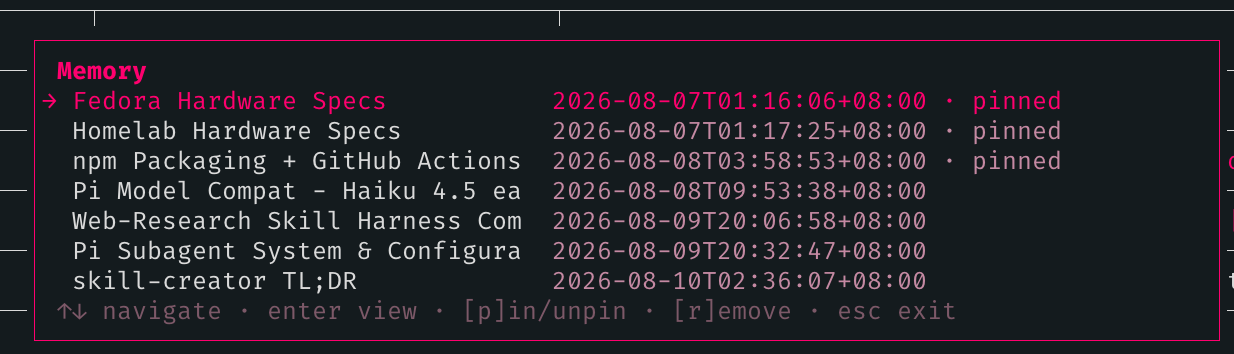
- List view — all topics with date and pin/stale status.
↑↓to navigate (the list wraps at both ends),enterto open a topic,[p]to pin/unpin the highlighted entry in-place,[r]to remove,escto close. Actions always apply to the highlighted entry, and its position is preserved across pin/unpin, remove, and detail-view round-trips. - Detail view — Markdown-rendered topic body (capped at 6 lines; longer entries show a
… N more lines (filename.md)indicator), metadata, and an action list: Pin/Unpin, Remove, Back.[p]and[r]hotkeys work here too. Remove asks for confirmation. Any action orescreturns to the list.
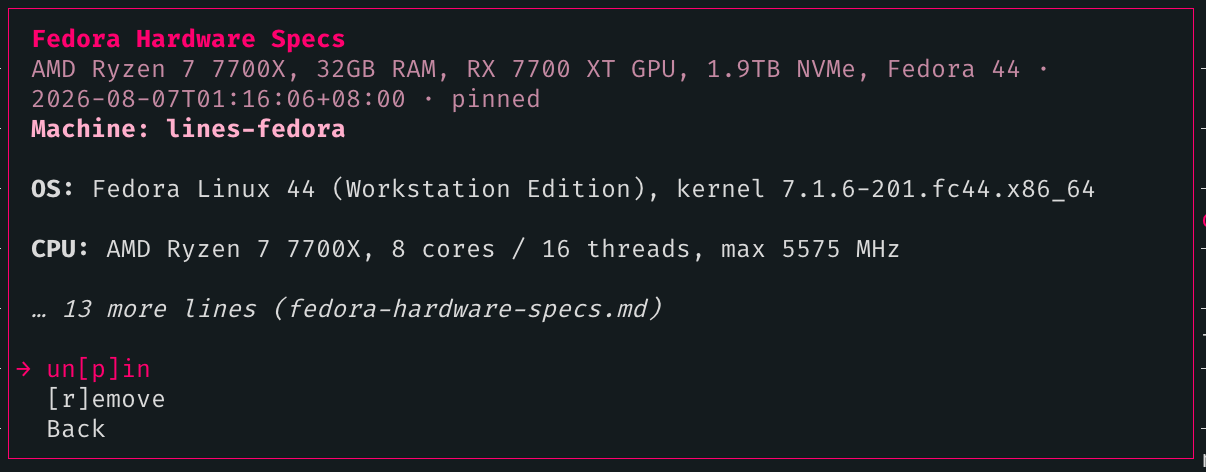
/memory <text> sends the text to the agent with an instruction to call write_memory. The agent decides the topic name, filename, summary, and whether to pin it.
/memory pin/unpin/remove <topic> are a chat-input fallback for when you already know the topic name and want to skip opening the browser. They run directly in the command handler — no LLM round-trip.
/memory search <query> does a case-insensitive substring search across the index (name, filename, summary) and all topic file bodies. Matching entries open in the full interactive browser — same pin/unpin, remove, and detail view as /memory. No LLM round-trip.
/memory consolidate sends a rules-driven prompt to the agent asking it to scan the current conversation history and call write_memory for each fact, decision, discovery, config detail, or technical learning that belongs in long-term memory under your current memory.jsonc rules (always_persist/never_persist/always_ask are rendered into the prompt), keeping the index focused on durable facts.
When triggered via consolidate_on_compact, the extension feeds pi's already-generated compaction summary directly to the agent instead of asking it to re-scan the full conversation (saving one LLM scan turn), and additionally stores that summary as the latest HANDOFF.md entry so the next session gets a coherent one-time orientation. When invoked manually via /memory consolidate, the agent scans the live conversation history.
Cost: one LLM round-trip (extraction only when via compaction; scan + extract when manual). Use at natural breakpoints — before closing a long session, before switching contexts, or any time you want the session's learnings captured. Enable consolidate_on_compact: true in memory.jsonc to run consolidation automatically after threshold compaction.
See Compaction Handoff & Auto-Resume for how the extension helps the agent resume work across context compaction.
Install
pi install npm:@openlines/openpi-memory
Or from git:
pi install git:github.com/linellazatin/openpi-memory
The extension and skill load automatically after install. No further setup.
Requires pi coding agent >=0.87.0 (current tests and typecheck pass on pi 0.87.0, 0.99.1, 1.1.0, and 1.2.0). This is declared as an advisory peerDependency — pi provides its own copy of the API at runtime, so npm won't hard-block an older install; if you're on an older pi and auto-resume/consolidation stop working, upgrade pi.
Update
pi update npm:@openlines/openpi-memory
To update all installed packages at once:
pi update --extensions
or just always do --all for convenience
Versioned installs (e.g. npm:@openlines/openpi-memory@0.3.10) are pinned and skipped by --extensions. Use pi install npm:@openlines/openpi-memory@new-version to move to a specific version.
Uninstall
pi remove npm:@openlines/openpi-memory
This removes the package from pi's settings. It does not touch your memory files — ~/.pi/agent/memory/ is left intact so nothing is lost. Delete that directory manually if you want to clear stored memories.
License
MIT