@neralabs/rerail0.1.0
Local semantic monitor and rule runtime for AI coding harnesses
Untested on omp
This is a pi package. No one has reported whether it works on omp yet. If you try it, add your result below.
Reports 0
No reports yet.
Readme
Rerail
Rerail checks the code your coding agent writes against your rules while it works, and steers it back in the same session.
Works with 



What is Rerail
Coding agents drift. They break your architecture's patterns, repeat approaches you already rejected, and ignore conventions they never saw. Writing more rules into the prompt doesn't fix this: it uses up context, goes stale, and still relies on the model noticing when a rule applies.
Rerail takes enforcement out of the model loop. Hooks or extensions in your coding agent send each edit the agent makes to a local daemon. A native Rust engine checks the changed code against your repository's rules, by regex, syntax tree and relations. When the agent breaks a rule, Rerail steers it back during the session and records what fired, where and why.
Rule checking runs on your machine and makes no network requests. No account or API key is needed.
Quickstart
You need Node.js 24 or later and Git, on macOS, Linux with glibc 2.28 or later (not Alpine or other musl Linux), or Windows, on arm64 or x64. Prebuilt native engines ship in the package, so nothing is compiled on your machine. If set-up or Rerail goes wrong, see Troubleshooting.
cd your-repo
npx @neralabs/rerail setup   # install under ~/.rerail, connect your coding agents, start Rerail here
Then, in a new terminal, which has rerail on its PATH, open the dashboard with rerail manage.
Set-up asks before it reads the repository, shows the rule packs that fit it with the reason for each, and installs only the ones you confirm. It connects the coding agents it finds (or only the ones you name with --agents), puts ~/.rerail/bin on your PATH, and starts Rerail in this repository only. Everywhere else Rerail stays off until you run /rerail-start (or rerail start) there. To have a coding agent install it for you, ask it to; it runs setup --relay and asks you each question in the session. Installing Rerail lists everything set-up writes and how to remove it.
Then start a new Claude Code, Codex, Cursor, OMP or Pi session in the repository. To watch Rerail catch a broken rule and steer the fix, run:
/rerail-show-me
To add a rule of your own, type /rerail-create followed by what you want:
/rerail-create <what you want>
/rerail-create never import from src/legacy in new code
The agent drafts the rule from your description, tests it against the repository without saving it, and adds it after you confirm. Writing rules covers which rules are worth having.
How it works
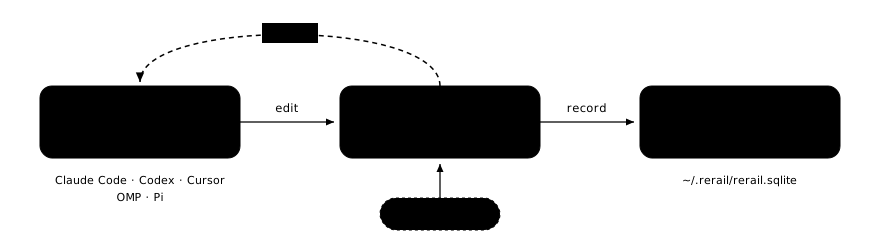
- Capture. Hooks (Claude Code, Codex, Cursor) or native extensions (OMP, Pi) observe the session automatically, so the agent never has to remember to call Rerail. Before an edit, Rerail records the file as it was, so it can tell which lines the agent changed.
- Evaluate. One background daemon keeps the engine and every repository's compiled rules in memory, checks the files the agent touched, and reports only the lines it changed.
- Steer. Each rule has a mode.
logrecords the violation.steersends the agent the rule, the location, what is wrong and, where the rule has one, a suggested fix. - Record. Sessions and violations are stored in one local SQLite database (
~/.rerail/rerail.sqlite) and shown in the dashboard, so you can see what fired, where and why.
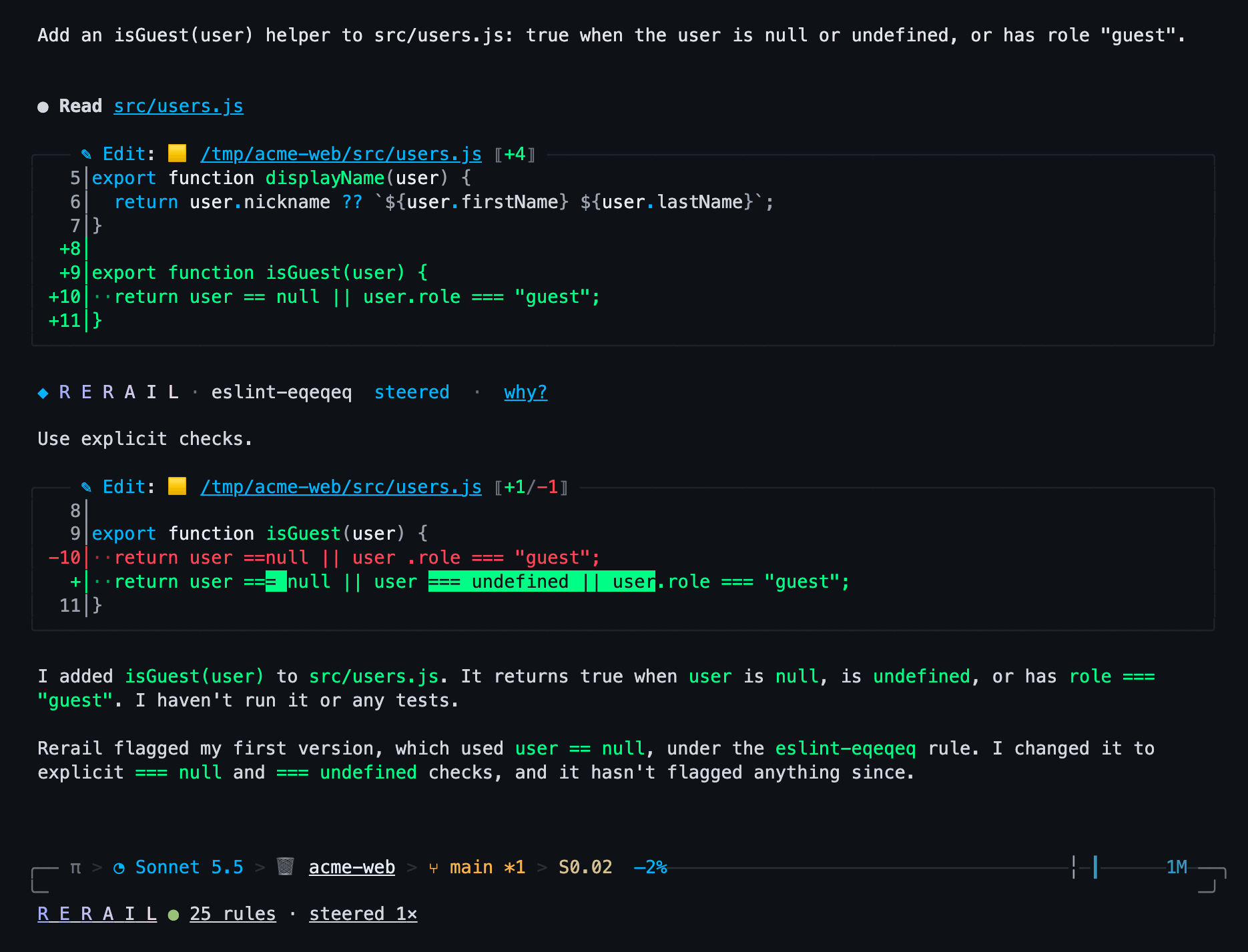
A session in OMP: Rerail steers the agent on eslint-eqeqeq from the javascript pack, and the line under the edit says so, with why? opening the rule on your local dashboard. The agent fixes its edit in the same turn, and the footer counts the steer; R E R A I L, the rule count and the steer count link to the session and the rules on the dashboard.
Capabilities
- Code rules. Rules are
rerail.policy/v1documents. Each clause isforbid,require_eachorbudget, built from regex, syntax-tree and relational queries. The native engine runs them the same way every time, within set limits on files, nodes and time. The code-rule DSL reference documents every construct. - Only the agent's new work is judged. Code rules report only the lines the agent changed in the session, so existing code does not bury the signal.
- Runtime steering. Violations go back into the live session while the change is still being made, not later in review.
- Rules belong to the repository. Every clone and worktree of a remote shares its rules. Turn a rule or pack on, off or to log-only per repository, folder or checkout, and choose whether linters' suppression comments (
eslint-disable,noqa, ...) silence it; changes apply on the next tool call. See Rule scoping. - Rules in your own words.
/rerail-createhas your coding agent draft a rule, test it withrerail rules test, and add it withrerail rules addafter you confirm.rerail rules evidenceshows what recent sessions suggest a rule for. - Local and multi-agent. One daemon serves Claude Code, Codex, Cursor, OMP and Pi, with a dashboard on your own machine.
- Explicit updates. Nothing updates on its own.
rerail updatebacks up the database and validates the new version before switching to it;rerail update rollbackgoes back.
Rule packs
Core ships no rules. A rule pack is a set of rules published as its own npm package, @neralabs/rerail-pack-<id>. Set-up recommends the packs that fit a repository, by its files or its dependencies, and installs the ones you confirm into ~/.rerail/packs. A pack runs only where you add it. Manage packs from the dashboard's Rule packs page or with rerail packs list|add|remove|recommend.
To add a pack after set-up:
rerail packs recommend        # the packs that fit this repository, and why
rerail packs add complexity   # install it into ~/.rerail/packs
rerail manage                 # Rule packs page: add it to this repository
rerail packs add installs a pack but turns it on nowhere; it runs only in the repositories you add it to.
| Pack | Ported from |
|---|---|
python |
Ruff 0.16.9, Bandit 1.9.4 |
javascript |
ESLint 10.11.0, eslint-plugin-unicorn 76.0.0 |
typescript |
typescript-eslint 8.70.1, eslint-plugin-vitest 1.6.27 |
next |
@next/eslint-plugin-next 16.3.8 |
sql |
SQLFluff 4.4.0 |
vue |
eslint-plugin-vue 10.11.1 |
rust |
Clippy (Rust 1.99.0) |
blade |
Bladestan, tlint, stillat/blade-parser |
php |
PHP_CodeSniffer 4.0.4, PHPStan 2.2.16, Psalm 6.19.1 |
complexity |
lizard 1.24.0: cyclomatic complexity above 6, for Python, TypeScript and JavaScript |
Every shipped ported rule is scored against the original tool's recorded findings before it ships. Ports that are not ready yet sit in each pack's candidates/, scored but never shipped. Each pack is versioned with changesets and released separately from core. See Rule packs and the pack format.
Rules can target Python, TypeScript, JavaScript, PHP, Blade, Rust, SQL and Vue; regex clauses work on any file. Move your own rules between machines with rerail rules export and rerail rules import.
Supported coding agents
Rerail works with five coding agents: Claude Code, Codex, Cursor, OMP (Oh My Pi) and Pi. Set-up connects the ones it finds, or the ones you name (--agents claude-code,codex,cursor,omp,pi). It backs up each config before changing it, and rerail install --remove takes everything out again.
| Agent | Integration | In-session commands | Status line |
|---|---|---|---|
| Claude Code | .claude-plugin, hooks/claude.json; commands in ~/.claude/commands/ |
/rerail-* |
Yes |
| Codex | .codex-plugin, hooks/codex.json; skills in ~/.codex/skills/ |
$rerail-* skills |
No |
| Cursor | .cursor-plugin, hooks/cursor.json; commands in ~/.cursor/commands/ |
/rerail-* |
No |
| OMP, Pi | Native extensions (src/hosts/omp, src/hosts/pi) |
/rerail-* |
Yes |
Every agent gets the same commands; Codex has them as $rerail-* skills:
| Command | What it does |
|---|---|
/rerail |
What Rerail is doing in this repository, and every command (/rerail-help is the same) |
/rerail-start, /rerail-stop |
Start or stop Rerail in this checkout and the worktrees inside it; rules and history are kept |
/rerail-create |
Create a rule in your own words |
/rerail-show-me |
See Rerail catch a broken rule in this repository and steer the fix, then clean up |
/rerail-manage |
Open the dashboard |
/rerail-update |
Update Rerail to the newest version |
/rerail-uninstall |
Remove Rerail from this computer; rules and history are kept in a backup |
Everything else is a rerail terminal command: rerail status, rerail version, rerail update check, rerail update rollback, rerail reset. Run rerail --help for the full list. In Claude Code, OMP and Pi the status line shows R E R A I L ● <n> rules, and how many times Rerail steered, while Rerail is on; see In-session surfaces.
Internal testing
[!WARNING] These features are in the code and you can find and run them, but they are not ready for public use. We are still testing them internally. They are not supported, they may change or be removed in any release without notice, and nothing in this README promises they work. Do not build on them or rely on them in your workflow.
Their list, and where each one surfaces, is in Internal testing. Found one? Feedback is welcome in an issue, labelled as internal testing.
Repository structure
.
├── src/              # TypeScript, one folder per layer (see src/README.md)
│   ├── engine/       # rule model, schemas, code-rule compile, native bridge, audits, database, pack catalog
│   ├── runtime/      # session events through the engine; the daemon client
│   ├── api/          # HTTP and MCP operations served by the daemon
│   ├── presentation/ # the session footer, dashboard links, terminal status
│   ├── daemon/       # the resident daemon: HTTP/MCP server, page, native session server
│   ├── harness/      # shared hook plumbing, event stream, /rerail commands
│   ├── hosts/        # one adapter per agent: claude, codex, cursor, omp, pi
│   ├── setup/        # agent registration and the managed updater
│   ├── activation/   # signed customer profiles and device keys
│   └── cli/          # the rerail command line
├── native/           # Rust engine (napi): embeddings, code-rule DSL, content store, git workspace
├── languages/        # language registry: one JSON file per language
├── packs/            # rule packs, one npm package each
├── model/            # bundled, pinned potion-base-8M model (Git LFS)
├── hooks/            # hook manifests for Claude Code, Codex and Cursor
├── skills/           # agent skills shipped with Rerail (rerail-create)
├── .claude-plugin/ .codex-plugin/ .cursor-plugin/  # agent plugin manifests
├── ui/               # dashboard: plain HTML, CSS and ES modules, no build step
├── conformance/      # scores ported rules against upstream tools' recorded output
├── fixtures/         # upstream test fixtures and corpora per language
├── benchmark/        # query parity and steer benchmarks
├── playground/       # tool for developing rules; never published
├── test/             # unit tests (Vitest), mirroring src/
├── integration/      # end-to-end tests against real agent hosts
├── e2e/              # dashboard tests (Playwright)
├── scripts/          # build, check, generate, release
├── docs/             # guides, reference and design notes
└── CONTEXT.md        # domain glossary: rules, clauses, violations, oracles
Good places to start
- CONTEXT.md: the vocabulary used across the codebase. Read it first.
- docs/installation.md: what set-up writes to your machine and how to remove it.
- docs/reference.md: rules and their configuration, the database, updates, the daemon and its API.
- docs/code-rule-dsl-reference.html: every construct of the
rerail.policy/v1rule language. - docs/rule-packs.md and docs/pack-format.md: how packs work and what each must prove.
- packs/complexity/rules/: real rules to copy when writing your own.
- src/README.md: the layers and which may import which.
- docs/vision.md: where Rerail is going beyond code rules, and the principles behind it.
Contributing
See CONTRIBUTING.md for how to start work and what a pull request needs. Contributions are licensed under Apache-2.0, with no CLA. Third-party material must use a permissive licence, and where it came from and under which licence must be recorded with it. How core is released is in docs/release.md.
To build from a checkout you need Node.js 24+, npm, Rust (pinned in rust-toolchain.toml), just and Git LFS. The model weights and an engine data table are stored in LFS, so install it before you clone.
git lfs install
npm ci && npm run build
npm run check:all
npm run test:all
Feedback
Found a false positive, a missed violation or a confusing steer? Open an issue with the rule id and the session link. To report a vulnerability, follow SECURITY.md instead.
License
Apache License 2.0. See LICENSE and NOTICE. Third-party material bundled with Rerail, including the minishlab/potion-base-8M model (MIT), the Blade parser ported from Forte 1.1.0 (MIT), the vendored grammars and the ported rules, is listed with its licence in THIRD_PARTY_NOTICES and LICENSES/. The coding agents' names and logos are trademarks of their owners.