@mozilla-ai/pi-otari0.5.0
Route Pi model requests through Otari with automatic model discovery
Untested on omp
This is a pi package. No one has reported whether it works on omp yet. If you try it, add your result below.
Reports 0
No reports yet.
Readme





Pi is a minimal, extensible terminal coding harness, while Otari is an AI control plane and gateway for routing model requests, managing provider credentials, and tracking usage, budgets, and traces. This extension connects them so Pi can use Otari-managed models.
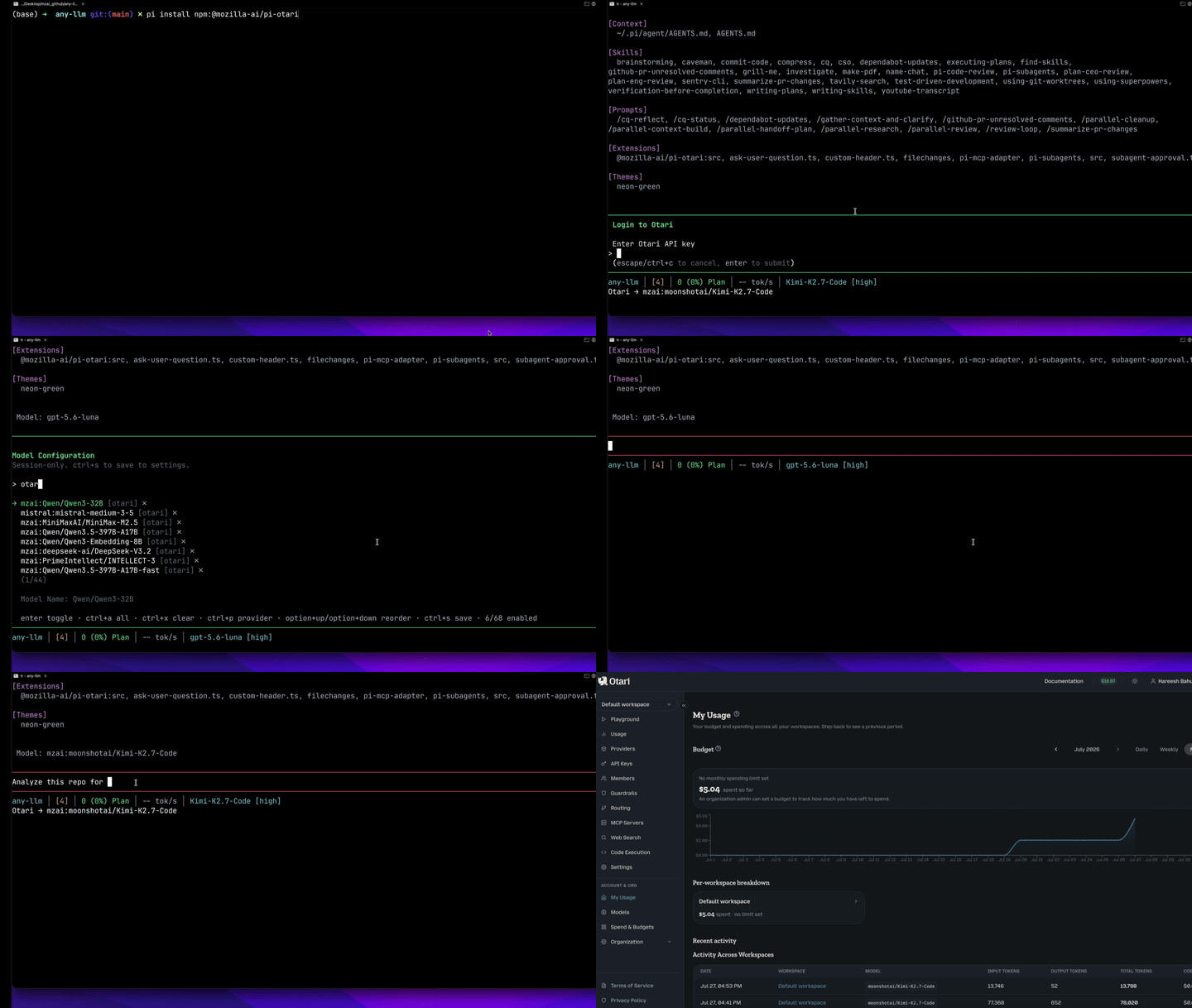
Demo
Requirements
- Pi 0.81.0 or newer, installed and available as
pi(older versions can install the package but the extension will remain disabled and show an upgrade message) - Node.js 22.19.0 or newer
- An Otari workspace API key
- At least one upstream provider and model enabled in your Otari workspace
Install and use
Install the extension from npm:
pi install npm:@mozilla-ai/pi-otariStart Pi:
piRun
/login otariand enter your Otari workspace API key in Pi's secret authentication prompt. This is API-key authentication, not OAuth: the prompt is separate from chat, so the key is not added to model context or sent to an LLM.Pi stores the credential in
~/.pi/agent/auth.json, a plaintext file created with user-only permissions (0600). Keep that file out of source control and untrusted backups. Run/logout otarito remove the stored credential.Make Otari models available in Pi:
- Run
/scoped-models. - Search for
otari. - Enable the models you want to use.
- Press Ctrl+S to save the scope.
- Run
Run
/modeland select one of the enabledotarimodels.Send a prompt normally. No Otari-specific slash command is required. When an Otari model is selected, Pi's status area shows
Otari → <model-id>.
Pi sends requests for the selected provider to ${OTARI_BASE_URL}/chat/completions, which is https://api.otari.ai/api/v1/chat/completions for hosted Otari. Local Pi tools continue to run according to your Pi configuration.
To list the Otari models Pi currently knows about from a shell, run:
pi --list-models otari
NOTE: this prints Pi's cached catalog and does not contact Otari; see Model discovery for when the cache is refreshed.
Update or remove
pi update npm:@mozilla-ai/pi-otari
pi remove npm:@mozilla-ai/pi-otari
Model discovery
After login and during provider refresh, the extension queries {OTARI_BASE_URL}/models (https://api.otari.ai/api/v1/models for hosted otari) with the workspace token. Only models available through providers enabled for the authenticated workspace are registered. If the hosted endpoint responds with 404 or 405, the extension reports that hosted model discovery is unavailable. It does not request a public catalog or substitute models outside the authenticated discovery response.
The model list is a cache
Otari's catalog is dynamic: workspaces can enable and remove providers and models at any time. Pi stores the last discovered list in ~/.pi/agent/models-store.json and shows that list until the next refresh. In interactive mode Pi refreshes in the background at startup, after /login otari, and whenever you open /model. Print mode and pi --list-models read the cache only.
The cache belongs to one Otari deployment. Pointing OTARI_BASE_URL at a different host, such as switching between hosted and self-hosted Otari, drops the previous deployment's entries, and the list stays empty until the next refresh. Changing only the API prefix on the same host keeps them, since the deployment is the same. Refresh after adding or removing models in Otari: until then, entries from the previous catalog stay listed, and a request to one that no longer exists fails with an error from the gateway. Pi warns you when a previously selected model is missing from the refreshed list, so you can pick a current one.
Wrong API prefix
If discovery gets 404 from a self-hosted gateway, the extension probes the other well-known API root's public health route, without sending the token, and shows a warning naming the exact OTARI_BASE_URL to set. Otari 0.6.0 and newer serve /api/v1; older gateways served /v1.
If no models are found, provide one or more explicit Otari selectors before starting or restarting Pi:
export OTARI_MODELS="anthropic:claude-sonnet-5,mistral:mistral-medium-3-5" # optional fallback or additional selectors
pi
These selectors are registered as given, and Otari must have the corresponding provider and model enabled for the workspace. When discovery succeeds and its list does not include one of them, the extension warns once, naming the selector and, if the same model is listed under another provider prefix, the current selector to use instead. The entry itself stays registered until you update or remove it in OTARI_MODELS and restart Pi.
Web search
When the connected Otari deployment offers its gateway-run web search tool, every Otari request declares it: the model can search the web mid-completion, Otari runs the search server-side, and the exchange stays out of Pi's transcript while its token usage is folded into the request's totals. Searches are billed by Otari per call, under the workspace's web-search policy. No setup is needed beyond an Otari deployment with a search backend configured; set OTARI_WEB_SEARCH=off to stop declaring the tool. Only chat completions sent to OTARI_BASE_URL for otari/* models carry the declaration; models from other Pi providers are never affected.
The extension learns availability from the gateway's tools catalog (GET {OTARI_BASE_URL}/tools) whenever the model list refreshes, and Pi's status line shows Otari → <model-id> · web search while it is offered. A deployment whose catalog route is unreachable, such as a hybrid gateway, is probed optimistically instead: requests keep declaring the tool until the gateway refuses one. When the first request after a refresh that declares the tool is rejected with a 400, 403, or 422, it is retried once without the declaration. If that retry succeeds, the declaration was the problem (no search backend configured, web search disabled for the workspace, or a gateway too old to know the tool): web search stays off until the next model refresh, and a warning names the gateway's reason. If the retry fails too, its error is shown as usual and web search stays on. Once the gateway has accepted the declaration, later errors are not retried.
Reasoning levels
Models that Otari discovery marks as reasoning-capable expose Pi's minimal, low, medium, high, xhigh, and max reasoning levels. Models without that capability use Pi's conservative non-reasoning default. The extension forwards the selected level unchanged. Pi's default remains medium unless the user configures or selects another level.
Otari discovery does not yet provide each model's supported reasoning levels, so the levels exposed for a reasoning model are optimistic: an upstream model may reject a level it does not support. The extension preserves that error without silently retrying at a different level or without reasoning. When the upstream error reports supported values, they appear in Pi's error message.
Subagent routing
With pi-subagents installed, the extension can ask Otari which model a new subagent should run on. A subagent starts with an empty prompt cache, so the moment it is spawned is where a cheaper model costs nothing. Otari puts the task to a decision model and recommends the cheapest candidate that should do it well on the first attempt.
Routing is off by default. Turn it on in Pi's settings, globally in ~/.pi/agent/settings.json or per project in .pi/settings.json (Pi reads a project's settings only once you trust the project):
{
  "otari": {
    "subagentRouting": {
      "enabled": true,
      "candidates": {
        "openai:gpt-5-mini": "Simple, mechanical work: find, search, read and report.",
        "anthropic:claude-sonnet-5-5": "Moderate reasoning: contained code changes, tests.",
        "anthropic:claude-opus-5-5": "Hard reasoning: design choices, subtle bugs, large refactors."
      }
    }
  }
}
candidates is optional. Each key is an Otari model id, and each value says what the model is for (or is null). Without candidates, Otari chooses among its own list for Pi. Models that Pi cannot run, because discovery did not list them or there is no credential, are left out of the request.
When the parent model's message ends, the extension asks Otari about each single subagent launch in it, all at once. It sends the agent name, the task and the parent model, waits at most 3 seconds, and starts the subagent on otari/<recommended model>. A thinking level set on the launch's own model, such as :high, is kept when the recommended model supports reasoning. A notice shows the choice. If anything fails, such as a timeout, an error from Otari, or a model Pi cannot run, the subagent starts on the model it would have had anyway, and the notice says why.
Limits:
- It needs Pi 0.99.0 or newer, and an Otari API key from
/login otariorOTARI_API_KEY. - It needs an Otari gateway that recommends models for Pi (mozilla-ai/otari#2198), with a decision provider configured. Standalone (self-hosted) deployments serve the route.
- Only single launches are routed. Workflows, parallel tasks, chains,
/run, and other launches that do not go through thesubagenttool call start on their usual model. - Otari is asked when the message ends, before Pi checks each tool call. A launch that Pi or another extension then blocks has already been sent to Otari.
- The recommended model counts as an explicit model in pi-subagents, so it wins over an agent's own
model:. An enforcedsubagents.modelScopecan still refuse it.
Non-interactive authentication
For CI, containers, and other noninteractive environments, provide the API key through OTARI_API_KEY:
OTARI_API_KEY=tk_example pi
A key stored through /login otari takes precedence over OTARI_API_KEY. Running /logout otari removes the stored key, but Pi will continue using OTARI_API_KEY if it is set.
Self-hosted Otari
export OTARI_BASE_URL=https://otari.example.com/api/v1
pi
OTARI_BASE_URL must include the gateway's API prefix, because Pi appends /chat/completions and discovery appends /models to it. Otari 0.6.0 and newer serve /api/v1; gateways older than 0.6.0 served /v1. A bare origin such as https://otari.example.com is rejected. For a gateway on your own machine, use http://localhost:8000/api/v1.
Then run /login otari. For noninteractive use, set both OTARI_BASE_URL and OTARI_API_KEY.
HTTP is accepted only for loopback development endpoints.
Configuration
| Variable | Default | Description |
|---|---|---|
OTARI_API_KEY |
none | Workspace token or standalone key fallback when no stored credential exists |
OTARI_BASE_URL |
https://api.otari.ai/api/v1 |
OpenAI-compatible base URL, including the gateway's API prefix |
OTARI_DISCOVERY_TIMEOUT_MS |
5000 |
Discovery timeout from 1000 to 30000 ms |
OTARI_MODELS |
none | Conditional fallback or additional model selectors |
OTARI_WEB_SEARCH |
on |
Declare Otari's gateway-run web search tool on Otari requests; off disables it |
Privacy and security
Model requests using otari/* pass through Otari and the selected upstream provider. The extension does not maintain its own credential file. When you use /login otari, Pi stores the API key in ~/.pi/agent/auth.json; when you use OTARI_API_KEY, the key remains environment-provided. The extension stores no prompts, responses, tool content, or telemetry. Pi persists provider model metadata in its native model store. Discovery rejects redirects and sends the token only to the configured model-discovery endpoint. When discovery returns 404 from a self-hosted gateway, the extension also requests that gateway's public health route on the other API prefix, again without the token. With subagent routing on, the extension also sends, for each single subagent launch in the parent model's messages (even one that is later blocked), the subagent's task, agent name, model ids, Pi's session id and the tool call id to {OTARI_BASE_URL}/routing/recommend, with the token and without following redirects. The session id lets Otari relate the launches of one session. A trusted project's .pi/settings.json can turn routing on, so trust only projects you would let send subagent tasks to Otari.
Troubleshooting
- “pi-otari requires Pi 0.81.0 or newer”: run
pi update, then restart Pi. The package uses wildcard Pi peer dependencies, as required for Pi packages, and checks host compatibility at runtime instead of installing a second copy of Pi. - No Otari models in
/model: run/scoped-models, search forotari, enable models, and press Ctrl+S. If no models are available there, setOTARI_MODELSbefore starting or restarting Pi. - “Otari returned no models for this workspace”: discovery succeeded but the workspace has no enabled provider or model. Enable one in Otari, then open
/modelto refresh; until then/modellists no Otari models. - Missing credentials: run
/login otari, or setOTARI_API_KEYbefore starting or restarting Pi. - 401/403: Otari rejected the key used for discovery. Run
/login otariwith a valid replacement key, or setOTARI_API_KEYand restart Pi; then confirm workspace access. One possible cause is a stale key saved with/login otari, which takes precedence overOTARI_API_KEY; run/logout otarito fall back to the environment variable. The cached model list stays in place until the key is fixed. - Unknown model: the selected provider or model is not enabled in your Otari workspace. Enable it in Otari, refresh the provider, or select a different Otari model in Pi.
- “Otari refused its web search tool: …”: the gateway rejected the
otari_web_searchdeclaration, so the request was retried without it and web search is paused until the next model refresh. The quoted reason is the gateway's own: configure a search backend (aweb_search_providerkey orweb_search_url) or enable web search for the workspace in Otari. SetOTARI_WEB_SEARCH=offto stop declaring the tool. - “Otari (at …) does not list …”: that selector is not in the model list Otari returned for the configured URL. Its provider or model was disabled, or the model moved to another provider prefix, as with hosted Otari's retired
mzai:prefix. Select a current model in/model; if the selector comes fromOTARI_MODELS, update or remove it there. - “400 status code (no body)” on a prompt: Otari rejected the request; its reason travels in a
detailfield that Pi's OpenAI client does not display (a directcurlto/chat/completionsshows it). When the selected model is missing from the discovered list, the extension's explanation precedes this line. Otherwise, check in Otari that the model's provider is enabled and has a credential, or select a model from another provider in/model. - “hosted model discovery is unavailable”: The hosted
/modelsendpoint returned404or405. No public catalog fallback is supported. Retry discovery when the service is available; if the error persists, contact the Otari service operator. - “Otari model discovery returned HTTP 404 … Set OTARI_BASE_URL=…”:
OTARI_BASE_URLhas the wrong API prefix for that gateway. Set it to the URL shown and restart Pi. Otari 0.6.0 and newer serve/api/v1; older gateways served/v1. - “Could not refresh otari; showing cached models”: this is Pi's summary. The extension's own warning next to it has the cause and, where possible, the fix.
- Models listed that no longer exist, or new ones missing: the list is a cache. Open
/modelto refresh it. See The model list is a cache.
Contributing
See CONTRIBUTING.md for development, testing, dependency updates, and release instructions.
License
Apache-2.0