@lune_99/pi-ask-question0.1.0
Ask the user questions for pi via tool and command
Untested on omp
This is a pi package. No one has reported whether it works on omp yet. If you try it, add your result below.
Reports 0
No reports yet.
Readme
Lune Ask Question



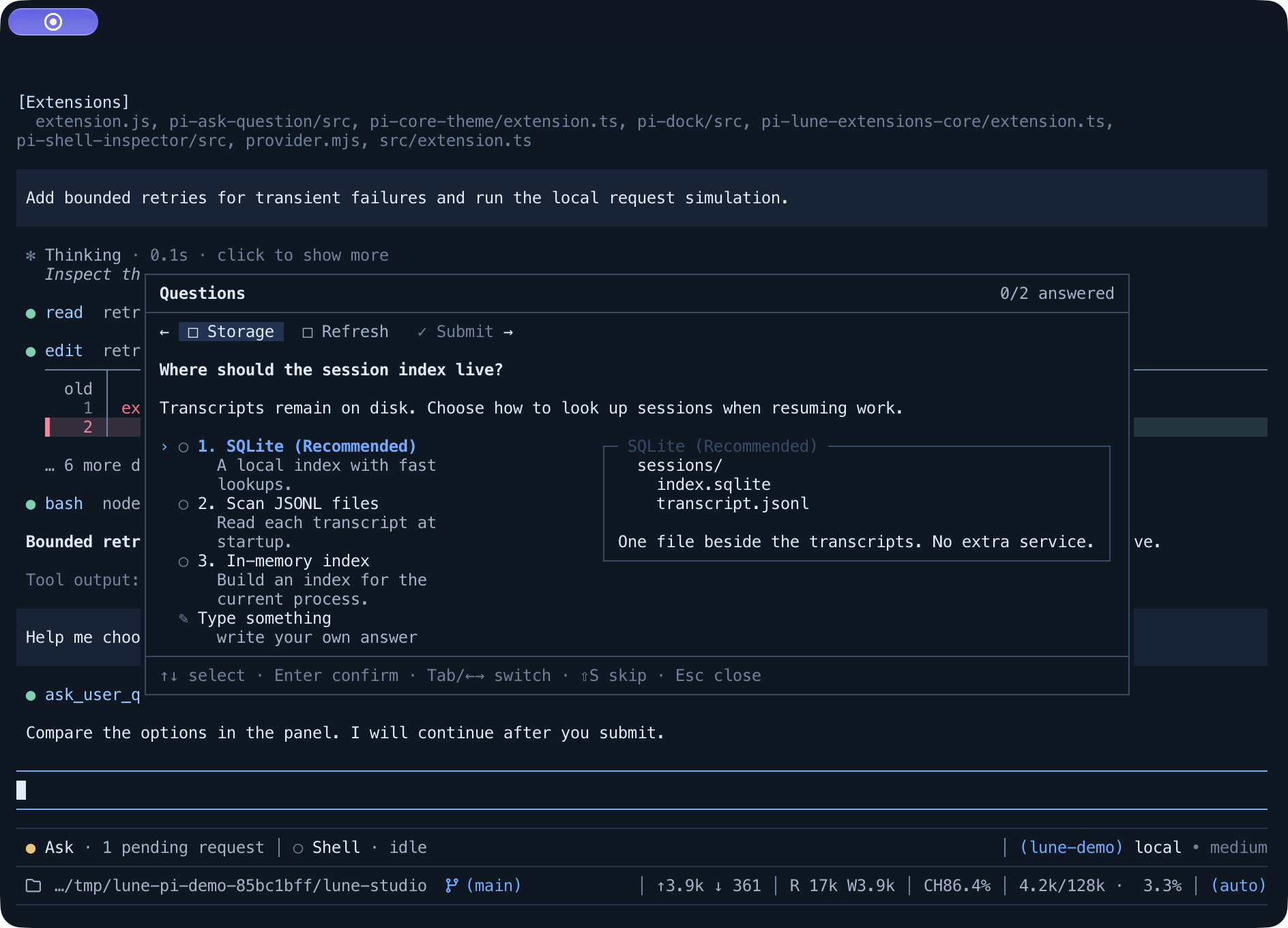
Structured questions for Pi: the model asks, the panel opens, and your answer reaches it when you are ready.
ask_user_questions is for the decisions the model should not make on its own. Asking is asynchronous: the question waits in the session while the model keeps working on everything that does not depend on it, and your answer - or a skip - arrives back as a message that resumes it. Read the panel, take your time, and answer when you get to it.
Quick start
Install from npm:
pi install npm:@lune_99/pi-ask-question
Then start Pi normally:
pi
What it does
- Asks without stopping the turn. The panel opens over the session the moment a decision is needed, and the model carries on with the parts that do not depend on the answer instead of waiting for you.
- Brings the answer back into the session. Answering or skipping adds a
Questions answeredorQuestions skippedrow to the transcript and resumes the model from there. - A question waits as long as you need.
Esccloses the panel without settling anything: a dock below the editor says a question is still pending, and/questionreopens it with the focused row and your drafts intact. - Survives a restart. A pending question and what you had written come back after
/reload,/resumeor/tree. - Compares options before answering. An option can carry a Markdown preview - a diff, a config block, a mockup - in a pane beside the options, side by side on a wide terminal and stacked under them on a narrow one. A preview is only for you: it never becomes the answer.
- Only as tall as its content. A short question covers as little of the transcript as possible; a long one scrolls, with the tab strip pinned above the body. While you are writing an answer, the body scrolls with you to keep the whole input box - and its cursor - in view instead of clipping the newest lines.
Panel
| Key | |
|---|---|
↑ ↓, k j |
Move between option rows |
Enter |
Confirm the focused row - on a submit row it submits |
Space |
Toggle the focused option in a multi-select question |
1–9 |
Pick an option by number |
Tab, ⇧Tab, ← → |
Switch question tabs and the ✓ Submit tab |
Any printable key except ⇧S on Type something |
Open the answer editor with that key |
Enter in the editor |
Submit the written answer |
Esc in the editor |
Back to the options, keeping the draft |
Esc |
Close the panel and leave the request pending |
⇧S |
Skip the whole request; inside the editor S is text, so leave it with Esc first |
A single-question request submits on the option press. Several questions walk through their tabs and meet on the ✓ Submit tab, and submitting with a gap jumps to the first unanswered question instead of doing nothing.
Skip is Shift+S, so a plain s stays available as the first letter of an answer; on a Type something row, an answer that starts with a capital S starts with Enter instead.
In pi's fullscreen mode the panel also takes the mouse:
| Mouse | |
|---|---|
| Click a tab | Switch question tabs |
| Click in the editor | Move the cursor |
| Wheel over the preview | Scroll the preview |
| Wheel elsewhere | Scroll the body, including a long question or displayText |
Option rows stay keyboard-only - a click neither focuses nor confirms one - and a press that hits no tab or editor is left to pi's text selection, so the panel's text can still be copied. Regular mode keeps the terminal's own mouse handling, and every action above also has a key.
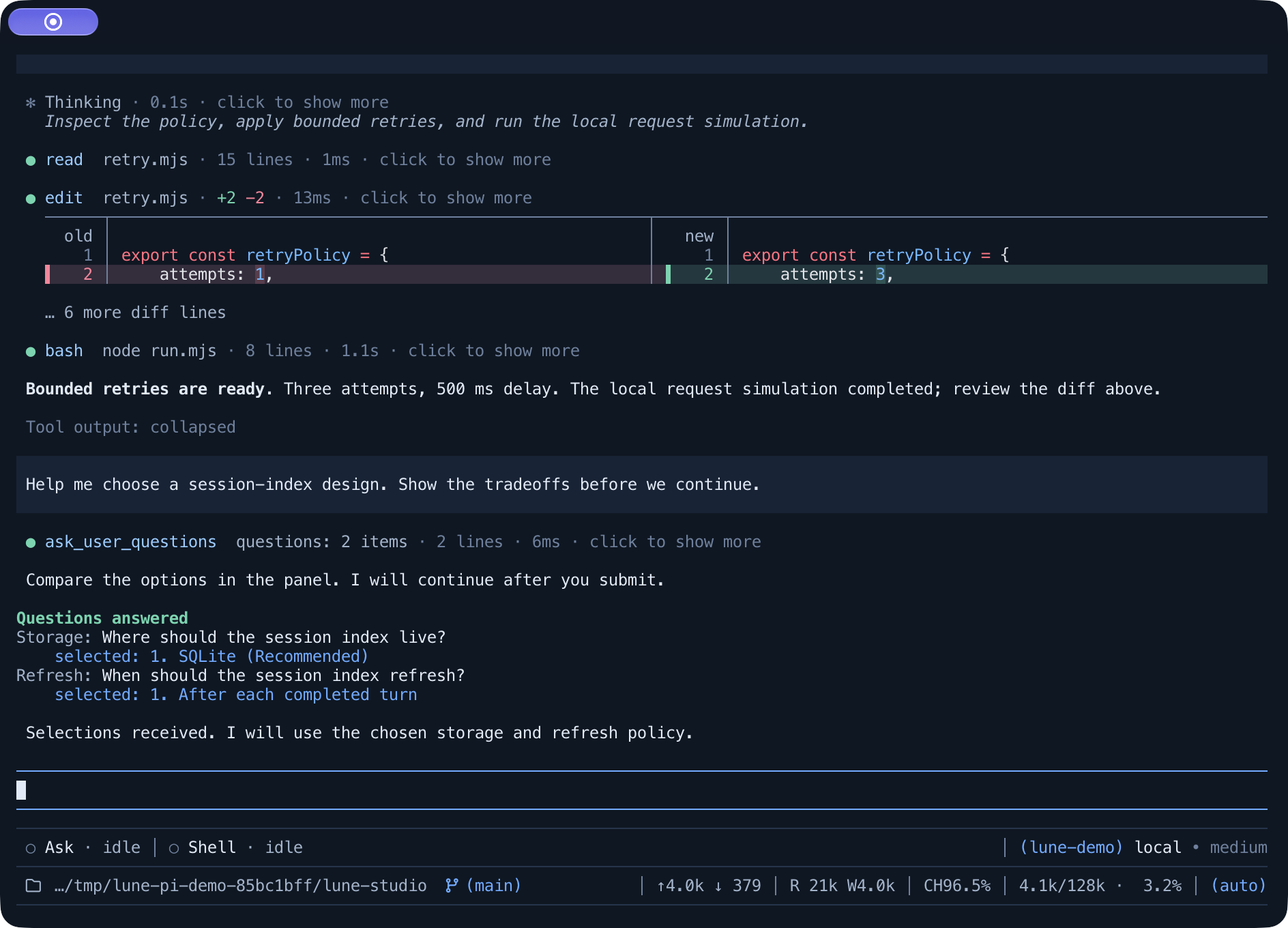
Answers land in the transcript and resume the model:
Pending questions
Esc is a defer, not a dismissal: the panel closes, the request stays pending, and the dock under the editor says which question /question would show next.
With the optional Lune Dock host active, this independent row is replaced by a shared one-line dock. Press Down in an empty main editor, select a module with Left/Right, and press Enter to open its panel directly. Closing the panel returns to dock focus. The plugin publishes its own single-line base, detail, and full Components through the Dock protocol in @lune_99/pi-lune-extensions-core/dock; /dock controls density, visibility and order. Idle state remains available in the shared Dock, and hiding the plugin keeps its snapshots current. Removing the host restores the independent row.

A question that just arrived surfaces immediately, while one you only deferred waits its turn. A request that arrives while a panel is open does not need /question: answering the current one hands the panel over to the next.
Development
npm install
npm test
npm run typecheck
npm run tui:demo                # real pi TUI, scripted model, one question
LAQ_DEMO=two npm run tui:demo   # queue a second request to watch the handover
LAQ_DEMO=multi npm run tui:demo # one request with three questions, to watch the tabs
npm run docs:images             # regenerate docs/*.svg + docs/*.png (needs rsvg-convert)
@earendil-works/pi-coding-agent, @earendil-works/pi-tui, and typebox are supplied by the Pi host at runtime, so the package declares them as peerDependencies with a "*" range and never bundles them. They are repeated in devDependencies so local typecheck and tests resolve the same modules Pi injects.
The Dock contribution comes from @lune_99/pi-lune-extensions-core/dock. Core is a required runtime dependency (@lune_99/pi-lune-extensions-core@^0.1.0 from npm); no sibling checkout or local build is needed. The optional Dock host is separate: without a compatible host, the plugin keeps its independent status bar.
License
MIT
Lune Dock can be toggled with /dock. Turning it off immediately restores this plugin's
independent status bar. The choice belongs to Lune Dock and is saved in
~/.pi/agent/lune-settings/pi-dock.json (following PI_CODING_AGENT_DIR; a project can
override it in <project>/.pi/lune-settings/pi-dock.json).