@lglen/pi-parse-commands1.3.2
Split dense chained bash commands into a numbered breakdown box below the tool call
Untested on omp
This is a pi package. No one has reported whether it works on omp yet. If you try it, add your result below.
Reports 0
No reports yet.
Readme
Pi Parse Commands



A pi coding agent extension that lists every command in a chained bash tool call.
Problem
Agents often emit dense one-liners like:
cd /repo && rg -c "foo" out.json; rg -c "bar" out.json; rg -c "baz" out.json && node -e "..."
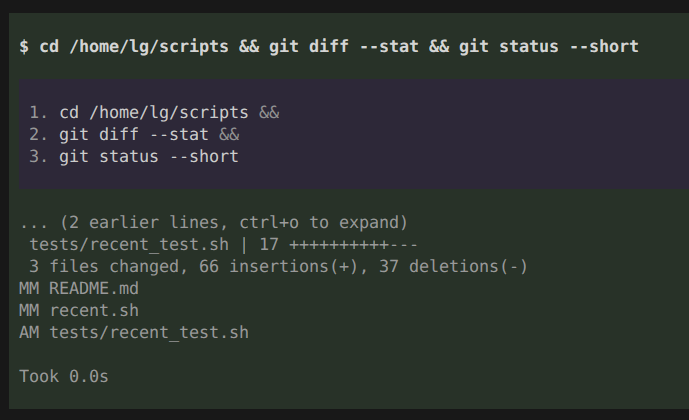
The default renderer prints that as a single long line, so it is hard to tell which commands actually ran. This extension keeps the normal command line and adds a nested box below it with one line per command:
$ cd /repo && rg -c "foo" out.json; rg -c "bar" out.json; rg -c "baz" out.json && node -e "..."

  1. cd /repo &&
  2. rg -c "foo" out.json ;
  3. rg -c "bar" out.json ;
  4. rg -c "baz" out.json &&
  5. node -e "..."
The breakdown box uses a slightly different background color so it reads as an inset annotation rather than tool output. Configured command names are highlighted in the breakdown and command line.
What it splits on
By default the breakdown splits on the main command-list operators plus newlines:
&&,||,;, and newlines
The pipe and background operators are opt-in through the separators config:
|&,|,&
It does not split inside:
- single quotes (
'a && b') - double quotes (
"a; b") - escaped separators (
a\;b) - comments (
echo a # not; a; command) - redirections (
2>&1,>&2,&>file)
Here-documents are recognized, so an embedded Python, Node, or bash program is
not split into one bogus command per line. The body up to the terminator stays
part of the command that opened it, and a multi-line segment is collapsed in the
box to its first line plus a … (+N lines) marker so the body is not reprinted.
Command substitution $(...) and case statements are parsed naively:
separators inside them are treated as command boundaries. This is usually fine
for a quick overview.
Installation
Install from npm with pi:
pi install npm:@lglen/pi-parse-commands
Or straight from GitHub:
pi install git:github.com/LaishGlenberg/pi-parse-commands
Pi loads index.ts through the package manifest in package.json.
Command highlighting
Create a config directory at ~/.pi/agent/extensions/pi-parse-commands-config/ and add one of
config.jsonc, config.json, config.yaml, or config.yml (the first file found is
used). JSONC supports comments and trailing commas:
{
  // 0 = green, 1 = yellow, 2 = orange, 3 = red
  "commands": {
    "node": 1,
    "rm": 3,
    "rg": 2
  },
  // List operators that start a new breakdown line.
  // Defaults to the three below; add any of "|&", "|", "&" to opt in.
  "separators": ["&&", "||", ";"]
}
The YAML equivalent is:
commands:
  node: 1
  rm: 3
  rg: 2
separators: ["&&", "||", ";"]
When a newer version adds a top-level option, run /parse-commands config to bring an existing
config up to date: it inserts the missing option with its default (keeping comments) and
writes a .bak backup first. Nothing is migrated or written automatically on load; a
malformed config is left untouched unless you confirm the regenerate prompt.
Slash commands
Run /parse-commands in the TUI to control the extension at runtime:
| Command | Effect |
|---|---|
/parse-commands on |
Enable the command breakdown for this session |
/parse-commands off |
Disable it for this session and restore the built-in command line |
/parse-commands config |
Create, upgrade, or regenerate the config file |
on/off are session-scoped: they flip a runtime flag and reset to on the next time
pi starts.
/parse-commands config manages the config file from the TUI. With no config it writes the default
template to config.jsonc; with a config that predates a newer top-level option it inserts
the option in place (keeping comments) and writes a .bak backup; with a current config it
reports it is up to date and offers to regenerate it from the default. A malformed config is
never overwritten unless you confirm that prompt. Changes take effect immediately, and the
command is TUI-only. The command completes on, off, and config as you type.
Behavior
The extension overrides only the rendering of the built-in bash tool. Execution, output truncation, timing, and the expanded result view are unchanged.
Development
Requirements: Node.js 22.19 or newer and npm.
npm install
npm test
npm run typecheck
npm run lint
See docs/development.md for parser details, test strategy, and release steps.
Changelog
See CHANGELOG.md.
License
MIT.