@kazda01/pi-tab-status0.2.1
Live Pi status and short AI-generated descriptions for terminal tabs, sessions, tmux, herdr, and zellij.
Untested on omp
This is a pi package. No one has reported whether it works on omp yet. If you try it, add your result below.
Reports 0
No reports yet.
Readme
@kazda01/pi-tab-status



Live Pi status in your terminal title, with an optional short description shared across Pi and supported terminal multiplexers.
π                   # idle
π ⠹ Package Tests   # working
π ? Package Tests   # waiting for an answer
π ✓ Package Tests   # done
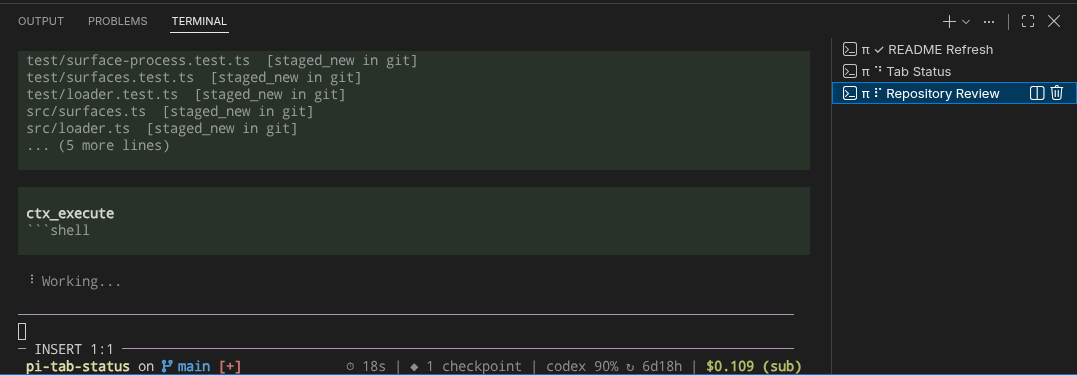
Multiple Pi sessions in VS Code's integrated terminal, each named after its current task.
Why this extension?
Pi has many extensions for terminal titles, session naming, and status indicators, but none matched the way I wanted to work. I wanted one extension that combined:
- a short description of the current task
- an at-a-glance status indicator
- an animated loader while Pi is working
- full customization without editing the extension itself
pi-tab-status brings those pieces together in one compact terminal title while also keeping Pi and supported multiplexer names in sync.
Highlights
- Clear idle, working, asking, and done states with an animated working loader
- Keeps working while background
pi-subagentsruns (including reviewers) are active - Compact default title with a two-word session description
- Configurable templates, icons, loader presets, and custom loader frames
- Explicit description-model selection—never silently uses Pi's active model
- Automatic naming for the Pi session, tmux, herdr, and zellij
- Protection for names changed manually during the session
- Global and project settings through
@juanibiapina/pi-extension-settings - Branch-aware description persistence
Installation
Install the settings extension first and then pi-tab-status:
pi install npm:@juanibiapina/pi-extension-settings
pi install npm:@kazda01/pi-tab-status
Keep the packages in that order in Pi's packages array:
{
  "packages": [
    "npm:@juanibiapina/pi-extension-settings",
    "npm:@kazda01/pi-tab-status"
  ]
}
Quick setup
Open the centralized settings screen:
/extension-settings
Select pi-tab-status, then configure Description model with a provider/modelId available to your Pi installation.
For project-specific settings, use:
/extension-settings-local
No description model is selected by default. If descriptions are enabled without an available, authenticated model, pi-tab-status reports an error. It does not fall back to the active model, which could be unexpectedly expensive.
Default title
The default title contains only:
- the Pi symbol,
π - a loader or status icon while Pi is active
- a two-word description
Its template is:
π{{#indicator}} {{indicator}} {{description}}{{/indicator}}
While idle, indicator is empty, so the conditional part is hidden and the title is simply π.
Configuration
The settings UI is the easiest way to configure the extension:
| Command | Scope | Storage |
|---|---|---|
/extension-settings |
Global | ~/.pi/agent/settings-extensions.json |
/extension-settings-local |
Current project | .pi/settings-extensions.json |
Changes are loaded before the next prompt. Run /tab-status reload to apply them immediately.
JSON configuration
You can also configure pi-tab-status directly with JSON.
Global configuration:
${XDG_CONFIG_HOME:-~/.config}/pi-tab-status/config.json
Trusted project override:
.pi/pi-tab-status.json
Settings are merged in this order, with later values taking precedence:
- built-in defaults
- global pi-tab-status JSON
- trusted project pi-tab-status JSON
- global centralized settings
- trusted project centralized settings
Defaults
{
  "enabled": true,
  "titleTemplate": "π{{#indicator}} {{indicator}} {{description}}{{/indicator}}",
  "titleMaxLength": 80,
  "shutdownTitle": "π",
  "loader": {
    "preset": "braille",
    "frames": [],
    "intervalMs": 75
  },
  "icons": {
    "idle": "",
    "working": "",
    "asking": "?",
    "done": "✓"
  },
  "description": {
    "wordCount": 2,
    "model": "",
    "refreshEveryPrompts": 3
  }
}
Template syntax
Templates support variables and conditional sections.
Variables
Insert a value with {{name}}:
| Variable | Value |
|---|---|
{{state}} |
idle, working, asking, or done |
{{loader}} |
Current loader frame while working; empty otherwise |
{{statusIcon}} |
Configured static icon for the current state |
{{indicator}} |
Loader while working; otherwise statusIcon |
{{description}} |
Generated short description |
For example:
Pi: {{state}} — {{description}}
Conditional sections
Use {{#name}}...{{/name}} to show content only when that variable is non-empty:
{{#description}} — {{description}}{{/description}}
The default template uses an indicator section:
π{{#indicator}} {{indicator}} {{description}}{{/indicator}}
This means “always show π; append the indicator and description only when an indicator exists.” Sections cannot be nested.
A template containing {{description}} enables description generation, even when that variable appears inside a conditional section. Remove all description references to disable model calls and multiplexer naming completely.
Invalid variables or malformed sections are reported when configuration is loaded.
Loaders
Available presets:
brailledotslinebouncepulsenone
A non-empty loader.frames array replaces the selected preset:
{
  "loader": {
    "preset": "none",
    "frames": ["·", "•", "●", "•"],
    "intervalMs": 120
  }
}
Loader animation affects only the terminal title. It does not replace Pi's inline working indicator.
When pi-subagents is installed, the working state covers both the parent agent and its background runs. The done icon appears only after the parent settles and no subagent remains active. This optional integration uses lifecycle events and read-only status queries to restore activity after reload; it adds no polling or model calls.
Descriptions
| Setting | Meaning |
|---|---|
wordCount |
Requested length from 1 to 12 words; extra words are discarded |
model |
One provider/modelId; model IDs may contain additional slashes |
refreshEveryPrompts |
Regenerate every N prompts; 0 means generate only once |
Any syntactically valid provider/modelId is accepted. Model availability and authentication are determined by the user's Pi configuration.
The extension sends the selected model a small, internally bounded window of recent user prompts. Credentials are resolved by Pi and are never stored by this package.
Commands
| Command | Action |
|---|---|
/extension-settings |
Configure global pi-tab-status settings |
/extension-settings-local |
Configure settings for the current project |
/tab-status |
Show state, model, description, and detected surfaces |
/tab-status status |
Show state, model, description, and detected surfaces |
/tab-status reload |
Reload global and trusted project configuration |
/tab-status preview |
Preview every state without running an animation |
/tab-status regenerate |
Regenerate the description from the current branch |
Multiplexer behavior
When descriptions are enabled, pi-tab-status automatically names:
- the Pi session
- the current tmux window, targeted through
TMUX_PANE - the current herdr pane and tab
- the current zellij pane and tab
Only description changes invoke multiplexer commands; loader frames never spawn subprocesses. Missing multiplexers and command failures are non-fatal.
If a managed name is changed externally, pi-tab-status leaves that surface alone for the rest of the session.
Development
Requires Node.js 22.19 or newer.
npm install
npm test
npm run typecheck
npm run test:coverage
npm run pack:check
npm run check
npm run check runs typechecking, tests with coverage, the Pi load smoke test, and npm pack --dry-run.
CI enforces at least 90% coverage for statements, branches, functions, and lines.
To verify package loading manually:
pi --no-extensions \
  -e ./node_modules/@juanibiapina/pi-extension-settings \
  -e . \
  --list-models
Acknowledgements
The multiplexer support and configuration approach were inspired by @normful/pi-auto-name.