@justar_96/pi-telecom0.5.0
Telecom for pi: parallel pi agents in the same project see each other, talk, claim work, and get told when a peer changes a file they depend on.
Untested on omp
This is a pi package. No one has reported whether it works on omp yet. If you try it, add your result below.
Reports 0
No reports yet.
Readme
pi-telecom


A pi extension that connects pi sessions working in the same repository.
Each session gets a callsign and publishes what it is doing. The model is told who else is working, on what, which paths are claimed, and which files a peer just changed. Telecom also stops an edit that would overwrite a peer's change the agent hasn't read, and lets agents message and ask each other. Sessions in different git worktrees of one repository are one team, and subagents started with pi-subagents are grouped with their parent.
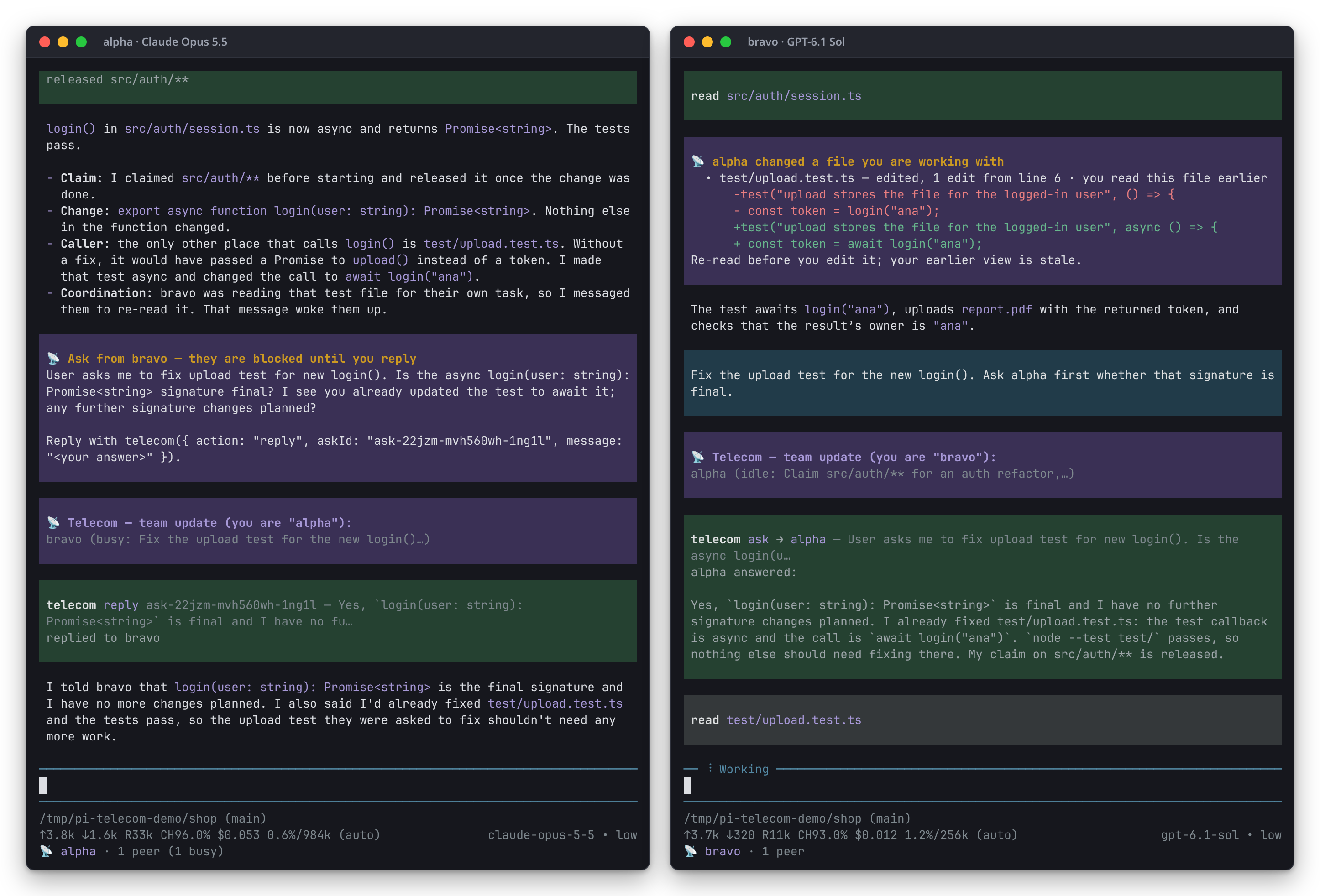
Two pi sessions in one repository: alpha on Claude Opus 5.5, bravo on GPT-6.1 Sol. alpha made
login() async and fixed the test that calls it. bravo had read that test, so it got a change
notice with alpha's diff. Asked to fix the test, bravo asked alpha first, and alpha answered.
Captured with npm run screenshots.
Quick start
pi install npm:@justar_96/pi-telecom
Open two or more pi sessions in the same repository. They find each other through a shared
directory on this machine; there is no server, port or configuration. /telecom shows the team,
and /telecom help lists the other commands. The footer shows this session's callsign, its
peers, and any ask waiting on it:
📡 bravo · 1 peer (1 busy) · 1 claim · 1 ask waiting
Other ways to install:
pi -e npm:@justar_96/pi-telecom                # for one session, without installing
pi install -l npm:@justar_96/pi-telecom        # for one project (loads once the project is trusted)
pi install npm:@justar_96/pi-telecom@0.4.0     # a pinned version
pi install git:github.com/Justar96/pi-telecom  # from GitHub
Requires pi 1.3 or later and Node 22.6 or later, on Linux, macOS or Windows. Use a newer Node version when required by your pi installation.
What the model receives
A team brief at the start of a prompt when other agents are live. The first one describes them:
📡 Telecom — you are "bravo". 1 other agent is working in this project right now:
• alpha [busy] on main  id 3f2a9c1e
    task: refactor the auth module (2m ago)
    claims: src/auth/** — refactor
    recently changed: src/auth/session.ts (1m ago)
Stay out of their claimed paths, re-read files they changed before editing, and use the telecom tool to coordinate when your work overlaps theirs.
Later briefs list only what changed, and nothing is sent when nothing changed:
📡 Telecom — team update (you are "bravo"):
• alpha is now on: write the session migration
• alpha released src/auth/**
A change notice when a peer edits a file this agent is working with:
📡 alpha changed a file you are working with
  • src/auth/session.ts — edited, 1 edit from line 1 · you read this file earlier
      -export function login(user) {
      +export async function login(user) {
Re-read before you edit it; your earlier view is stale.
A refusal when the agent tries to overwrite a peer's change it hasn't read:
telecom: alpha edited shared.txt 5s ago, after you last read it. Re-read shared.txt and re-apply
your change on top of theirs (prefer `edit` over a whole-file `write`). If you must coordinate,
telecom({ action: "ask", to: "alpha", message: "…" }).
Features
Callsigns and presence
Each session gets a callsign: the first free word of alpha, bravo, charlie, … in the
repository. It is kept across a resume, and /telecom name ops changes it. Each session
publishes:
- busy or idle, and its task: one set with
statusor/telecom run, else the first line of its latest prompt. A one-word prompt ("continue") never becomes the task, a task set withstatusis replaced only by a prompt of 10 words or more, not by a short reply, and a short question ("you tested?") replaces no task; - its checkout and git branch;
- how long it has been idle, or, inside one long tool call, which tool and for how long
(
bravo [busy · bash 14m]on the board). A message to such a peer says it waits for that call to end; - its claims and locks, its place in line for a lock, and whom it says it is waiting for;
- the last 12 files it changed through pi's
editandwritetools; - the sessions its open asks are waiting on.
Team briefs
The brief is added at the start of a prompt. The first one describes every peer. After that, a
brief lists only changes: a peer joined or left, changed its callsign or task, claimed or released
a path, or moved to another worktree or branch. A peer editing files is not listed; change notices
cover that. With no peers, or no changes, nothing is added. A full brief is sent again only after
a compaction or a callsign change, since the first one and every update since are still in the
context. An agent that has no task yet (it was put to work by a peer's message) is reminded in its
full brief to set one with status.
If a teammate joins or leaves while an agent is in a run, the agent hears it during the run as a
short team update, and its next brief doesn't repeat it. An idle agent is not woken for this; it
gets the news in its next brief. The human's notices name who joined and who left
(📡 bravo left; foxtrot joined). A record missing from one refresh (a cleaned runtime directory,
for example) is not a departure, in the notices or in briefs: a peer counts as gone after it is
missing twice in a row, or at once when its process has exited or it left on purpose
(/telecom off, /new).
With more than three other agents (subagents not counted), a brief describes only the peers near this agent's work, at most six. A peer is near when it changed a file this agent is working with, holds a claim that covers such a file or overlaps one of this agent's claims, has the same parent session, or has exchanged messages with this agent. The other peers share one roster line:
Also here, not near your work so far: charlie [busy] the api layer (claims src/api); echo [busy] the build
In later briefs, task changes and new claims of peers that are not near are left out. The edit
guard still stops an edit inside their claims. Joins, departures, callsign changes, and releases
of claims the agent was told about are always listed. When a peer becomes near, it is described
once (• now working near you: echo …), and changes that were left out while it was not near
are listed then.
Change notices
A notice is sent when a peer edits a file this agent read in the last hour, a file it edited, or a file inside one of its claims. It includes the first changed lines.
- Edits by one peer within about a second are combined into one notice.
- A file produces one notice until the agent reads it again.
- Files read before a compaction produce no notices, since their content is no longer in context. The edit guard still checks them.
- A busy agent receives the notice before its next step. An idle agent sees it with its next prompt. A notice never starts a turn.
The edit guard
The guard checks edit and write calls against changes made by peers through their own edit
and write tools. It does not track changes made by bash (formatters, sed -i, git checkout) or by an editor. With no peers and no peer history for a file, it does nothing.
| Situation | standard (default) |
strict |
off |
|---|---|---|---|
write over a peer's change the agent hasn't read |
blocked until the agent re-reads the file | blocked | allowed |
edit over a peer's change the agent hasn't read |
allowed, with a ⚠ note | blocked | allowed |
write after an edit that was applied over an unread peer change |
blocked until the agent re-reads the file | blocked | allowed |
| editing inside a peer's claim | blocked once and the owner is told; a retry within 10 minutes goes through | blocked | allowed |
| editing inside a claim whose owner hasn't checked in for 45 s | allowed, with a ⚠ note | allowed, with a ⚠ note | allowed |
| editing this checkout's copy of a file inside a claim made in another worktree | allowed, with a ⚠ note; the owner is told | allowed, with a ⚠ note; the owner is told | allowed |
| editing a file that a peer in another worktree also changed in its copy | allowed, with a ⚠ note, once per peer and file | allowed, with a ⚠ note, once per peer and file | allowed |
| a subagent editing inside its parent's claim, or a parent inside its subagent's | allowed | allowed | allowed |
A refusal states what happened and what to do next, including the exact telecom call when one
helps. If the same unread change blocks a write twice, the third attempt is allowed with a ⚠
note, so an agent cannot be blocked indefinitely.
Claims
An agent reserves paths before a larger change:
telecom({ action: "claim", paths: ["src/auth/**"], message: "refactor" })
Patterns are project-relative paths or globs (src/auth, src/**/*.test.ts, src/{api,db}/**).
An absolute path into a worktree of the repository is claimed as the same repository path, so it
binds in every checkout the agent works in. A path outside the repository can't be claimed; the
rest of the call is granted, and the result says how to tell peers instead.
A path that overlaps a peer's claim in the same checkout is not claimed: the rest of the call is
granted, and the result names the owner to ask. Overlaps with a claim in another worktree are
allowed, with a note, and a subagent may claim part of its parent's claim.
A claim ends when it is released, when its session ends, or after 2 hours without an edit inside
it, in any checkout the agent works in (PI_TELECOM_CLAIM_TTL_MIN). When a claim ends, peers that
were held back by it are told.
Locks and waits
Some shared things are not files: the build directory, the test runner, a port. Claim them by
name with an @:
telecom({ action: "claim", paths: ["@cargo"], message: "release build" })
A lock matches no file and is shared by every worktree of the repository. If someone holds it,
the claim is refused with the holder, since when, its state, and the call to queue: add
queue: true to wait in line. When the lock frees (released, its holder left, or it expired), the
first agent in line gets it and is woken (📡 @cargo is yours now (charlie released it)). Two
agents taking a free lock at the same moment settle on the earlier claim; the other goes back to
its place at the front of the line, and is told if it already thought the lock was its own.
Edits don't renew a lock, so claim it again within the claim TTL to keep it (once it has expired,
claiming it again is a new claim), and release it when done. To claim a path that starts with @, write it as ./@….
An agent blocked on a teammate says so:
telecom({ action: "status", message: "waiting for the green run", waitingFor: ["charlie"] })
It is woken when charlie finishes a run, takes up a new task, or leaves, and the wait ends when
charlie messages it. A status set without waitingFor clears it. The board lists locks with their
queues (@cargo — charlie (queue: echo, bravo)), shows who waits for whom, and flags agents
waiting on each other in a cycle; each agent on a cycle is told once.
Team log
Telecom keeps a short history for each repository: who joined and left, task changes, broadcasts,
claims and releases, and who took a lock from the line after whom. A session that joins late, or whose context was compacted, can read what was
decided without opening other agents' transcripts. Agents call telecom({ action: "log" }),
optionally with paths to see only entries about those files, and a full brief points to it when
teammates have logged. Humans run /telecom log. Direct messages, asks and answers are private
and never logged. A session that has left stays in the log for 24 hours.
Worktrees
Sessions in the main checkout and in git worktrees of the same repository (checkouts that share a git common directory) are one team. Callsigns are unique across the repository, and the board shows each session's checkout:
• bravo [idle] on lane-b in worktree /home/me/repo-lane id 9d41c07a
Each checkout has its own files, so a peer's edit in another worktree doesn't make this agent's copy stale, and the guard doesn't block it. Two cases are reported because the changes will meet when the branches merge:
- If a peer in another worktree edits a file this agent also changed in its own checkout, the agent gets one notice, and the peer gets a ⚠ note on its edit.
- A claim made in another worktree is advisory for this checkout's copy of those files: the edit goes through with a ⚠ note, and the owner is told once the edit has succeeded (at most once every 10 minutes per file).
An edit that reaches into another checkout's own files, through an absolute path or a worktree nested inside the main checkout, is treated like an edit in that checkout: claims bind and the guard checks it. A submodule is its own repository, and a folder outside git is its own project.
Checkouts are told apart by where the edited files are, not by where each session started. If every agent starts in the main checkout and works in a worktree of its own, each agent's edits are compared as edits in that worktree. A claim binds an edit in the worktree its owner works in (where its recent edits landed), and the board shows that worktree and its branch.
Subagents
Subagents started with pi-subagents are recognized
in both modes. A foreground subagent runs inside the parent's pi process and is found through its
session header. A background subagent runs in a separate runner process and is found through the
runner's PI_SUBAGENT_* environment variables. Processes started from inside a subagent, such as a
test suite or another pi, are not counted as subagents.
- Names. A subagent is named after its parent:
alpha-1,alpha-2, …. It ignores aPI_TELECOM_CALLSIGNinherited from the parent. The board lists it under its parent as(subagent of alpha). - Briefs. Subagents don't produce join or leave notices. In other agents' briefs they are shown inside their parent's entry, with their claims. A parent gets no brief about its own subagents, and a subagent gets none about its parent. Sibling subagents see each other.
- Claims. A subagent is not held back by its parent's claims, or a parent by its subagent's. Siblings hold each other back like any two peers.
- Asks to a blocked parent. A parent is blocked while its foreground subagent runs, so an
askto that parent, or to a foreground ancestor further up, is refused at once. The refusal suggests deciding without an answer, or pi-subagents'contact_supervisor. - Leaving. A subagent record that stays silent for 5 minutes while another session in the same process keeps checking in is removed.
Background subagents load the installed extensions, so they load telecom. Foreground subagents
load only the extensions their agent lists. To load telecom in every subagent, add it to the pi
settings (~/.pi/agent/settings.json):
{
  "subagents": {
    "defaultSubagentOnlyExtensions": ["~/.pi/agent/npm/node_modules/@justar_96/pi-telecom/src/index.ts"]
  }
}
Or list it under subagentOnlyExtensions in one agent's definition. Each subagent with telecom
pays the tool's fixed prompt cost (about 950 tokens, cached), so read-only subagents may not need
it.
Messaging
The telecom tool:
| action | parameters | what it does |
|---|---|---|
board |
scope? |
Lists the agents in this repository: state, task, claims, recent changes, and asks waiting on this agent. scope: "machine" lists every agent on the machine. |
send |
to or paths, message |
Sends a message to one agent. Starts a turn if the agent is idle (see the wake limit below). |
ask |
to or paths, message, timeoutSec?, wait? |
Sends a question and waits for the answer (default 300 s, at most 1 h). An answer that arrives after the wait ended is delivered as a message. With wait: false it returns at once, and the answer arrives later as a message (see below). |
reply |
message, askId? |
Answers an inbound ask. askId can be omitted when only one ask is waiting. |
broadcast |
message, paths?, scope? |
Sends a message to every agent in the repository. Never starts a turn. |
status |
message, waitingFor? |
Sets the task peers see, and whom this agent waits for. |
claim |
paths, message?, queue? |
Reserves paths or globs, or takes @name locks; queue: true waits in line for a held lock. |
release |
paths? |
Releases those claims, or all of them, and leaves the line for a lock. Releasing nothing is a no-op. |
log |
paths? |
The team's recent history in this repository (see Team log). |
to is a callsign, session name or id as the board shows it.
send and ask by path. With paths instead of to, the message goes to the agent that
claims those paths: one in this checkout first, then one in another worktree. If nobody claims
them, it goes to the agent that most recently changed a file there. If several agents claim them,
or nobody claimed or changed them, the call is refused with the candidates and the call to use:
telecom({ action: "ask", paths: ["src/db/**"], message: "Is users.email unique?" })
broadcast with paths. Agents that read, changed or claim a file under paths receive the
broadcast right away. The others receive it when their next run starts, not during their current
one. A broadcast without paths goes to everyone right away.
Delivery rules:
- Wake limit. Direct messages and late answers start at most 6 turns per minute per agent
(
PI_TELECOM_MAX_WAKES). Beyond that, they arrive without starting a turn. Messages steered into a busy session do not use this allowance. Explicit tasks from/telecom runbypass it. - Messages during an ask. While an ask waits on a peer, messages from that peer are held and shown in the ask's result ahead of the answer, in the order sent, so a newer answer is never read before an older message. If the ask ends without an answer, they are delivered as usual.
- Asks that don't wait.
askwithwait: falsedelivers the question and returns at once. The answer arrives later as a message that starts a turn. If none comes withintimeoutSec(default 1800 s, at most 3600 s), the asker gets a notice that starts no turn, also after a/reload; a later answer still arrives. Use it for "tell me when your job is done" instead of a long timeout or a polling loop. Such an ask creates no wait-for edge and never interrupts the receiver's own wait. - Asks always start a turn, since the asker is waiting. An agent about to stop with an unanswered ask is reminded once.
- Wait cycles. Each agent publishes which sessions its asks are waiting on. An ask to an agent
that is itself waiting interrupts that wait only if it closes a cycle: the two agents ask each
other, or alpha waits on bravo, bravo on charlie, and charlie asks alpha. The interrupted agent
sees the question, answers it, and the other asks then complete. Any other ask waits until the
agent's own ask has completed. The board and
sendresults show who is waiting on whom:alpha [busy, waiting on bravo (asked 40s ago)]. - Cycles through a subagent. If alpha is inside a foreground subagent run that waits on bravo, alpha cannot read anything until that run ends. An ask from bravo to alpha is then refused at once, and the refusal names the waiting ask bravo should answer.
- Cancelled asks. Pressing Esc during an ask withdraws it from the peer. If the peer's session ends, the ask fails at once.
- Unresponsive peers. A peer that hasn't checked in for 45 s is shown as
unresponsive. Messages to it wait in its inbox, and its claims don't block anyone.
The /telecom command
/telecom                     the board for this repository
/telecom all                 every agent on this machine
/telecom run <prompt>        start work in every connected session in this repository, including this one
/telecom msg <agent> <text>  message an agent as its human (starts a turn if it's idle)
/telecom broadcast <text>    message every agent in this repository
/telecom off                 disconnect this session and release its claims
/telecom on                  reconnect this session
/telecom name <callsign>     rename this session
/telecom widget              show or hide a live team list above the editor
/telecom release             release every claim this session holds
/telecom log                 the team log for this repository
/telecom help                list the commands, including while telecom is off
In the terminal UI, /telecom and /telecom all open a live board in place of the editor: Tab
switches between this repository and the whole machine, w toggles the widget, the arrow keys
scroll, and Esc closes it. /telecom help opens a command list; Enter runs the selected command,
or puts it in the editor when it takes arguments. Completions after /telecom describe each
command, and /telecom msg lists each agent with its state and task. In RPC mode and other
clients without the terminal UI, the same commands answer with plain text.
The widget lists this agent first, then each teammate with its state, task and claims, subagents
under their parent, and any ask waiting on this agent. Each agent keeps one colour in the widget,
the board, and the transcript, where telecom's own tool calls and peers' messages show as panels
edged in the sender's colour. When telecom is off, the footer reads 📡 off.
To give the whole team a task from one terminal:
/telecom run Review your changes, run the relevant tests, and report any blockers.
The prompt reaches this session and every connected teammate in the repository, including subagents and sibling worktrees. Idle sessions start a turn; busy sessions receive it before their next model step. Multiline prompts keep their formatting. The command reports which sessions received the task and any delivery failures. A session running an older telecom receives it as a human message under that version's wake limit.
/telecom off stops messaging and edit guards in this session, releases its claims, and ends its
pending asks. /telecom on reconnects it. The setting survives reloads and resumes on the current
session branch, and an explicit command overrides PI_TELECOM_DISABLE. Other sessions keep their
own settings. Disconnected sessions do not receive team tasks.
Configuration
Environment variables, read when a session starts or reconnects:
| variable | default | |
|---|---|---|
PI_TELECOM_GUARD |
standard |
strict, standard or off (see the edit guard) |
PI_TELECOM_CALLSIGN |
first free word | a fixed callsign for this session |
PI_TELECOM_ASK_TIMEOUT_MS |
300000 |
default wait for ask (at most 1 h) |
PI_TELECOM_MAX_WAKES |
6 |
automatic peer wake-ups per minute; 0 disables them (asks and /telecom run still wake) |
PI_TELECOM_CLAIM_TTL_MIN |
120 |
minutes without an edit inside a claim before it expires |
PI_TELECOM_DIR |
see How it works | the shared directory |
PI_TELECOM_DISABLE |
unset | 1 starts telecom off; /telecom on or /telecom off overrides it for this session |
Behavior under failure
Prompt cache
Telecom doesn't change the system prompt or the tool definitions while a session runs. Its messages are appended to the end of the conversation, and messages already sent are never rewritten, so the cached prefix of each request stays valid. The tool and its guidelines add about 950 prompt tokens to every session.
Delivery
- A message is removed from the inbox only after it is handled. After a crash it is delivered again, and a duplicate is handled once.
/reloadkeeps the session's presence record and inbox, so peers don't see it leave, and messages sent during the reload wait in the inbox. The new runtime keeps the callsign, claims, task, unanswered inbound asks, and the asks whose answers may still arrive late.- If the same session is open in two pi processes (
pi -cin two terminals), the younger process stops using telecom and its footer shows📡 off (session open elsewhere). - A session whose presence record disappears writes it again within about a second.
Errors
- pi treats a throwing
tool_callhook as a block. Telecom's hooks catch their own errors, report them once, and let the tool run. - Telecom's background loop catches errors in each step, so one failing step doesn't stop the heartbeat or ask timeouts. When pi disposes a session without the usual shutdown, telecom removes its record.
- Data from peers (callsign, name, task, claim notes, paths, event data) is validated, flattened to one line, and length-capped before it reaches a model. Messages are limited to 32 KB of text and 64 KB in total.
How it works
- Team. A session's checkout is the nearest folder above its working directory that contains
.git, or the working directory when there is none. Checkouts that share a git common directory form one repository, and the sessions in one repository form a team.scope: "machine"and/telecom allshow agents in other repositories. - Shared directory.
$XDG_RUNTIME_DIR/pi-telecom, or a directory under the OS temporary folder:pi-telecom-<uid>on Unix,pi-telecom-<user hash>on Windows. It holds one presence record, one inbox and one log file per session. Files are written under a temporary name and then renamed, so a reader never sees a partial file. Unix roots must belong to the user and have mode0700; Windows uses the user's temporary folder and inherited Windows permissions. Temporarily locked messages stay queued, and one file's cleanup failure does not stop the rest of the inbox. - Liveness. A record is live while its process is. On Linux the process start time must also
match, so a reused process id isn't mistaken for a live session; when
/proccan't be read for another reason, the process id alone decides, so a live peer is never taken for dead. Records of exited sessions are removed. Subagents share their host's process, so they are also checked by heartbeat (see Subagents). A suspended process stops all of its sessions at once, so their records are kept. - Paths are compared in canonical form:
@,~and file URLs are expanded, relative paths are resolved against the session's directory, and symlinks and Windows junctions are followed. On macOS and Windows, the OS supplies the spelling of existing paths, keeping aliases together while preserving distinct files on case-sensitive volumes. Windows claims accept/or\, including drive and UNC paths;*stays within a directory and**crosses directories.
Limits
- Only changes made through pi's
editandwritetools are tracked. Changes made by a peer'sbash(git checkout, code generators) produce no notice. - Whether a peer is near this agent's work is judged from the files this agent read or changed and from claims. A peer working on related code in other files is not considered near.
- A broadcast held for an agent's next run is not shown until that run starts.
- Any process running as the same user can write to the inbox, the same trust boundary as the user's files. A peer's message is text written by another model and should be treated that way.
- Checks across worktrees compare paths, not contents: two worktrees changing different parts of one file get a note even when git would merge them cleanly.
Contributing
See AGENTS.md for the development setup, the architecture, the rules the code must
keep, and the release process. Run npm install and npm run check.
The CI workflow runs typechecking, tests and real pi RPC checks on Linux, macOS and Windows with
Node 24 and 26. RPC checks use the locally installed pi package and a local fixture provider;
they need no global pi command, model credentials or network calls.
Credits
The message transport and the ask/reply bookkeeping are derived from
@tinoy/pi-ipc and
@tinoy/pi-ext-lib by
Tinoy Thomas (MIT). Telecom adds the team layer (callsigns, briefs, change notices, claims and the
edit guard), macOS support, the separate reply action, and wait-cycle detection.