@hypercarrier/rarebit0.5.2
Sparse, provenance-bearing conversational evidence recovery for Pi sessions.
Untested on omp
This is a pi package. No one has reported whether it works on omp yet. If you try it, add your result below.
Reports 0
No reports yet.
Readme
Rarebit
Watch the demo
Play the video inline in the release notes · Download the MP4
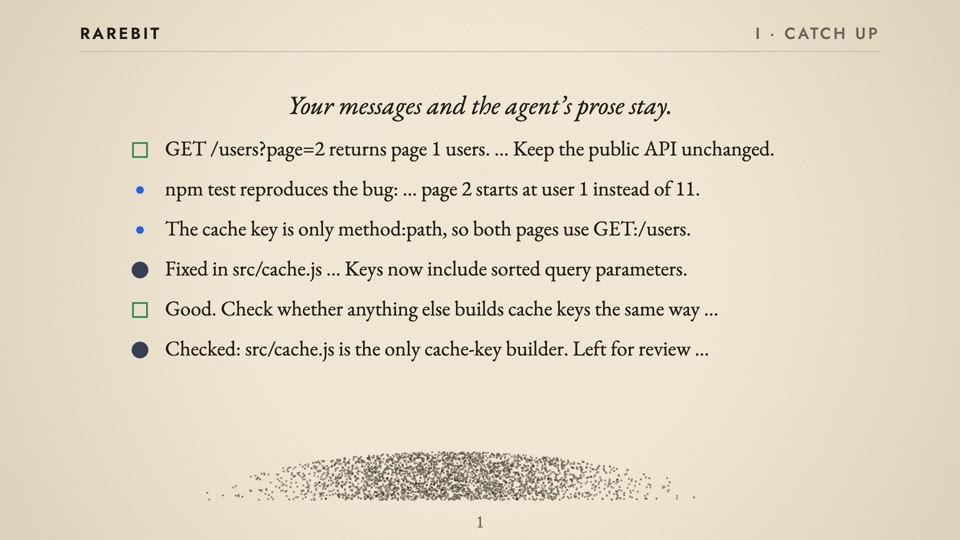
Rarebit helps you catch up on a long Pi session without rereading its tool traffic. It selects original messages from the active branch so you can read the conversation, ask an agent to use it, or start a focused new Session. The original Pi Session stays intact.
Rarebit is public alpha software. Its CLI output, exports, sidecar protocol, and visual language can change.
Start here
Three outcomes cover the useful path:
- Catch up — read selected conversational prose from the active branch.
- Recall — let an agent read that same selection for one request.
- Fork — start a fresh native Pi Session from a bounded newest suffix.
Install Rarebit and make the first deterministic, zero-model extraction:
# In a shell, install the extension in Pi, then restart Pi to load it.
pi install npm:@hypercarrier/rarebit@0.2.0

# Install the CLI in the Node project where you will run it.
npm install @hypercarrier/rarebit@0.2.0
npm exec -- rarebit extract \
  --session /absolute/path/to/session.jsonl --json > selected-prose.json
Replace the example path with an exact Pi Session JSONL path or supported Session
identifier. Pi normally stores Session JSONL below ~/.pi/agent/sessions/.
Open selected-prose.json to catch up on the conversation. Then
choose Recall or Fork when you need an agent request or a fresh Session.
Summary and Title are optional model-derived projections. Recap only displays an existing Summary in the Pi TUI.
The product in one view
long Pi Session
  └─ Distill: selected active-branch prose
       ├─ Catch up: read the conversation through CLI extract or Pi view
       ├─ Recall: let an agent use the selection for one request
       ├─ Fork: start a new native Pi Session from a bounded suffix
       └─ Summary / Title: optional model-derived projections
            └─ Recap: show an existing Summary in the Pi TUI
1. Catch up and distill
Rarebit selects these occurrences from one exact active branch:
- readable user messages;
- assistant prose at a continuation boundary;
- assistant prose at a normal stop boundary.
It excludes tool-call inputs, tool results, hidden reasoning, and transport records. Selection is deterministic. It is not model summarization. Each selected occurrence keeps its source entry, branch position, role, outcome, timestamp when available, and lineage.
Read in the Pi TUI
Use /rarebit view beside CLI extract to read the current Session without a
model call. The command opens a picker. Choose a view directly with
/rarebit view [context|all|peek|off]:
- all reads every Rarebit on the active branch across compactions. Each compaction has a marker. This is the first-toggle default.
- peek reads that same branch while you type in the editor. It stays open on submit. Replies appear when finished. It reserves a fixed seven-row dock; a tall multiline editor can overlap the view.
- context is experimental. The context view filters Pi's own transcript. It depends on how Pi draws the transcript, which Pi does not guarantee for extensions, so a Pi update can disable it. Rarebit then reports that the context view is unavailable on this Pi version; the all and peek views keep working. Context shows only Rarebits after the last compaction; use all to read across compactions. It keeps Pi's compaction summary and Rarebit Recaps visible.
- off restores the normal transcript and removes the view status line.
In all, use j/k or ↑/↓ for lines, u/d or Ctrl+U/Ctrl+D for half pages,
b/Space for pages, and g/G for the ends. Search with / or ?, then repeat
with n/N. Search ignores case unless the query has an uppercase letter. Esc
clears a search before it closes the view; q closes it. Mouse wheel scrolling
requires fullscreen Pi with component mouse-event support. Pi 0.84.2 does not
provide that support; Pi 1.0.0 does. In peek, keyboard input goes to the
editor.
Ctrl+Alt+R toggles the view. Ctrl+Alt+N cycles context → all → peek. The
Ctrl+Super+R/N aliases support terminals that report the Super modifier through
Kitty keyboard sequences. Later toggles reopen the last used view. Extension
shortcuts cannot be rebound in keybindings.json; /rarebit view is the
fallback. Close all before using Ctrl+Alt+G to acknowledge a Recap.
The status line names the active view. The palette's View action opens the picker. Opening the Rarebit palette or settings closes the view. Session replacement, reload, and shutdown reset it to off. Turn it off before changing TUI mode. The views are verified on Pi 0.84.2 and 1.0.0. Other versions use capability checks and can report an unavailable view.
2. Recall for the agent
In Pi, run:
/rarebit recall What decisions and open questions should guide the next turn?
Recall writes a private conversation view and a detailed lineage view, then sends one user-message envelope with your request and both file references. The agent reads those referenced files through its configured model provider. The files are private on local disk, but Rarebit makes no provider-privacy claim; apply your provider's policy. An idle Pi starts one turn. A busy Pi queues one steering message. Recall does not create a durable Recall record or a second follow-up message.
For agent workflows outside the Pi TUI, use the CLI's extract operation. It
is the CLI catch-up interface; there is no CLI recall command:
npm exec -- rarebit extract \
  --session /absolute/path/to/session.jsonl --json > selected-prose.json
Treat that output as sensitive. It contains selected raw prose.
3. Fork as a distilled native fork
Fork creates a new native Pi Session from the newest contiguous suffix of the selected active-branch prose. It does not summarize, deduplicate, or modify the source. It does not start a model turn and does not transfer mutable Team, Task, subscription, or extension state.
In Pi:
/rarebit fork
From a shell, use the exact source Session path or ID:
npm exec -- rarebit fork /absolute/path/to/session.jsonl
npm exec -- rarebit fork /absolute/path/to/session.jsonl \
  --max-token-length 64000 --no-launch --json
The default import budget is 64,000 estimated tokens. Fork keeps whole occurrences in branch order. If the newest occurrence cannot fit, it refuses with an actionable error. The new Session contains machine-readable source lineage and a recovery route. It does not promise complete context transfer.
Use piq to inspect source evidence that the bounded fork omitted:
npm exec -- piq entries --session /absolute/path/to/session.jsonl
PiQ is read-only JSONL output for jq. It does not classify Rarebits, mutate a
Session, invoke a model, or migrate legacy entries.
BTW: side questions while the agent works
/rarebit btw opens a temporary Pi in a Herdr split beside the current pane.
Ask it about the history while the main agent keeps working. The main Session
is unchanged.
/rarebit btw What did we decide about the release version?
/rarebit btw --rarebits --readonly Why did we drop the old schema?
- By default, BTW copies the active branch.
--rarebitscopies only the Rarebit messages, which is cheaper and reaches past compaction. - By default, the side Pi loads extensions and enables the parent's active
tools.
--readonlyenables onlyread,grep,find, andls, and loads no extensions, skills, context files, or MCP servers. - The side Pi uses
rarebit.btw.modelwhen set, for example"btw": { "model": "provider/model:low" }. Otherwise it uses the parent model and thinking level. - A new BTW replaces the earlier BTW pane in the tab. Closing the pane deletes the private snapshot in the OS temp directory.
BTW requires Pi inside Herdr.
4. Summary, Title, and Recap
Summary and Title are optional derivations over the selected evidence. Recap is a presentation of an existing Summary, not a derivation.
- Summary is a lossy, model-derived Session assessment. It can describe what appears finished or needs attention in the selected prose. It is not proof of completed work.
- Title is a mutable label proposal derived from a suitable user message.
- Recap presents the current Summary in the Pi TUI. It reads an existing receipt and does not generate a Summary.
Use the Pi commands for a derivation or presentation:
/rarebit summarize
/rarebit title
/rarebit recap
/rarebit got-it
The CLI exposes the same model operations for an exact Session:
npm exec -- rarebit summarize \
  --session /absolute/path/to/session.jsonl --json --force
npm exec -- rarebit title \
  --session /absolute/path/to/session.jsonl --json
Summary and Title need a configured model. Query, extract, and PiQ inspection do not need a model. Fork creation needs an installed Pi peer and a resolvable target model context, but it does not invoke that model or start a turn.
Continue from the first result
- Install the pinned npm package in Pi and restart Pi. For a local checkout,
use
pi install /absolute/path/to/rarebit. - Read or automate against
selected-prose.json. The deterministic path works without a model. - Run
/rarebit recall <request>when the agent should read selected earlier conversation for one request. - Use
/rarebit forkwhen a bounded, fresh Session is more useful than continuing the original one. - Add model configuration only when you need Summary or Title.
The package uses Pi's bundled @earendil-works/pi-ai peer. Do not install or
bundle a second Pi core. Pi packages run with your user permissions. Review
source before installation. Use npm install @hypercarrier/rarebit@0.2.0 and
npm exec -- rarebit --help when you use the CLI from a normal Node project.
Scope and source
Native Pi Session JSONL remains the evidence authority. Rarebit does not own Task, Project, runtime, priority, attention, or delivery state. A Summary is a lossy Session assessment, not proof of completed Task or Project work. A Title is a label proposal, and Recap only presents the current Summary.
Configure optional derivations
Copy the example from
docs/examples/rarebit.settings.json
into the rarebit object in global Pi settings
(~/.pi/agent/settings.json, or $PI_CODING_AGENT_DIR/settings.json when set)
or a trusted Project's .pi/settings.json. Preserve other settings.
{
  "rarebit": {
    "model": "provider/model",
    "min_total_length": 80000,
    "max_rarebit_ratio": 0.4,
    "auto_title": true,
    "max_input_tokens": 64000,
    "summary_prompt": "State when evidence is uncertain, confusing, contradictory, or importantly missing.",
    "diagnostics": {
      "summary_triggered": false,
      "summary_updated": false
    },
    "recap": {
      "enabled": true,
      "delay_ms": 60000,
      "timezone": "host"
    }
  }
}
Set model to a model available through your authenticated provider. Rarebit
uses this model for Summary and Title; it does not inherit Pi's interactive
defaultModel.
Use /rarebit settings to edit the dedicated namespace. The editor supports
global settings and a trusted Project override. Settings apply to future
operations. The default Summary prompt requests 1–2 sentences and at most 300
characters including spaces; this is model guidance, not an enforced truncation.
Existing custom prompts keep their own length guidance. The summary_prompt value changes Summary format and length, but
Rarebit still owns evidence handling and the structured status contract.
Automatic Summary work runs only at eligible persisted direct-input or settled-
agent boundaries. It also requires the configured minimum estimated Session
length and maximum selected-prose ratio. A Pi Session start does not trigger
synthesis. Explicit /rarebit summarize or rarebit summarize --force remains
available.
After successful materialization, Recap can offer the current Summary in the Pi
TUI after one minute by default. On Pi with registerEntryRenderer (tested on
0.84.2), it appears in the scrollable transcript with the same muted border and
prose styling, and survives resume. Older Pi versions retain the pinned widget
fallback, which clears at input/turn/Session boundaries.
Press Ctrl+Alt+G or run /rarebit got-it to mark the latest displayed Recap
in the active branch as read. Its inline header affordance changes to ✓ got it.
Native Session JSONL stores a read marker for the Recap receipt and covered
evidence cut. A request-prefix Recap ends at its receipt cut, before later
assistant prose. New messages remain unread. The next Summary includes the read
boundary and emphasizes later updates while still checking earlier unresolved
requests. Reading a Recap does not approve or complete work, and does not trigger
a model call. The marker is branch-local and survives resume. The read marker
is unavailable with the legacy widget fallback.
A manual /rarebit summarize reports when the Summary is current, already
current or in flight, generated but no longer current, or failed. These result
messages do not enable automatic Summary notices.
Mouse activation is not supported yet: Pi 0.84.2 consumes fullscreen mouse
input before extension listeners, so the affordance is a keyboard action.
Set rarebit.recap.enabled to false, change delay_ms, or set
timezone to host or an IANA zone such as Asia/Hong_Kong.
Privacy and local data
- Rarebit reads native Pi Session JSONL locally. Fork writes a new target Session but never modifies the source Session.
queryreturns metadata and selected occurrence identifiers.extractreturns selected raw prose on demand.- Scrollable Recaps and read markers are stored as native custom Session entries. They do not enter the main agent model context. Read-boundary metadata enters subsequent Rarebit Summary requests.
- Summary and Title send selected prose to the provider and model you
configure. If the input exceeds
max_input_tokens, Rarebit sends a newest suffix with an explicit omission marker and coverage record. - Rarebit does not send tool inputs, tool results, hidden reasoning, provider credentials, or HTTP headers as Rarebit content.
- Derived receipts live below
~/.pi/agent/rarebit/materializations-v4/. Job leases live below~/.pi/agent/rarebit/jobs-v4/. These directories use mode0700; their files use mode0600. - Receipts retain compact metadata, not selected prose, prompts, provider response bodies, headers, or credentials. Receipts remain until you remove them.
- Recall files are private OS-temporary JSON files. They contain selected content and lineage and remain until you delete them after the turn no longer needs them. The persisted Pi user message and both files are sensitive.
Pi controls Session JSONL retention. Do not put Session prose, credentials, Recall files, or private paths in public issues.
Update, uninstall, and rollback
Pin a version when you need reproducible installs:
pi install npm:@hypercarrier/rarebit@0.2.0
pi remove npm:@hypercarrier/rarebit
A versioned npm install moves an existing Rarebit npm source to that pin. Pi skips versioned npm sources during package updates. Restart Pi after an install to load new extension code.
To roll back, reinstall a known version:
pi install npm:@hypercarrier/rarebit@<version>
Removal stops package loading. It does not alter Pi Session JSONL or delete Rarebit sidecars, job leases, or Recall temporary files. Review retained local data before removing it.
If you need source evidence after a fork or a bounded extraction, use the read-only PiQ command:
npm exec -- piq entries --session /absolute/path/to/session.jsonl
For sidecar locks, leases, and recovery details, see RUNBOOK.md.
Compatibility and support
Rarebit supports Node 22+ and Pi 0.83.0 or later. Its Pi AI peer has no upper bound. The release gate runs Recall against Pi 0.83.0 and Pi 0.84.2. Rarebit works as a deterministic CLI without a model. Summary, Title, and the Pi extension require a compatible Pi installation and configured provider credentials.
Report security issues privately as described in SECURITY.md.
Use GitHub Issues for normal
support. Include no Session prose, credentials, or Recall files in public
reports.
Development verification
npm ci && npm test runs standalone unit and selection checks. The private
R&D simulator lane uses HC's shared @hypercarrier/pi-sim; it does not enter
Rarebit's root install or published artifact. Run npm run test:sim in the HC
workspace or set HC_PI_SIM_PATH to an installed simulator package root.
Run npm run test:sim:campaign for the longer seeded campaign.
Simulator scope, setup, properties, replay, and results remain
repository-only development artifacts. No real provider credentials are needed.
Release and source history
Rarebit is released from an immutable version tag by
.github/workflows/publish.yml. The workflow
runs package gates, verifies one packed artifact, scans that artifact, and
publishes it with npm provenance.
The old alpha.1, alpha.2, and alpha.3 tag graphs remain public and are not
privacy-clean. Existing package versions, tags, and releases remain immutable.
The source-only candidate derivation and vendored-scanner binding is
release/privacy-lineage.v1.json. It is
excluded from npm and does not claim publication completion.
More detail:
- Visual language defines evidence marks and Summary presentation.
- Runbook covers operator recovery and sidecars.
- Rarebit website introduces the product.