@dkmnx/pi-clarify0.4.2
Prompt clarification extension for pi coding agent
Untested on omp
This is a pi package. No one has reported whether it works on omp yet. If you try it, add your result below.
Reports 0
No reports yet.
Readme
pi-clarify
Prompt clarification extension for pi coding agent.
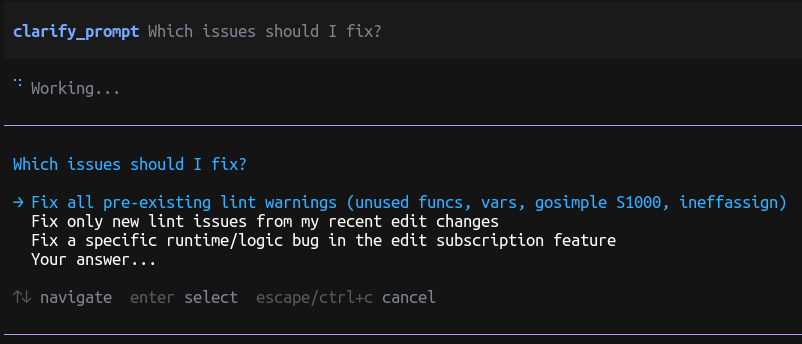
Features
clarify_prompttool - Prompts the LLM to ask clarifying questions when user input is vague- Vague input detection - Flags structurally empty input (blank, single-character, or pure punctuation) and lets the LLM judge ambiguity for everything else via an injected system-prompt section
/clarifytoggle - Enable or disable clarification with/clarify on|off~bypass prefix - Prefix prompts with~to skip clarification for one turn- Network/proxy issue handling - When a tool call fails with a network, proxy, connectivity, or rate-limit error, the model stops and asks the user how to proceed instead of silently retrying or switching approaches
Requirements
pi 1.0.0 or newer. The extension injects its instructions as a structured system-prompt section and registers clarify_prompt with exposure: "model-only", both of which require pi 1.0.0.
On an older host the extension reports pi-clarify requires pi 1.0.0 or newer once per turn instead of failing silently, so a stale host is obvious rather than leaving clarification quietly disabled.
Installation
From npm:
pi install npm:@dkmnx/pi-clarify
From a local path (the path is added to settings without copying, so edits take effect on the next pi start — useful when developing the extension):
pi install /path/to/pi-clarify
Or add directly to your settings.json:
{
  "packages": ["npm:@dkmnx/pi-clarify"]
}
Usage
Automatic Clarification
When enabled, the LLM automatically detects vague prompts and asks for clarification:
- "fix it" → "What specifically needs to be fixed?"
- "make it better" → "What does 'better' mean in this context?"
- "optimize this" → "Which files or functions should be optimized?"
Manual Tool Call
The LLM can explicitly call the clarify_prompt tool:
clarify_prompt({
  question: "What specific behavior needs to be fixed?",
  options: [
    "Fix the login redirect issue",
    "Fix the form validation error",
    "Fix the memory leak in the dashboard"
  ]
})
Commands
| Command | Description |
|---|---|
/clarify |
Toggle clarification on/off |
/clarify on |
Enable clarification |
/clarify off |
Disable clarification |
Bypass
Prefix your prompt with ~ to skip clarification for one turn:
~ fix it - just update the error message text
~is used instead of!because pi reserves!/!!as the built-in shell-command prefix.A prompt starting
~/…or~user/…is a home-relative path, not a bypass marker, so it passes through untouched. A tilde followed by whitespace is always the marker, so~ /etc/hostsbypasses like any other~prompt.
Network / proxy issue handling
When a tool call fails with a network, proxy, connectivity, or rate-limit error (timeout, ECONNREFUSED, ENOTFOUND, ETIMEDOUT, ECONNRESET, fetch failed, socket hang up, proxy error, 429, 502/503/504, TLS or certificate failures, …), the extension:
- Injects a
NETWORK_ISSUE_PROMPTguideline into the system prompt telling the model to not silently retry more than once and to not silently switch approaches. - Detects network/proxy error signatures in failed tool results (
tool_resultwithisError: true) and appends a reminder that nudges the model to callclarify_promptwith options like:- "Retry the same request"
- "Switch to a different proxy / network"
- "Wait and try again later"
- "Use a fallback approach / different tool"
- "Skip this step and continue"
This behavior is governed by the same /clarify toggle and is disabled for RPC/print mode (no interactive UI).
How vague input is detected
Clarification is driven by the LLM, not by keyword matching. When enabled, the extension writes a clarify section into pi's system-prompt options instructing the model to call clarify_prompt whenever a request is ambiguous, has unclear outcomes/scope, admits multiple valid interpretations, or is missing constraints. It is a structured section rather than a whole-prompt replacement, so pi records it as a transcript delta and its own prompt sections stay intact.
The only client-side heuristic is a minimal structural guard: completely blank, single-character, or pure-punctuation input is flagged as vague so the model receives an extra reminder. Short but actionable commands like git push or npm test are not auto-flagged — the model decides based on the full conversation context.
Example patterns the LLM is told to clarify
These are examples the injected section tells the model to watch for (the model does the actual judgment, not the extension):
- Ambiguous referents: "fix it", "this is broken", "the bug"
- Unclear outcomes: "make it better", "improve the code"
- Undefined scope: "refactor everything", "fix the tests"
- Missing constraints: no mention of backwards compatibility, performance priorities, or approach preferences
- Multiple valid interpretations: the request could reasonably mean 2+ different things