@diegopetrucci/pi-minimal-footer0.1.24
A minimal custom footer for pi.
Untested on omp
This is a pi package. No one has reported whether it works on omp yet. If you try it, add your result below.
Reports 0
No reports yet.
Readme
minimal-footer
A minimal custom footer for pi.
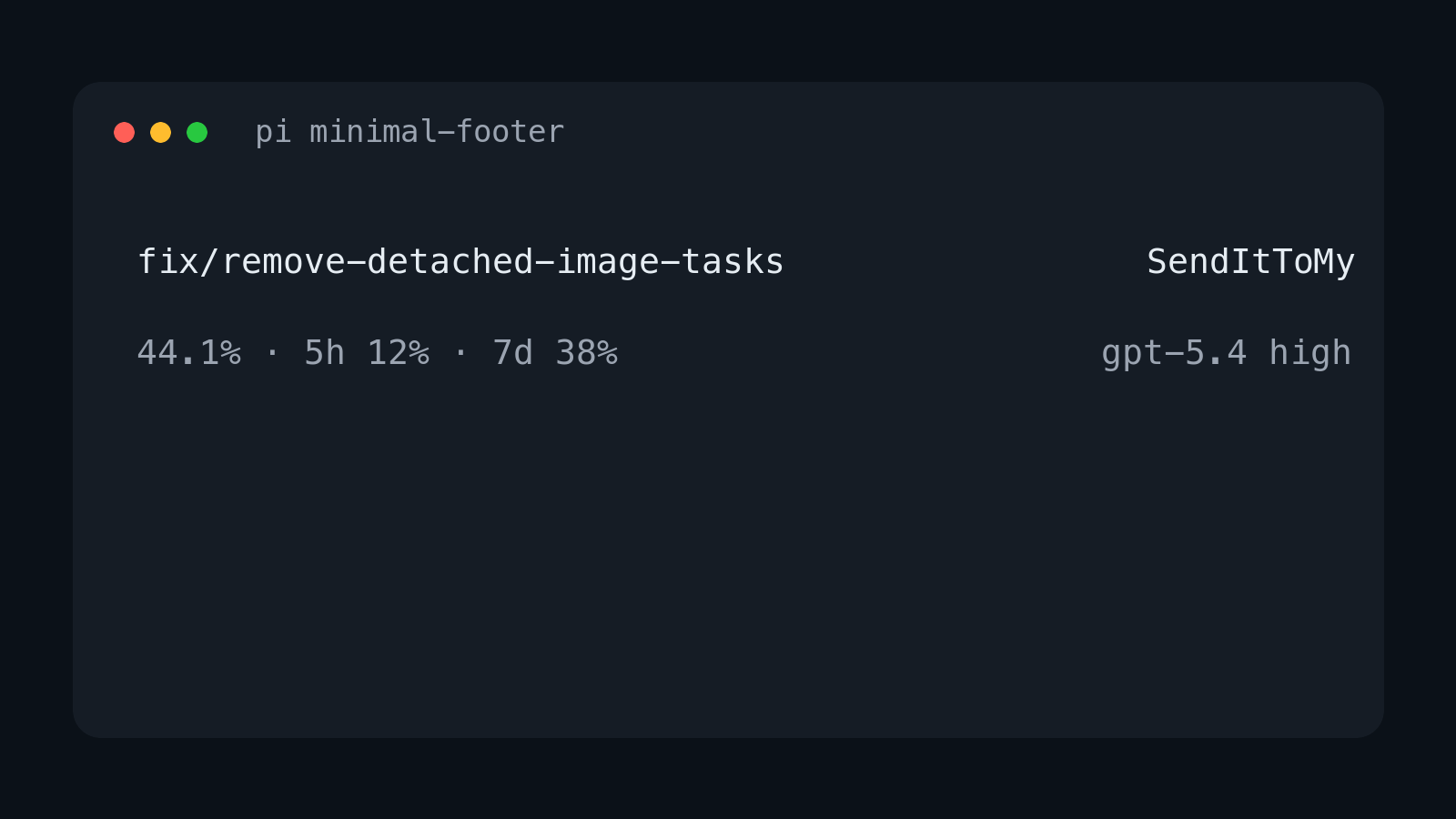
It replaces pi's built-in footer with a cleaner two-line layout that focuses on the information I care about most:
- current git branch
- TLH-style git dirty counts, ahead/behind counts, and optional PR number
- current repo name
- current context percentage
- red
DUMB ZONEindicator when context usage is above 350k tokens - current model and thinking level
- OpenAI Codex usage windows, labeled from the durations reported by OpenAI
xpmarker when Pi experimental features are enabled
Layout
On wide terminals it renders two lines:
<git-branch> · <git-status>                          <repo-name>
<context-%>                                     <model> <thinking>
Example:
fix/remove-detached-image-tasks                     SendItToMy
44.1%                                              gpt-5.4 high
When the project is trusted and the repo has local or remote git state, the top-left line includes the same cached summary as git-footer:
main · +1 ~2 ?3 ↑1 • PR #42
The markers are ! conflicts, + staged, ~ unstaged, ? untracked, ↑ ahead, and ↓ behind. PR numbers are fetched best-effort with gh pr view. Git polling is skipped until Pi reports that the project is trusted, and git status is run with fsmonitor disabled.
When context usage is above 350k tokens, the bottom-left line includes a red warning:
44.1% · DUMB ZONE
When using legacy openai-codex, the bottom-left line also includes subscription usage. A typical account with both windows looks like:
44.1% · 5h 12% · 7d 38%
Window labels come from OpenAI's reported durations, so an account that reports only a weekly primary window is shown correctly (for example, 7d 38%) instead of being assumed to have a 5-hour window.
Pi's openai ChatGPT OAuth uses the direct OpenAI API and has no documented
account-usage endpoint compatible with this legacy WHAM reader. In that case,
the footer shows usage unsupported and does not send the new token to
chatgpt.com/backend-api/wham/usage. Direct OpenAI API-key users have no
subscription-usage line. Legacy Codex fetch failures, missing OAuth, or a
malformed/mismatched token account claim show usage unavailable rather than
retaining an older account's snapshot; the request is not sent until the token
claim and lifecycle identity agree.
When PI_EXPERIMENTAL=1, the bottom-left line also includes an experimental marker:
44.1% · xp
On narrow terminals it falls back to one item per line.
Install
Standalone npm package
pi install npm:@diegopetrucci/pi-minimal-footer
Collection package
pi install npm:@diegopetrucci/pi-extensions
GitHub package
pi install git:github.com/diegopetrucci/pi-extensions
Then reload pi:
/reload
Configuration
Config files are merged, with project config overriding global config:
~/<pi-config-dir>/agent/extensions/minimal-footer.json<project>/<pi-config-dir>/minimal-footer.json
Here <pi-config-dir> is Pi's runtime config directory name (CONFIG_DIR_NAME; .pi by default). Project config is only read after Pi reports that the project is trusted.
A ready-to-copy sample file is included at minimal-footer.example.json.
Example:
{
  "context": {
    "showPercent": true,
    "dumbZone": {
      "enabled": true,
      "thresholdTokens": 350000,
      "label": "DUMB ZONE",
      "color": "error"
    }
  },
  "codexUsage": {
    "enabled": true,
    "cacheTtlMs": 300000,
    "requestTimeoutMs": 10000,
    "windows": {
      "primary": {
        "enabled": true,
        "label": "auto"
      },
      "secondary": {
        "enabled": true,
        "label": "auto"
      }
    }
  },
  "experimentalMarker": {
    "enabled": true,
    "label": "xp",
    "color": "warning"
  },
  "gitStatus": {
    "enabled": true,
    "refreshIntervalMs": 8000,
    "gitTimeoutMs": 1500,
    "ghTimeoutMs": 3000
  }
}
Disable DUMB ZONE:
{
  "context": {
    "dumbZone": {
      "enabled": false
    }
  }
}
Disable OpenAI Codex session-limit usage entirely:
{
  "codexUsage": {
    "enabled": false
  }
}
Disable one session-limit window:
{
  "codexUsage": {
    "windows": {
      "secondary": {
        "enabled": false
      }
    }
  }
}
Disable the experimental-features marker:
{
  "experimentalMarker": {
    "enabled": false
  }
}
Disable git dirty/ahead/PR status:
{
  "gitStatus": {
    "enabled": false
  }
}
Config fields
context.showPercent: show the context percentagecontext.dumbZone.enabled: showDUMB ZONEwhen context tokens exceed the thresholdcontext.dumbZone.thresholdTokens: token threshold forDUMB ZONEcontext.dumbZone.label: warning textcontext.dumbZone.color: theme color for the warning (error,warning,accent,text, ordim)codexUsage.enabled: show OpenAI Codex session-limit usage when usingopenai-codex; also controls the explicit unsupported/unavailable status for account usagecodexUsage.cacheTtlMs: in-memory usage-result cache duration and account-only login detection interval; provider/model/account changes invalidate the cached snapshot. The timer only compares identity and does not fetch unchanged-account usage. The default is 5 minutes;0disables usage-result caching but keeps identity checks every 5 minutes. Positive values above Node's2,147,483,647ms timer limit use that maximum only for scheduling; the configured TTL still controls lifecycle cache semantics.codexUsage.requestTimeoutMs: usage request timeoutcodexUsage.windows.primary.enabled: show the primary usage windowcodexUsage.windows.primary.label:"auto"derives the primary label from OpenAI's reported duration; any other value overrides itcodexUsage.windows.secondary.enabled: show the secondary usage windowcodexUsage.windows.secondary.label:"auto"derives the secondary label from OpenAI's reported duration; any other value overrides itexperimentalMarker.enabled: show the marker whenPI_EXPERIMENTAL=1experimentalMarker.label: marker textexperimentalMarker.color: theme color for the marker (error,warning,accent,text, ordim)gitStatus.enabled: show cached git dirty counts, ahead/behind counts, and optional PR number for trusted projectsgitStatus.refreshIntervalMs: background git status refresh intervalgitStatus.gitTimeoutMs: timeout forgit status --porcelain=v2 --branchgitStatus.ghTimeoutMs: timeout for best-effortgh pr view
What it shows
- Top left: current git branch plus dirty/ahead/PR status when available
- Top right: current repo directory name
- Bottom left: current context usage percentage, plus red
DUMB ZONEabove 350k context tokens - Bottom left on
openai-codex: current context usage percentage plus the Codex usage windows reported for the account - Bottom left on
openaiChatGPT OAuth: current context usage percentage plususage unsupported; no legacy WHAM request is attempted - Bottom left with
PI_EXPERIMENTAL=1: current context usage percentage plusxp - Bottom right: model id and thinking level
Publishing notes
This extension also lives inside the broader pi-extensions collection, but it is set up to be publishable as its own npm package too.
Notes
- Replaces pi's built-in footer entirely.
- Uses pi footer data for git branch updates, plus background cached git/gh checks for dirty counts and PR number after project trust is granted.
- Shows only context percentage, not context window size.
- Shows
DUMB ZONEonly while context usage is above 350k tokens. - Shows the model id rather than a provider-specific display label.
- Shows
xpwhenPI_EXPERIMENTAL=1. - For
openai-codex, reads pi's stored OAuth login and fetches usage from ChatGPT's backend usage endpoint. Window labels are inferred from each window's reported duration; missing or unrecognized durations use neutralusagelabels rather than guessing from window position. - For direct
openaiChatGPT OAuth, no usage endpoint is assumed: the footer marks usage unsupported and never calls the legacy WHAM endpoint. API-key requests do not use subscription usage. - Usage is cached briefly in memory and refreshed after turns. A provider/model/account boundary clears the old snapshot, and late results from an earlier request are ignored. Because Pi 0.99 emits no auth-change event, account-only logins are detected by one per-session identity-only timer: it uses
cacheTtlMswhen positive, checks every five minutes whencacheTtlMs: 0, and clamps larger schedules to Node's2,147,483,647ms maximum. Unchanged-account ticks make no WHAM request; an account change uses the normal safe refresh. The timer is disposed on shutdown/restart, and no credential file is read during footer rendering. - Footer colors continue to come from Pi's active theme; the extension does not embed ANSI color codes.