@datspike/pi-ask-user0.15.0
Interactive ask_user tool for pi-coding-agent with wrapped selection UI, batch clarifications, and freeform input
Untested on omp
This is a pi package. No one has reported whether it works on omp yet. If you try it, add your result below.
Reports 0
No reports yet.
Readme
pi-ask-user
A Pi package that adds an interactive ask_user tool for collecting explicit user decisions during an agent run.
This repository is a heavily reworked fork of the original
edlsh/pi-ask-user. It keeps the same tool name and core intent, but themainbranch in this fork contains additional changes beyond upstreamv0.6.1.
Preview
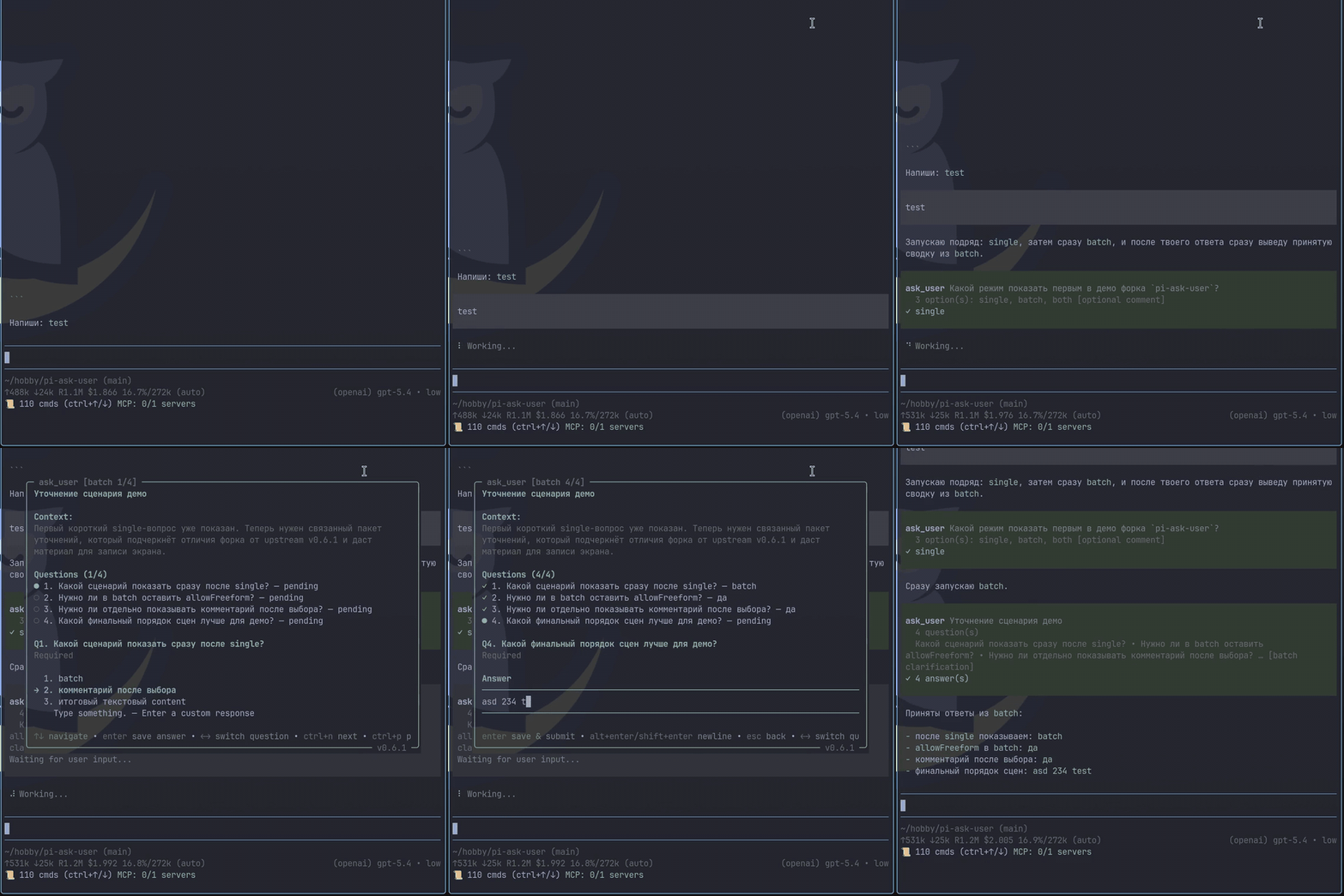
High-quality video: ask-user-demo.mp4
What changed in this fork after upstream v0.6.1
- Batch clarification mode for collecting 2-7 related answers in a single
ask_usercall - Plain-text answer summaries in tool
content, so agents can continue even in integrations that only surface tool text - Stronger freeform UX: direct typing in selectable prompts, safer backspace handling, and preserved batch drafts while moving between questions
- Updated tool guidance and bundled skill guidance around one focused question per call or one related clarification batch
- Internal refactor that split the runtime into core, overlay controller, overlay UI, and batch components for easier maintenance
Features
- One focused decision gate in single-question mode
- One related clarification packet in
mode: "batch" - Single-select and multi-select option lists
- Optional freeform responses
- Optional comment capture for structured single-question answers
- Wrapped option rows with titles and descriptions
- Responsive split-pane details preview on wide terminals with single-column fallback on narrow terminals
- Context display support
- Overlay and inline display modes, selected per call or with
PI_ASK_USER_DISPLAY_MODE - Hide and restore an active overlay with
f7(configurable withPI_ASK_USER_OVERLAY_TOGGLE_KEY) without recreating its component state - Pi-TUI-aligned keybinding and editor behavior
- Custom TUI rendering for tool calls and results
- Graceful fallback when interactive custom UI is unavailable
- Optional timeout for auto-dismiss in both overlay and fallback input modes
- Structured
detailson all results for session state reconstruction - Bundled
ask-userskill for mandatory decision-gating in high-stakes or ambiguous tasks
Bundled skill: ask-user
This package ships a skill at skills/ask-user/SKILL.md that nudges or mandates the agent to use ask_user when:
- architectural trade-offs are high impact
- requirements are ambiguous or conflicting
- assumptions would materially change implementation
The skill follows a decision handshake flow:
- Gather evidence and summarize context
- Use single-question
ask_userfor one decision gate, or batch mode to ask several related clarification questions in one sweep when they are already known up front and can be answered in one pass - Wait for explicit user choice
- Confirm the decision, then proceed
The bundled skill is self-contained in skills/ask-user/SKILL.md.
Install
This fork from npm
pi install npm:@datspike/pi-ask-user@0.15.0
This fork from git
pi install git:github.com/datspike/pi-ask-user
# or
pi install https://github.com/datspike/pi-ask-user
Local checkout during development
pi install /absolute/path/to/pi-ask-user
Original upstream npm package
pi install npm:pi-ask-user
Use the scoped package or the git/local install forms if you want the fork-only behavior documented in this repository. The unscoped pi-ask-user package remains the upstream release line.
Tool name
The registered tool name is:
ask_user
Parameters
Single-question mode
| Parameter | Type | Default | Description |
|---|---|---|---|
mode |
"single"? |
omitted | Optional explicit single-question mode |
question |
string |
required | The question to ask the user |
context |
string? |
- | Relevant context summary shown before the question |
options |
{title: string, description?: string}[]? |
[] |
Multiple-choice options exposed to the model |
allowMultiple |
boolean? |
false |
Enable multi-select mode |
allowComment |
boolean? |
env / false |
Expose a user-toggleable extra-context option and collect an optional comment; overrides PI_ASK_USER_ALLOW_COMMENT |
displayMode |
"overlay" | "inline"? |
env / "overlay" |
UI presentation; overrides PI_ASK_USER_DISPLAY_MODE |
singleSelectLayout |
"auto" | "list"? |
env / "auto" |
Use responsive preview panes or force a list; overrides PI_ASK_USER_SINGLE_SELECT_LAYOUT |
contextExpanded |
boolean? |
env / false |
Initial state for oversized context; overrides PI_ASK_USER_CONTEXT_EXPANDED |
overlayToggleKey |
string? |
env / "f7" |
Hide/restore shortcut; overrides PI_ASK_USER_OVERLAY_TOGGLE_KEY; use off to disable |
commentToggleKey |
string? |
env / "ctrl+g" |
Comment toggle shortcut; overrides PI_ASK_USER_COMMENT_TOGGLE_KEY |
timeout |
number? |
- | Auto-dismiss after N ms; returns cancelled: true with outcome: "timeout" |
Batch clarification mode
| Parameter | Type | Default | Description |
|---|---|---|---|
mode |
"batch" |
required | Enables a one-call clarification batch |
title |
string? |
- | Short title shown above the batch UI |
context |
string? |
- | Relevant context summary shown before the batch |
questions |
BatchQuestion[] |
required | Related clarification questions; must contain 2-7 questions |
displayMode |
"overlay" | "inline"? |
env / "overlay" |
UI presentation; parameter overrides environment |
overlayToggleKey |
string? |
env / "f7" |
Hide/restore shortcut in overlay mode |
timeout |
number? |
- | Auto-dismiss after N ms; returns cancelled: true with outcome: "timeout" |
Environment and keyboard behavior
Configuration precedence is per-call parameter, matching environment variable, then built-in default. Supported variables are PI_ASK_USER_DISPLAY_MODE, PI_ASK_USER_SINGLE_SELECT_LAYOUT, PI_ASK_USER_CONTEXT_EXPANDED, PI_ASK_USER_ALLOW_COMMENT, PI_ASK_USER_OVERLAY_TOGGLE_KEY, PI_ASK_USER_COMMENT_TOGGLE_KEY, and PI_ASK_USER_EMIT_FULL_EVENTS. Boolean values accept 1/true/yes/on and 0/false/no/off. Shortcut values accept off, none, disabled, false, or an empty string to disable the shortcut.
Use ctrl+j / ctrl+k as down/up aliases. Searchable single-select uses printable input as a fuzzy filter; Backspace removes filter characters and Escape clears the filter. Oversized context starts from contextExpanded, then can be expanded and collapsed with the first free key among ctrl+e, ctrl+x, and ctrl+y. This avoids configured overlay/comment shortcuts. If overlay and comment shortcuts are identical, overlay hide/restore takes priority and comment remains available through its selectable row. In overlay mode the help includes the hide shortcut; hiding also emits a notification with the restore key.
herdr:blocked emits { active: true, label: "Waiting for user response" } while interactive input is pending and { active: false } on every exit path. ask:answered and ask:cancelled are privacy-minimal by default: they omit context, option lists, question packets, and answer text. Set PI_ASK_USER_EMIT_FULL_EVENTS=true only when trusted consumers require full payloads.
BatchQuestion reuses the current ask vocabulary where possible:
interface BatchQuestion {
  id: string;
  question: string;
  options?: { title: string; description?: string }[];
  allowMultiple?: boolean;
  required?: boolean;
}
For runtime compatibility, legacy string options and defensive object aliases (label, text, value, name, option) are normalized before schema validation. New model-generated calls should use the flat { "title": "...", "description": "..." } shape shown above.
Batch-mode notes:
- Use it only for one related clarification pass, not unrelated questions, branching interviews, or a single go/no-go decision.
- If you already know you need several related clarifications, prefer one batch instead of repeated single-question pauses.
- Keep batch questions independent enough to answer in one pass.
questionsmust contain between 2 and 7 entries.- Batch questions do not support
allowComment; add a final optional text question instead. - In the interactive overlay, use
left/rightorctrl+n/ctrl+pto switch questions. - For selectable questions, start typing to filter options or enter a custom response.
Example usage shapes
Single-question mode
{
  "question": "Which option should we use?",
  "context": "We are choosing a deploy target.",
  "options": [
    { "title": "staging" },
    { "title": "production", "description": "Customer-facing" }
  ],
  "allowMultiple": false,
  "allowComment": true
}
Batch clarification mode
{
  "mode": "batch",
  "title": "Clarify implementation scope",
  "context": "I need a few details before proceeding.",
  "questions": [
    {
      "id": "surface",
      "question": "Which surface is in scope?",
      "options": [{ "title": "Overlay" }, { "title": "RPC/headless fallback" }, { "title": "Both" }],
      "required": true
    },
    {
      "id": "compat",
      "question": "Must the current single-question behavior remain exact?",
      "options": [{ "title": "Yes" }, { "title": "No" }, { "title": "Mostly yes" }],
      "required": true
    },
    {
      "id": "notes",
      "question": "Anything else I should optimize for?",
      "required": false
    }
  ]
}
Result details
Successful tool results include the user's actual answer text in plain-text content so agents can continue even in integrations that surface only tool text. Results also include a structured details object for rendering and session state reconstruction:
type AskResponse =
  | { kind: "selection"; selections: string[]; comment?: string }
  | { kind: "freeform"; text: string }
  | {
      kind: "batch";
      answers: Array<
        | { id: string; kind: "selection"; selections: string[] }
        | { id: string; kind: "freeform"; text: string }
        | { id: string; kind: "skipped" }
      >;
    };

interface AskToolDetails {
  mode: "single" | "batch";
  question?: string;
  title?: string;
  context?: string;
  options?: QuestionOption[];
  questions?: BatchQuestion[];
  response: AskResponse | null;
  cancelled: boolean; // compatibility flag: true for cancel, timeout, and abort
  outcome: "answered" | "cancelled" | "timeout" | "aborted";
}
Single-question payloads and response variants remain unchanged. The batch result branch is returned only when mode: "batch" is used. Configuration precedence is always per-call parameter, then the corresponding environment variable, then the documented default. Manual cancellation, timeout, and AbortSignal remain backward-compatible through cancelled: true and are distinguished by outcome.
Changelog
See CHANGELOG.md.